
Depots, warehouses and the equipment that keeps them moving
Wholesalers and distributors run on regional warehouses and depots, each with racking, forklifts, weighing scales, delivery vehicles and a small office. Equipment is shared, lent and relocated as the network changes. FixedAsset Pro gives every depot its own place in one register and keeps the count, the maintenance and the books together.
Who this page is for
- Wholesalers
- Distribution networks
- Regional warehouse operators
- FMCG and pharma distributors
- Dealer and stockist networks
Common challenges
The operational and financial problems this industry brings to an asset register, and what FixedAsset Pro does about each.
- Operational
Assets are shared across depots
A forklift or a pallet truck is lent to the next depot for the season and never formally returned. Each depot believes the other one has it.
- Operational
Locations inside the warehouse matter
Racking bays, cold rooms and loading docks hold different equipment. A register that only knows the warehouse cannot say which bay a scale or a dock leveller is in.
- Operational
Counting is done between shipments
Warehouse teams have short windows for verification. A paper count across several depots is slow and the results are never reconciled into the register.
- Financial
Network changes leave ghost assets
Depots open, merge and close as distribution routes change. Assets that were scrapped or left behind stay on the books.
- Financial
Vehicles and equipment need insurance that matches
Delivery vehicles and material-handling equipment are insured per policy, but the schedule is rarely updated when a vehicle is sold or moved.
- Financial
Depreciation per depot is guesswork
Comparing depot costs needs depreciation and maintenance per branch, not a single consolidated number.
Asset categories you can track
Categories, lives and depreciation rates are configurable; these are the ones this industry usually needs.
- Storage infrastructure
- Material-handling equipment
- Weighing and handling
- Vehicles
- Depot IT
- Building equipment
Applicable workflows
Each workflow is a product area; the link opens the feature page.
Depots as branches, bays as locations
Each depot is a branch; zones, bays, cold rooms and docks are locations in a hierarchy, so the register says exactly where each piece of equipment sits.
Fixed Asset ManagementTransfers and loans between depots
Equipment moved or lent to another depot goes through an approved transfer between branches, and the Asset Movement report lists every move in the period.
Asset LifecycleCampaigns per depot
Scope a campaign by depot or location, scan the location label and then each tag, and resolve missing, found-elsewhere and custodian-mismatch queues into transfers or write-offs.
Physical VerificationService and breakdowns for handling equipment
Preventive schedules by time or meter for forklifts and reach trucks, breakdown work orders with cost and downtime, and AMC visits recorded against the equipment.
Maintenance & AMCDepot-level reports
Branch-wise Summary, Assets by Location, Idle Assets and Insurance Expiry per depot, exported to PDF, Excel, CSV or Word.
Reporting & Analytics
Key features
Location hierarchy
Branch, building, zone and bay as locations, with the custodian on each asset, so verification can be planned bay by bay.
Found Elsewhere queue
Assets counted at a different depot from the register are listed together and resolved into a transfer in bulk.
Idle Assets report
Equipment marked idle, listed per depot, for deciding what to redeploy to a busier one.
Insurance per asset
Policies and claims recorded against vehicles and equipment, with Uninsured Assets and Insurance Expiry reports for renewals.
Count sheets when scanners are short
Paper or Excel count sheets imported back with validation, alongside USB scanner, webcam and manual counting.
Disposal at depot closure
Full or partial disposal by sale, scrap or write-off with the gain or loss and a disposal approval certificate.
Verification campaigns across depots
A real screen of the desktop edition, captured on a demo server. The figures are sample data, not customer data.
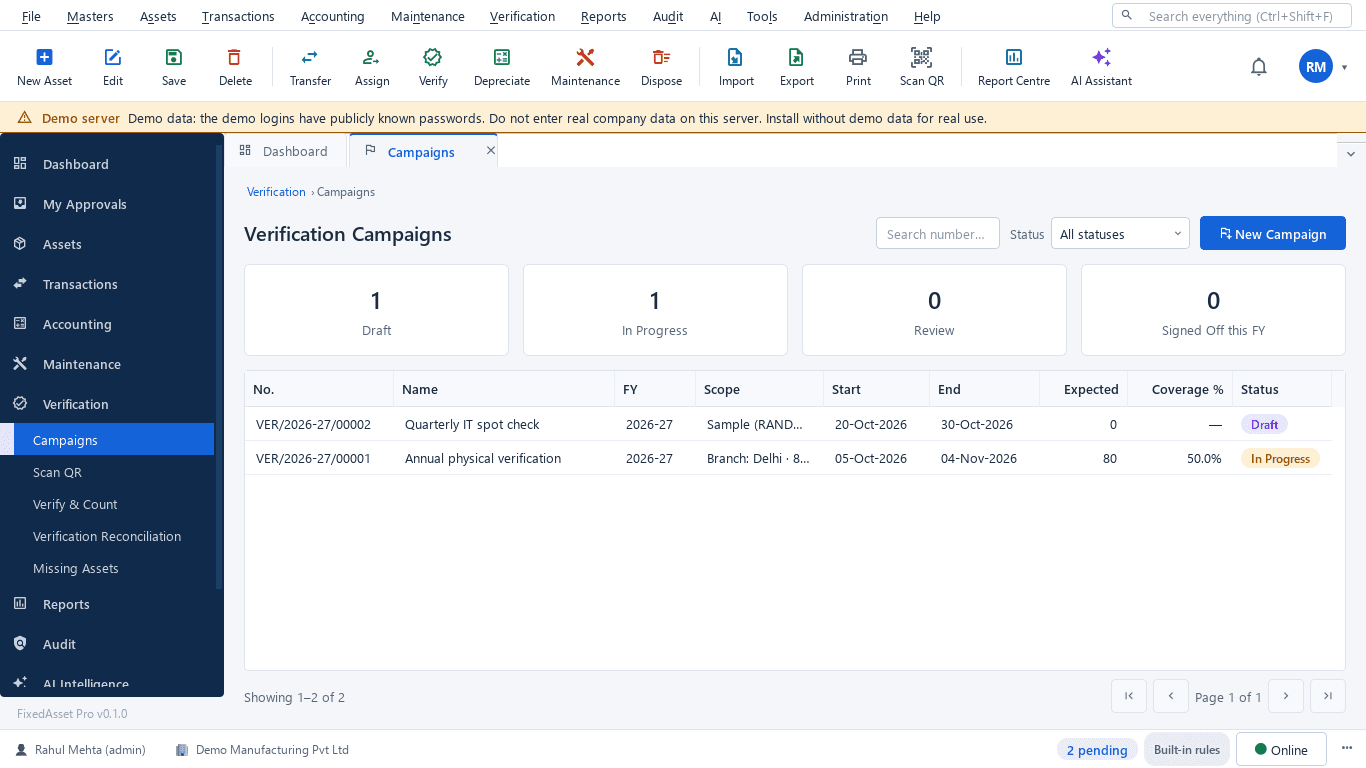
What this screen shows
- Campaigns in draft, in progress, review and signed off this year
- Scope by branch, location or sample
- Start and end dates
- Expected count and coverage percentage
- Status per campaign
Typical buyers and users
Asset manager
Every forklift and rack in the right depot, loans between depots on record, and counts that fit between shipments.
Solution for the Asset managerOperations or warehouse head
Handling equipment serviced on time, breakdowns recorded with downtime, and idle equipment moved to where it is needed.
Solution for the Operations or warehouse headFinance manager
Depreciation per depot, disposals recorded when a depot closes, and insurance that matches the register.
Solution for the Finance managerInternal auditor
Verification coverage per depot, found-elsewhere items resolved, and a sign-off trail for each campaign.
Solution for the Internal auditor
Deployment considerations
The desktop edition is available today for a single PC or an office LAN; the cloud-hosted web edition and the mobile app are available too. All start with your real company, never demo data.
- Desktop editionAvailable now
Runs today on a server PC at head office or the main warehouse, with client PCs on the LAN; counts use USB scanners or webcams, or count sheets imported back.
- Web editionAvailable now
Suits networks of depots run from a central office: browser access per depot with a Branch context bar, approvals from anywhere, and counting through the companion mobile app.
- Using bothSame rules, same engine
A distributor that starts on desktop keeps its register; both editions share the same rules, approvals and audit trail.
Frequently asked questions
Does FixedAsset Pro manage the goods we distribute?
No. It manages fixed assets such as racking, equipment, vehicles and IT. Stock in trade belongs in your inventory or ERP system.
Can we record equipment lent to another depot for a season?
Yes. Record a transfer between branches, and a transfer back when it returns. Both appear in the Asset Movement report with their approvals.
Can we count a depot bay by bay?
Yes. Locations can go down to bays; scan the location label, then each tag. See Physical Verification.
Can forklift servicing follow running hours?
Yes. Preventive schedules can be based on time or on a meter reading, and work orders are raised when a schedule falls due.
Can we close a depot cleanly?
Transfer what moves to another branch and dispose of what does not, by sale, scrap or write-off, with the gain or loss and approvals recorded.
Guides and articles
Published articles tagged for this industry.
Moving assets between locations, branches and companies without losing the trail
A transfer looks like a change of location in the register. Depending on where the asset goes, it can also be a GST supply, a disposal by one company and an acquisition by another, and a gap in your verification. A practical guide.
Other industries
All industries Manufacturing
 Pharmaceutical & Life Sciences
 Healthcare & Hospitals
 Information Technology
 Banking & Financial Services
 Retail
 Logistics & Warehousing
 Education
 Government & Public Sector
 Real Estate & Facilities
 Construction & Infrastructure
 Energy & Utilities
 Telecommunications
 Hospitality
 Automotive
 Media & Entertainment
 Agriculture & Food Processing
 Professional Services
 Multinational Enterprises
See FixedAsset Pro on your own depot register
Start a free trial, or book a demo and bring one depot's equipment list and your vehicle insurance schedule.