

Every property, every room, every piece of kit, on one register
Hotels and restaurant chains buy the same equipment many times over: ovens, chillers, room furniture, laundry machines, point-of-sale terminals. Each property has its own general manager, its own maintenance team and its own count. FixedAsset Pro gives the group one register with a property-level view, so head office and the site see the same assets.
Who this page is for
- Hotel groups
- Resorts
- Restaurant chains
- Facility operators
Common challenges
The operational and financial problems this industry brings to an asset register, and what FixedAsset Pro does about each.
- Operational
Each property keeps its own list
Every hotel has a spreadsheet, every restaurant a register in the back office. Head office cannot compare properties, and a transfer of furniture between two sites is recorded in neither.
- Operational
Kitchen and laundry downtime hits guests
A combi oven or a washer-extractor out of service is felt the same day. Without work orders and service contracts tied to the equipment, the repeat offenders are never identified.
- Operational
Annual counts are a room-by-room chore
Counting furniture and fittings room by room with a printed list is slow and rarely reconciled. Missing items are noted but not resolved.
- Financial
Refurbishment spend is not capitalised cleanly
A floor refurbishment replaces beds, carpets and televisions in one project. Which items are disposals, which are additions and what is still in CWIP is sorted out at year-end.
- Financial
Insurance schedules lag the register
Equipment is replaced between policy renewals, so the schedule over-insures scrapped kit and misses new installations until a claim is made.
- Financial
Lifecycle spend per property is unknown
Comparing the maintenance cost and replacement rate of two similar properties needs figures per branch that most groups do not have.
Asset categories you can track
Categories, lives and depreciation rates are configurable; these are the ones this industry usually needs.
- Kitchen equipment
- HVAC
- Furniture, fixtures and fittings
- IT equipment
- Laundry equipment
- Vehicles
- Building plant
Applicable workflows
Each workflow is a product area; the link opens the feature page.
Properties as branches, rooms and areas as locations
Each hotel or restaurant is a branch; floors, rooms, kitchens and back-of-house areas are locations. Users are scoped to their property, head office sees all of them.
Fixed Asset ManagementWork orders and service contracts per property
Report a breakdown from the register or a scanned tag; work orders carry parts, cost and downtime; AMCs for kitchen, laundry and HVAC equipment record visits, missed visits and renewals.
Maintenance & AMCRoom-by-room counting with a scanner
Scan the room label, then each tag, with a USB scanner or webcam; rapid mode takes one scan when nothing differs, and the missing and damaged queues are resolved into transfers, recoveries or write-offs.
Physical VerificationRefurbishment as a CapEx project
Budget the refurbishment, book costs to CWIP while the floor is closed, dispose of the replaced items, and capitalise the new ones when the rooms reopen.
Procurement & CapExBranch-wise reporting for head office
Branch-wise Summary, Assets by Location, Asset Age Analysis and Insurance Expiry by property, exported to PDF, Excel, CSV or Word, with presets like This financial year.
Reporting & Analytics
Key features
Branch-wise Summary
One row per property with count, cost, accumulated depreciation and net book value, for comparing like-for-like sites.
Rapid mode and blind counts
Counting takes one scan per item when nothing differs; blind counts hide the expected result, and photo, comment and signature rules apply per result.
Insurance and claims per asset
Policies, endorsements and claims recorded against the covered equipment, coverage gaps shown, and the Insurance Expiry report for renewals.
Transfers between properties
Furniture or equipment moved from one site to another goes through an approved transfer between branches, with the audit trail showing who approved it.
Warranty and AMC alerts
Expiry alerts at 90, 60, 30 and 7 days, AMC and warranty cover shown on every work order, and the Warranty Expiry and AMC Expiry reports.
Invoice to asset
Drop in the supplier invoice for a new oven or a batch of televisions; Document Intelligence reads vendor, lines, serials and warranty with a confidence chip, and a person confirms every value before the asset is created.
Counting a floor with a scanner
A real screen of the desktop edition, captured on a demo server. The figures are sample data, not customer data.
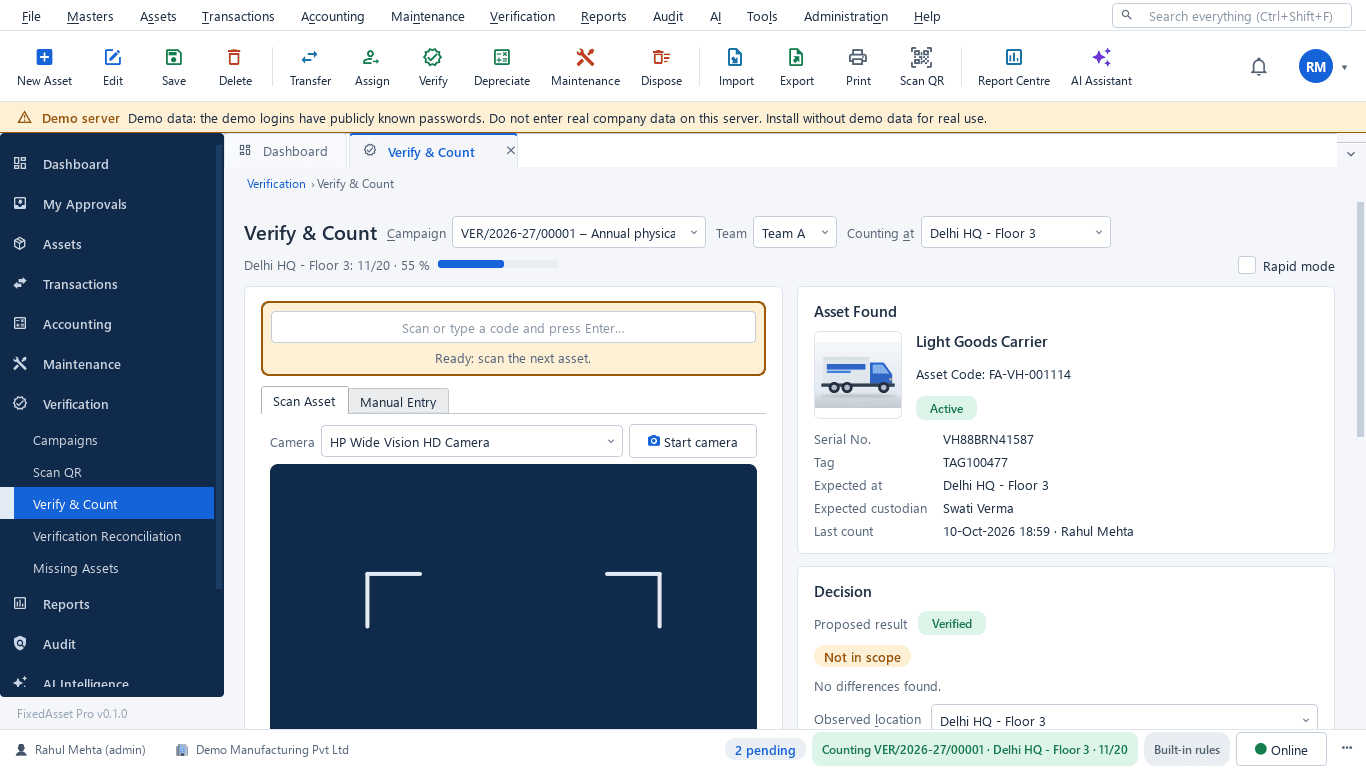
What this screen shows
- Campaign, team and the location being counted
- Progress for the location
- Scan or type a code, or use the camera
- Asset found: serial, tag, expected location and custodian, last count
- Proposed result and observed location
- Rapid mode for unchanged items
Typical buyers and users
Group asset or finance manager
One register across properties, refurbishments capitalised cleanly, and depreciation by property that reconciles to the ledger.
Solution for the Group asset or finance managerChief engineer or property maintenance head
Work orders on kitchen, laundry and HVAC equipment, AMC visits done, and the equipment that fails most often.
Solution for the Chief engineer or property maintenance headHotel or restaurant general manager
What the property holds, what is out of service today, and a count that is finished without closing rooms for a week.
Solution for the Hotel or restaurant general managerInternal auditor
Campaigns per property with scanned evidence, missing items resolved with a reason, and an evidence pack per site.
Solution for the Internal auditor
Deployment considerations
The desktop edition is available today for a single PC or an office LAN; the cloud-hosted web edition and the mobile app are available too. All start with your real company, never demo data.
- Desktop editionAvailable now
Runs today on a server PC at head office or in one property, with client PCs on the same network; counts use USB scanners or webcams, and daily work needs no internet.
- Web editionAvailable now
Suits groups with many properties: head office and each site in a browser with a Branch context bar, approvals from anywhere, dashboards across the portfolio, and counting through the companion mobile app.
- Using bothSame rules, same engine
A group that starts on desktop at head office keeps its register; both editions share the same rules, approvals and audit trail.
Frequently asked questions
Can each property see only its own assets?
Yes. Properties are branches, and users are scoped by company, branch and location. Head office roles see every property; amounts are hidden from users without finance rights.
How long does a room-by-room count take?
That depends on the property, but the count is one scan per item with a USB scanner or webcam, rapid mode when nothing differs, and the reconciliation queues are resolved on screen rather than on paper. See Physical Verification.
How do we handle a floor refurbishment?
As a CapEx project: budget it, book costs to CWIP while the floor is closed, dispose of the replaced items with their gain or loss, and capitalise the new assets when the rooms reopen. See Procurement & CapEx.
Can we move furniture between two hotels?
Yes. A transfer between branches goes through the approval chain you configure, and the Asset Movement report lists every transfer in the period.
Does the register handle low-value items like crockery?
Each book has a low-value write-off policy; items below the threshold follow that rule rather than being depreciated individually. Operating supplies are not fixed assets and are better kept out of the register.
Can we enter new equipment from the supplier's invoice?
Yes. Document Intelligence reads the invoice, PO, GRN or warranty certificate and drafts the asset with a confidence chip per field; a person confirms every value, and the draft goes through normal approval. See AI Asset Intelligence.
Guides and articles
Published articles tagged for this industry.
Impairment indicators for fixed assets: a practical year-end review under Ind AS 36 and AS 28
You do not have to test every asset for impairment every year, but you do have to look for indicators at every reporting date. How to run that review, document it, and recognise when a full test is needed.
Low-value assets: setting a capitalisation threshold after Schedule XIV
The old ₹5,000 write-off rule disappeared with Schedule XIV. Here is what replaced it in the books, why the Income-tax and GST answers differ, and how to keep control of items you expense.
Component accounting in practice: deciding what to split and how to price it
Schedule II and Ind AS 16 both require significant parts with different lives to be depreciated separately. The hard part is the judgement: which parts, at what cost, and what happens when one is replaced.
Other industries
All industries Manufacturing
 Pharmaceutical & Life Sciences
 Healthcare & Hospitals
 Information Technology
 Banking & Financial Services
 Retail
 Wholesale & Distribution
 Logistics & Warehousing
 Education
 Government & Public Sector
 Real Estate & Facilities
 Construction & Infrastructure
 Energy & Utilities
 Telecommunications
 Automotive
 Media & Entertainment
 Agriculture & Food Processing
 Professional Services
 Multinational Enterprises
See FixedAsset Pro on your own property register
Start a free trial, or book a demo and bring one property's equipment list and your last count sheet.