

Evidence first, then the opinion
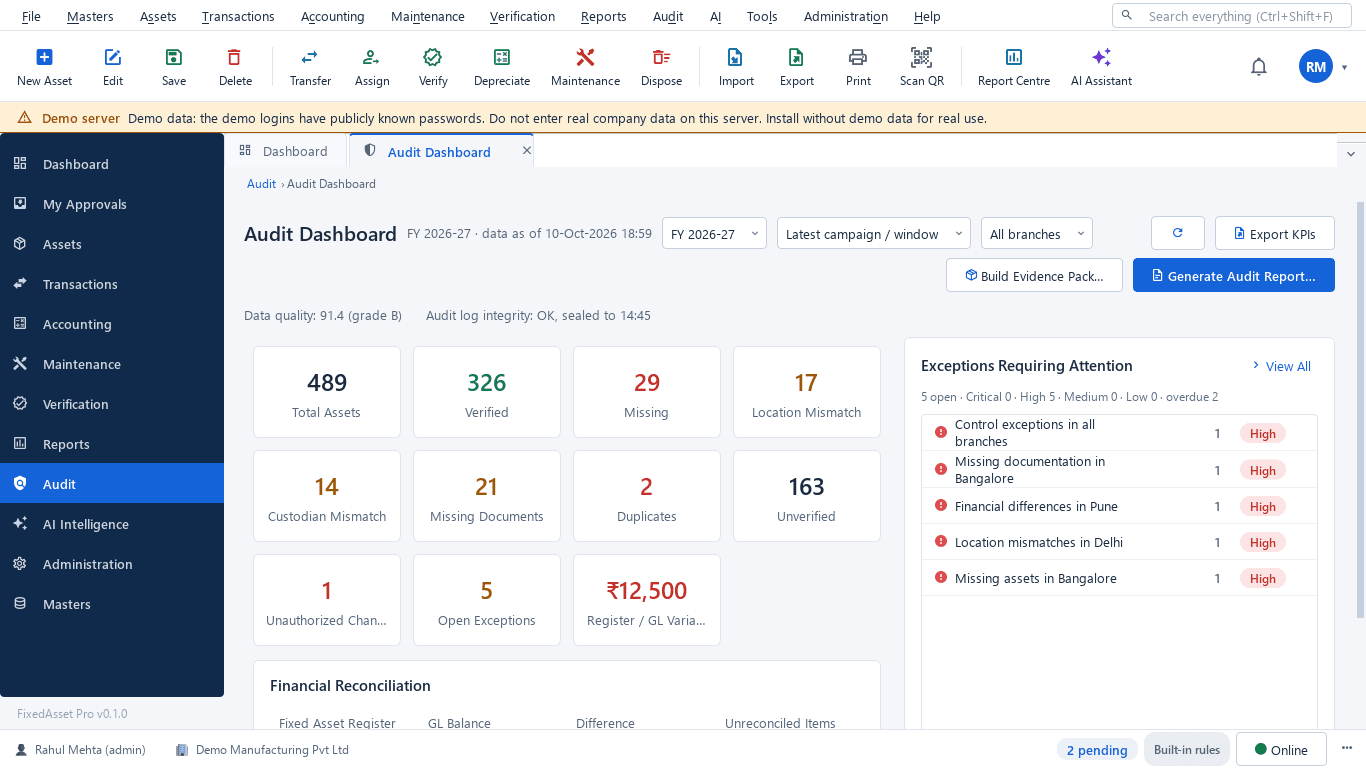
An internal auditor needs to know what exists, what changed and who approved it, and to prove it without asking the people being audited for a spreadsheet. FixedAsset Pro gives auditors read-only access to the verification results, the evidence vault, the reconciliation and an audit trail that is sealed and cannot be switched off.
The questions this role asks
- Was every asset in scope physically sighted, and what is the evidence?
- What was missing or found elsewhere, and how was it resolved?
- Does the register agree with the ledger as at the balance-sheet date?
- Who changed this asset's cost or life, when and why?
- Has anything been changed outside the application?
A typical workflow
In order, with the product area behind each step.
Scope a verification campaign
By branch, location and category, full count or sample, with a preview of what will be counted and teams per campaign.
Physical VerificationReview the evidence
Photo, comment and signature rules per outcome; outcomes are classified by one server-side rule set, whatever device recorded the count.
Physical VerificationTrack exceptions
Exceptions from verification, data-quality rules or reconciliation, with severity, owner, due date, the four-eyes rule and the resolution kept.
Audit & ComplianceReconcile to the ledger
Register vs ledger vs depreciation per account as at a date, with drill-down to the asset; a difference can become an exception.
Audit & ComplianceRead the trail
Every change with who, when, old value, new value and reason; changes made outside the application are listed separately.
Audit & ComplianceIssue the pack
The signed verification statement and the audit report pack in PDF or Word; evidence packs carry a SHA-256 checksum and cannot be deleted.
Audit & Compliance
Outcomes the platform is designed to support
Outcomes depend on how your organisation uses the product; we do not promise savings or percentages.
Independent access
Read-only auditor roles let you test the records yourself instead of relying on extracts.
Traceable exceptions
Every exception has an owner, a due date and a recorded resolution, so follow-up is part of the record.
A trail you can rely on
The audit log is sealed every 15 minutes with chained digests and checked daily; a break raises a critical exception.
Ready-made statements
The verification statement used for CARO 3(i)(b) reporting comes from the signed campaign, not from a typed letter.
Reports this role opens most
- Audit Trail
- Changes to Financial Fields
- Missing and Damaged Assets
- Register Reconciliation
- Data Exceptions
- Deleted Assets
- User Access Report
- Role–Permission Matrix
Frequently asked questions
Can the audit trail be switched off or edited?
No. The trail cannot be switched off. Rows are sealed with SHA-256 digests chained to the previous seal, and a daily check raises a critical exception on any break.
Do custodian confirmations count as verification?
No. Custodian confirmations are kept separate from physical sightings so they never inflate verification coverage.
Does it make us compliant with CARO or other rules?
It produces the records and the signed statement you need; whether the requirements are met is your judgement and the statutory auditor's.
Can I see who has access to what?
Yes. The user access report, the role–permission matrix, login history and access reviews show current access and how it changed.
Relevant guides and articles
The audit trail rule and your fixed asset register
Since 1 April 2023, companies keeping books in accounting software must use software with an audit trail that cannot be disabled, and auditors report on it under Rule 11(g). What that means for the system that holds your fixed assets.
Schedule III disclosures for property, plant and equipment: what the notes must show
The fixed asset note is more than a roll-forward. Since the 2021 amendments, Schedule III also asks about title deeds, registered valuers, CWIP ageing and benami proceedings. A walk through what goes in, and where the data comes from.
What your auditor will ask for on fixed assets, and how to have it ready
A prepared-by-client list for property, plant and equipment, organised by the questions the auditor is trying to answer: does it exist, is it complete, do you own it, and is it valued and presented correctly.





Audit a sample of your own register
Book a demo and bring last year's verification findings, or start a free trial and run a campaign.