

Thousands of locations, one register that knows what is where
Telecom equipment lives at tower sites, exchanges, data rooms and in engineers' vans. Routers are swapped at night, batteries replaced on a cycle, and spares move between regions. FixedAsset Pro treats every site as a location, every swap as a transaction and every count as a campaign, so the register keeps up with the network.
Who this page is for
- Telecom operators
- Network infrastructure providers
- Enterprise communications teams
Common challenges
The operational and financial problems this industry brings to an asset register, and what FixedAsset Pro does about each.
- Operational
Swaps in the field never reach the register
A faulty card is replaced during a night shift and the old one goes back to the regional store. Months later the register still shows the serial that left the site.
- Operational
Verification across hundreds of sites
A physical count means visiting tower sites spread across a region, often by contractors. Without scoped campaigns and per-site coverage, nobody knows which sites were counted and which were skipped.
- Operational
Field devices assigned to engineers
Test sets, laptops and tools are issued to field engineers and move with them between regions. When an engineer leaves, what they hold is reconstructed from e-mails.
- Financial
Backup power is a maintenance and insurance problem
Batteries, rectifiers and DG sets at remote sites need service cycles, warranty tracking and insurance cover; a missed service shows up as an outage.
- Financial
High-volume, low-value items distort the books
Thousands of small devices are capitalised individually, or not at all. A low-value write-off policy per book and a clear category rate master keep the depreciation honest.
- Financial
Vendor equipment and spares blur the line
What is owned, what is on lease and what is a spare in store must be separate in the register; the lease register and the Idle Assets report make the distinction visible.
Asset categories you can track
Categories, lives and depreciation rates are configurable; these are the ones this industry usually needs.
- Networking equipment
- Towers and supporting equipment
- Backup power systems
- Field devices
- Data-room equipment
- Vehicles
Applicable workflows
Each workflow is a product area; the link opens the feature page.
Swap, transfer and return to store
A replacement in the field is a transfer of the new unit to the site and a return of the old one to store, each approved and each recorded against the serial, so the register and the network agree.
Asset LifecycleCampaigns scoped by region and site
Create a campaign by branch, location or category, assign teams, scan tags on site with a scanner or webcam or capture on paper and Excel count sheets, and watch coverage per site on the campaigns list.
Physical VerificationField devices assigned to engineers
Assign test sets and laptops to the engineer with a printable handover; custodians confirm what they hold and the Assets by Employee report lists it when someone leaves.
Fixed Asset ManagementService cycles for backup power
Preventive schedules by time or meter for batteries, rectifiers and DG sets; AMC and warranty cover shown on every work order; expiry alerts before cover lapses.
Maintenance & AMCLedger mapping and the REST API
Map categories to GL accounts, reconcile the register to the ledger, and use the REST API and webhooks to connect the register with network inventory or service systems your IT team maintains.
Integrations
Key features
Sites as locations, regions as branches
Locations nest under branches, users are scoped to the branch or location they manage, and Assets by Location reports what each site holds.
Coverage per campaign
The campaigns list shows expected count, coverage percentage and status (draft, in progress, review, signed off) for each verification, with a re-verify campaign cloned from the discrepancies.
Serial-level global search
Search across assets, serials, tags, invoices, POs and GRNs from any screen, so a serial number read off a card in the field finds its record at once.
Lease register
Leased equipment is recorded in the lease register with right-of-use life, kept separate from owned assets in the books.
Duplicate and ghost detection
Nightly data-quality rules flag duplicate serials and assets in the books that were never sighted; duplicates are grouped side by side for resolution.
Bulk edit with a reason
Re-categorise or re-locate many assets at once with a preview and a recorded reason; every changed asset is audited.
Verification campaigns across sites
A real screen of the desktop edition, captured on a demo server. The figures are sample data, not customer data.
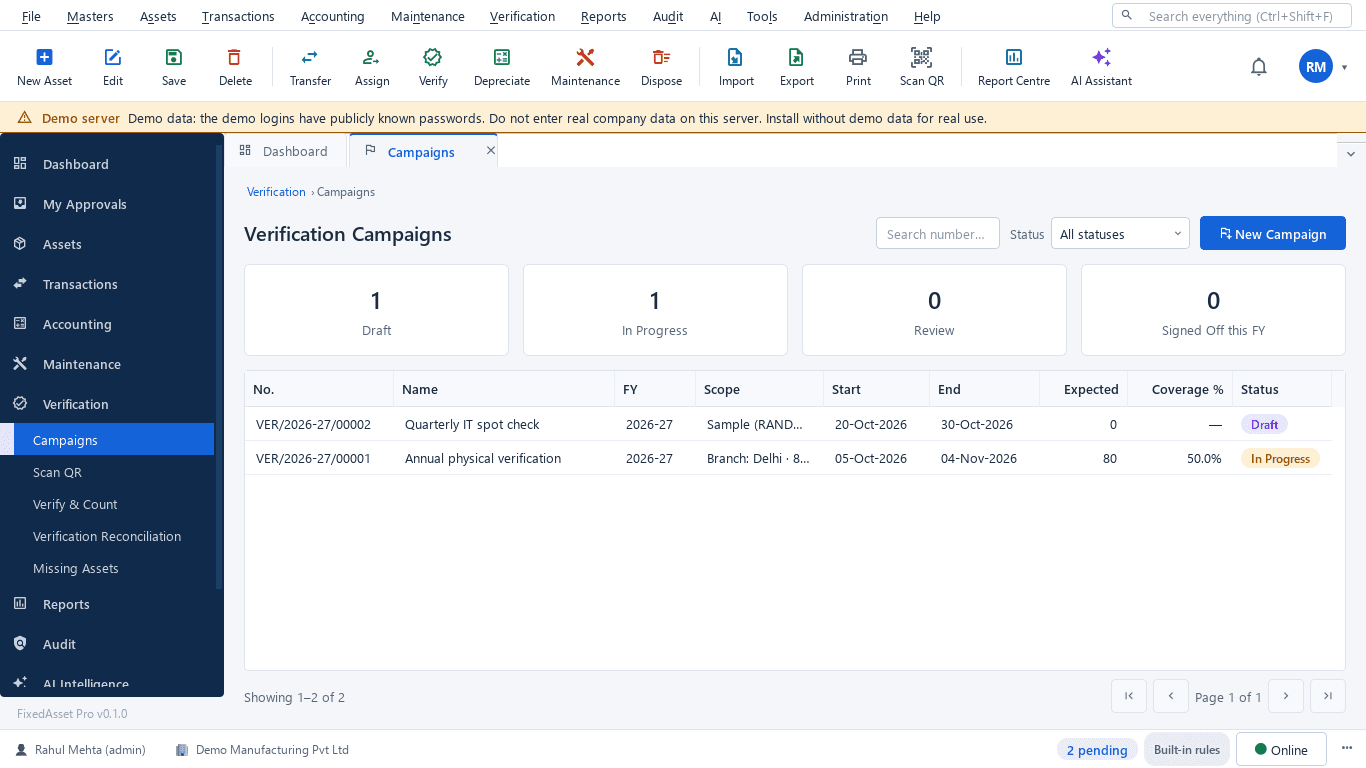
What this screen shows
- Campaigns in draft, in progress, review and signed off this year
- Scope by branch, location or sample
- Start and end dates
- Expected count and coverage percentage
- Status per campaign
Typical buyers and users
Network operations manager
Which sites have overdue battery or DG services, which swaps are pending approval, and the maintenance cost per region.
Solution for the Network operations managerAsset manager or inventory lead
A register that matches the network serial by serial, campaigns with coverage per site, and field devices traced to engineers.
Solution for the Asset manager or inventory leadIT manager
Data-room and engineer equipment with warranty dates, role scoping by region, SSO sign-in and an API to connect inventory systems.
Solution for the IT managerFinance controller
Low-value write-off policy, owned against leased equipment, and depreciation runs that reconcile to the ledger by category.
Solution for the Finance controller
Deployment considerations
The desktop edition is available today for a single PC or an office LAN; the cloud-hosted web edition and the mobile app are available too. All start with your real company, never demo data.
- Desktop editionAvailable now
Runs today on a server PC at head office or a regional centre, with client PCs on the corporate network; counts use USB scanners, webcams or count sheets, and daily work needs no internet.
- Web editionAvailable now
Suits operators with regional teams and contractors: a Branch context bar per region, approvals from anywhere, and field counting through the companion mobile app that works offline and syncs later.
- Using bothSame rules, same engine
An operator that starts on desktop keeps its register; both editions share the same transactions, approvals and audit trail.
Frequently asked questions
Can we scope a verification to one region or a sample of sites?
Yes. A campaign is scoped by branch, location or category, as a full count or a sample, with teams assigned; coverage per campaign is shown on the campaigns list. See Physical Verification.
How is a field swap recorded?
As a transfer of the replacement unit to the site and a return of the faulty unit to store, each approved and recorded against the serial. The Asset Movement report lists every transfer in a period.
Can contractors count sites without full access?
A Verifier role sees assets without amounts and can count within its scope; counts can also be captured on paper or Excel count sheets and imported with validation.
Can the register connect to our network inventory system?
Through the generic REST API and webhooks, maintained by your IT team; ledger mapping connects the register to your accounting system. FixedAsset Pro never creates ledgers in your accounting system. See Integrations.
How are leased units kept separate from owned ones?
Leased equipment goes in the lease register with right-of-use life, separate from owned assets in both depreciation books.
Can thousands of low-value devices be handled sensibly?
Each book has a per-book policy including a low-value write-off threshold, and the category rate master sets life, method and rate per category so small devices follow a consistent rule.
Guides and articles
Published articles tagged for this industry.
Capital work-in-progress: ageing, overdue projects and getting the capitalisation date right
CWIP is where cost waits until an asset is ready for use. Too long there and the Schedule III ageing exposes it; too short and depreciation starts on an asset that is not ready. How to manage CWIP through the year.
Impairment indicators for fixed assets: a practical year-end review under Ind AS 36 and AS 28
You do not have to test every asset for impairment every year, but you do have to look for indicators at every reporting date. How to run that review, document it, and recognise when a full test is needed.
Other industries
All industries Manufacturing
 Pharmaceutical & Life Sciences
 Healthcare & Hospitals
 Information Technology
 Banking & Financial Services
 Retail
 Wholesale & Distribution
 Logistics & Warehousing
 Education
 Government & Public Sector
 Real Estate & Facilities
 Construction & Infrastructure
 Energy & Utilities
 Hospitality
 Automotive
 Media & Entertainment
 Agriculture & Food Processing
 Professional Services
 Multinational Enterprises
See FixedAsset Pro on your own site register
Start a free trial, or book a demo and bring the equipment list of one region and the results of your last count.