
Equipment records you can find when the inspector asks
In a pharmaceutical plant or a laboratory, the asset register is only half the story. The other half is the calibration certificate, the last preventive maintenance, the service report and who approved the change. FixedAsset Pro keeps each instrument's finance figures and its maintenance and document history on the same record, with an audit trail that cannot be switched off.
Configurable workflows, not a compliance certificate
Who this page is for
- Pharmaceutical manufacturers
- Laboratories
- Biotech companies
- Contract manufacturing organisations
- Quality and compliance teams
- Engineering and finance teams
Common challenges
The operational and financial problems this industry brings to an asset register, and what FixedAsset Pro does about each.
- Operational
Calibration due dates slip between systems
Balances, HPLCs, temperature probes and pressure gauges each have their own calibration interval. When the schedule is a spreadsheet and the certificates are in a folder, an overdue instrument is found during an audit, not before it.
- Operational
Maintenance evidence is scattered
Service reports from the vendor, internal work orders and AMC visit records sit in email, binders and the engineering office. Pulling together one instrument's history takes a day.
- Operational
Cold-chain and HVAC equipment cannot fail quietly
Walk-in cold rooms, refrigerators, freezers and air-handling units protect product and environment. Breakdowns, repairs and downtime need to be recorded against the equipment, not just fixed.
- Operational
Changes need a named approver
Moving an instrument to another lab, retiring it or changing its record should go through an approval with a reason. Free-text edits in a spreadsheet leave no trail.
- Financial
Expensive instruments, long lives, many parts
Chromatography systems and production lines have significant components with different lives. Capitalising them as one asset hides what was replaced and distorts depreciation.
- Financial
New facilities sit in CWIP for months
A new production block or lab expansion is built, installed and qualified over a long period. Costs need to be tracked in CWIP and capitalised when the facility is ready for use.
Asset categories you can track
Categories, lives and depreciation rates are configurable; these are the ones this industry usually needs.
- Laboratory instruments
- Production equipment
- HVAC equipment
- Cold-chain equipment
- Calibration instruments
- Utilities
- IT infrastructure
Applicable workflows
Each workflow is a product area; the link opens the feature page.
Calibration and preventive maintenance schedules
Preventive schedules by time or meter raise their own work orders; calibration records carry tolerance checks and a second-person approval, and AMC visits are recorded against the instrument with missed visits shown.
Maintenance & AMCEvidence vault per instrument
Calibration certificates, service reports, photos, movements and approvals are linked to the asset. Evidence packs carry a SHA-256 checksum and cannot be deleted; file integrity can be re-checked on demand.
Audit & ComplianceApproved transfers and retirements
Moving an instrument between labs, sites or departments, or retiring it, goes through a configurable approval chain with a reason, and the lifecycle timeline shows every step.
Asset LifecycleFacility projects through CWIP
Budget and approve a new block or lab expansion, book vendor, material, labour and trial-run costs to CWIP, and capitalise when the facility is ready for use. CWIP ageing is reported in Schedule III buckets.
Procurement & CapExComponent depreciation for complex equipment
Significant parts such as detectors, pumps or line modules can be components with their own cost and life, on the Companies Act book alongside the Income-tax blocks.
Depreciation
Key features
Calibration with a second-person approval
Calibration records with tolerance checks and a second approver, kept on the asset next to its warranty, AMC, insurance and documents.
Tamper-evident audit trail
Who, when, old value, new value and reason for every change. The log is sealed every 15 minutes, an integrity check shows any break, and the trail cannot be switched off.
Versioned documents
Certificates, SOP references, service reports and manuals stored as versioned documents that can be linked to many assets.
Configurable approval chains
Approval chains by transaction type, amount and branch, so transfers, disposals and record changes are reviewed by the people your procedures name.
Maintenance dashboard
Maintenance cost, open and overdue work orders, downtime, availability and preventive-maintenance compliance for the period and site you pick.
Local AI and OCR
On the desktop edition the AI Assistant and document reading run on your own server PC; cloud AI is off by default and database rows are never sent.
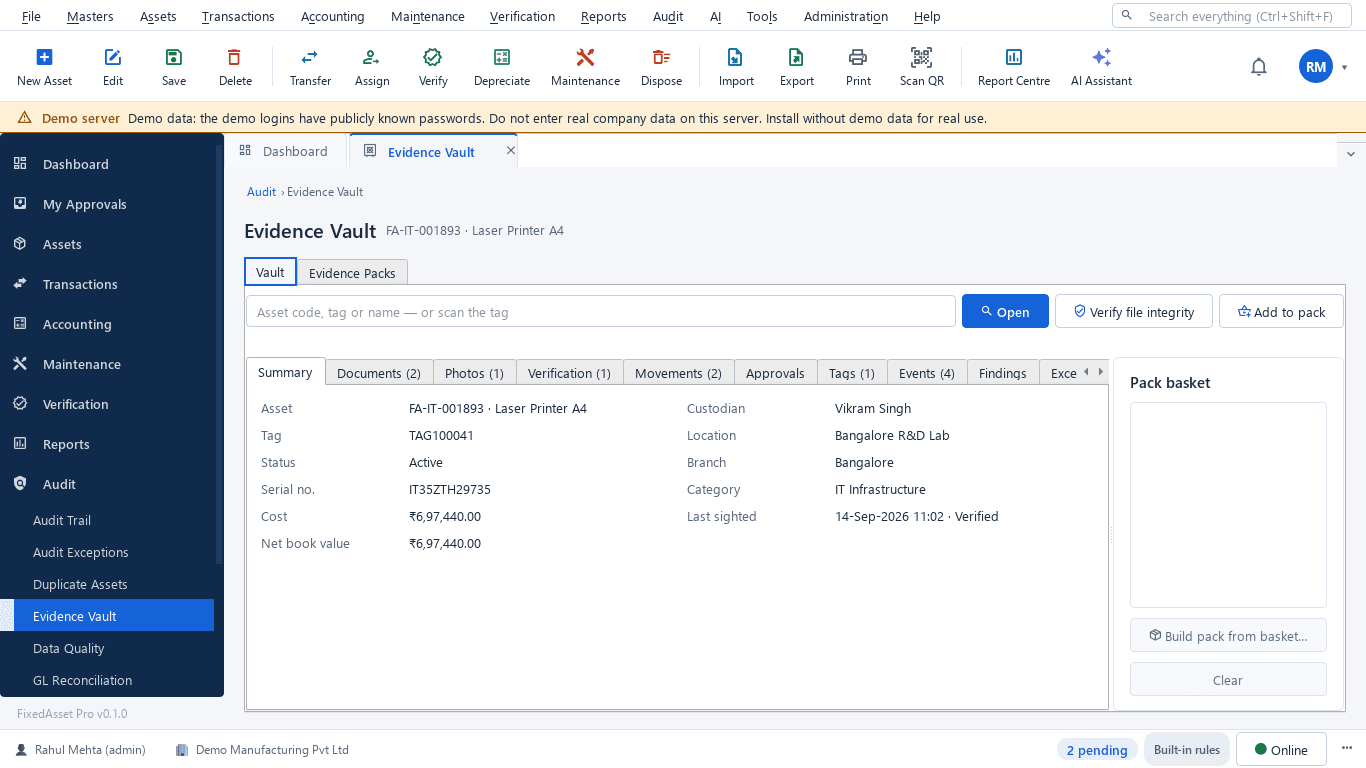
The evidence vault for one instrument
A real screen of the desktop edition, captured on a demo server. The figures are sample data, not customer data.
What this screen shows
- Asset summary: tag, serial, custodian, location, cost and book value
- Documents, photos and verification results
- Movements, approvals, tags and events
- Findings from data-quality and audit checks
- Pack basket to build a checksummed evidence pack
- Verify file integrity on demand
Typical buyers and users
Engineering or maintenance head
Calibration and PM due dates that are met, work orders with service reports attached, and the equipment that keeps breaking down.
Solution for the Engineering or maintenance headQuality or compliance manager
Finding any instrument's calibration and maintenance history in minutes, with the approvals and the audit trail behind it.
Solution for the Quality or compliance managerFinance controller
Component depreciation on high-value equipment, facility projects capitalised from CWIP on time, and a register that ties to the ledger.
Solution for the Finance controllerSite IT manager
Instrument PCs and lab servers on the register, data staying on the company's own server, and role-based access per site.
Solution for the Site IT manager
Deployment considerations
The desktop edition is available today for a single PC or an office LAN; the cloud-hosted web edition and the mobile app are available too. All start with your real company, never demo data.
- Desktop editionAvailable now
Runs today on a server PC inside your network, with client PCs on the LAN. Data, documents, AI and OCR stay on your server, which many quality teams prefer for equipment records.
- Web editionAvailable now
Suits groups with several plants or labs and a central finance team: one browser login with a Branch context bar and approvals from anywhere. Hosted in our cloud, so check it against your own data policies first.
- Using bothSame rules, same engine
A site can stay on desktop while head office evaluates the web edition later; both editions use the same rules, approval chains and audit trail.
Frequently asked questions
Does FixedAsset Pro make us compliant with GMP or other regulations?
No software does that on its own. FixedAsset Pro gives you configurable workflows, approvals, calibration and maintenance records and a tamper-evident audit trail. Whether your processes meet a regulation is decided by your quality system, your validation and your auditors.
Is the software validated for regulated use?
We do not supply a validation package or claim any certification. If your procedures require computer system validation, plan it as part of your own implementation and talk to us about what documentation we can share.
Can calibration be scheduled per instrument?
Yes. Preventive schedules by time or meter raise work orders automatically, and calibration records carry tolerance checks and a second-person approval. See Maintenance & AMC.
Where do we keep calibration certificates and service reports?
In the evidence vault, as versioned documents linked to the asset. Evidence packs carry a SHA-256 checksum and cannot be deleted. See Audit & Compliance.
Can every change to an equipment record be traced?
Yes. The audit trail records who, when, the old value, the new value and the reason for every change, is sealed every 15 minutes and cannot be switched off.
Does our data leave the site?
Not with the desktop edition: the database, documents, local AI and OCR run on your own server PC. Cloud AI is off by default and needs two confirmations to enable.
Guides and articles
Published articles tagged for this industry.
Capital work-in-progress: ageing, overdue projects and getting the capitalisation date right
CWIP is where cost waits until an asset is ready for use. Too long there and the Schedule III ageing exposes it; too short and depreciation starts on an asset that is not ready. How to manage CWIP through the year.
Tagging the awkward ones: a field guide for assets that resist a label
Laptops and chairs are easy. Hot machines, sterilised equipment, vehicles, moulds at a vendor's site and land are not. A practical, asset-by-asset guide to tagging and verifying what does not take a sticker well.
What your auditor will ask for on fixed assets, and how to have it ready
A prepared-by-client list for property, plant and equipment, organised by the questions the auditor is trying to answer: does it exist, is it complete, do you own it, and is it valued and presented correctly.
Other industries
All industries Manufacturing
 Healthcare & Hospitals
 Information Technology
 Banking & Financial Services
 Retail
 Wholesale & Distribution
 Logistics & Warehousing
 Education
 Government & Public Sector
 Real Estate & Facilities
 Construction & Infrastructure
 Energy & Utilities
 Telecommunications
 Hospitality
 Automotive
 Media & Entertainment
 Agriculture & Food Processing
 Professional Services
 Multinational Enterprises
See FixedAsset Pro on your own equipment list
Start a free trial, or book a demo and bring an instrument list, a calibration schedule and a sample certificate.