

Many entities, many currencies, one way of working
A group with legal entities in several countries runs the same asset processes with different books, currencies, financial years and approvers. The usual answer is one spreadsheet per entity and a consolidation exercise at year-end. FixedAsset Pro configures each company separately, scopes every user to the companies and branches they are allowed to see, and reports across the group from one register.
Who this page is for
- International corporate groups
- Shared-service centres
- Organisations with multiple legal entities and currencies
Common challenges
The operational and financial problems this industry brings to an asset register, and what FixedAsset Pro does about each.
- Operational
Each entity works differently
Approval chains, categories and naming drift between subsidiaries. A shared-service centre then processes ten versions of the same transfer or disposal.
- Operational
Access must stop at the entity boundary
A controller in one country should see their companies and nothing else, while group finance and internal audit see everything. Spreadsheets cannot do that; a register must.
- Operational
Transfers between entities are two transactions
Moving equipment from one legal entity to another is a disposal on one side and an addition on the other, with a value and an approval in each. Done informally, both registers end up wrong.
- Financial
Several books, several currencies
Local statutory books, a group book under Ind AS or IFRS and a management book each have their own rules, and assets bought in USD or EUR must carry dated exchange rates.
- Financial
Financial years do not line up
An April to March entity and a January to December entity report in different periods; consolidated figures need both schedules as of the same date.
- Financial
Consolidation is rebuilt every quarter
Group gross block, net book value and depreciation across entities are assembled from exported sheets, with no drill-down to the asset when a number is questioned.
Asset categories you can track
Categories, lives and depreciation rates are configurable; these are the ones this industry usually needs.
- Plant and machinery
- IT infrastructure
- Office premises and fit-outs
- Vehicles
- Leased assets
- Capital work in progress
Applicable workflows
Each workflow is a product area; the link opens the feature page.
A company per legal entity
Each legal entity is a company with its own country, currency, time zone and financial year, its own branches and locations, and its own masters, under one organisation.
Fixed Asset ManagementBooks per entity, currencies with dated rates
Companies Act and Income-tax books for Indian entities, Ind AS or IFRS, Management or custom books where needed, each with its own policy, and INR, USD, EUR, GBP, AED and SGD with dated exchange rates.
Financial ManagementInter-company transfers
A transfer between companies goes through an approval chain configured by type, amount and branch, and lands on both registers with the audit trail showing who approved it on each side.
Asset LifecycleGroup-wide controls
Ten built-in roles and custom roles, scoped by company, branch and location; two-factor sign-in, LDAP or Active Directory and OpenID Connect SSO; a sealed audit trail per transaction.
Audit & ComplianceConsolidated and per-entity reporting
Fixed Asset Register, Fixed Asset Schedule, Depreciation Register and Branch-wise Summary per company, and the Report Builder for group views with grouping and totals, exported to PDF, Excel, CSV or Word.
Reporting & Analytics
Key features
Country-aware setup
Country, currency, time zone and financial year are chosen when a company is created; statutory defaults are supplied as reference data to agree with your auditor.
Scope by company, branch and location
Users see only the companies and branches they are given; amounts are hidden from users without finance rights; the User Access Report shows users by roles and branch scope.
Multiple books with per-book policy
Each book keeps its own rules: month rule, low-value write-off, true-up and disposal day. One corporate book posts to the general ledger.
Foreign-currency assets
Six currencies with dated exchange rates, and s.43A exchange differences for Indian entities.
Workflow Designer
Approval steps by role or user, any or all approvers, time limits, conditions by transaction type, amount and branch, tested before activation and reusable across entities.
Integrations per entity
Ledger mapping per company; Tally, Zoho Books and QuickBooks Online connectors; SAP, Oracle and Microsoft Dynamics in file mode; generic REST and webhooks. FixedAsset Pro never creates ledgers in your accounting system.
Register to ledger, per company
A real screen of the desktop edition, captured on a demo server. The figures are sample data, not customer data.
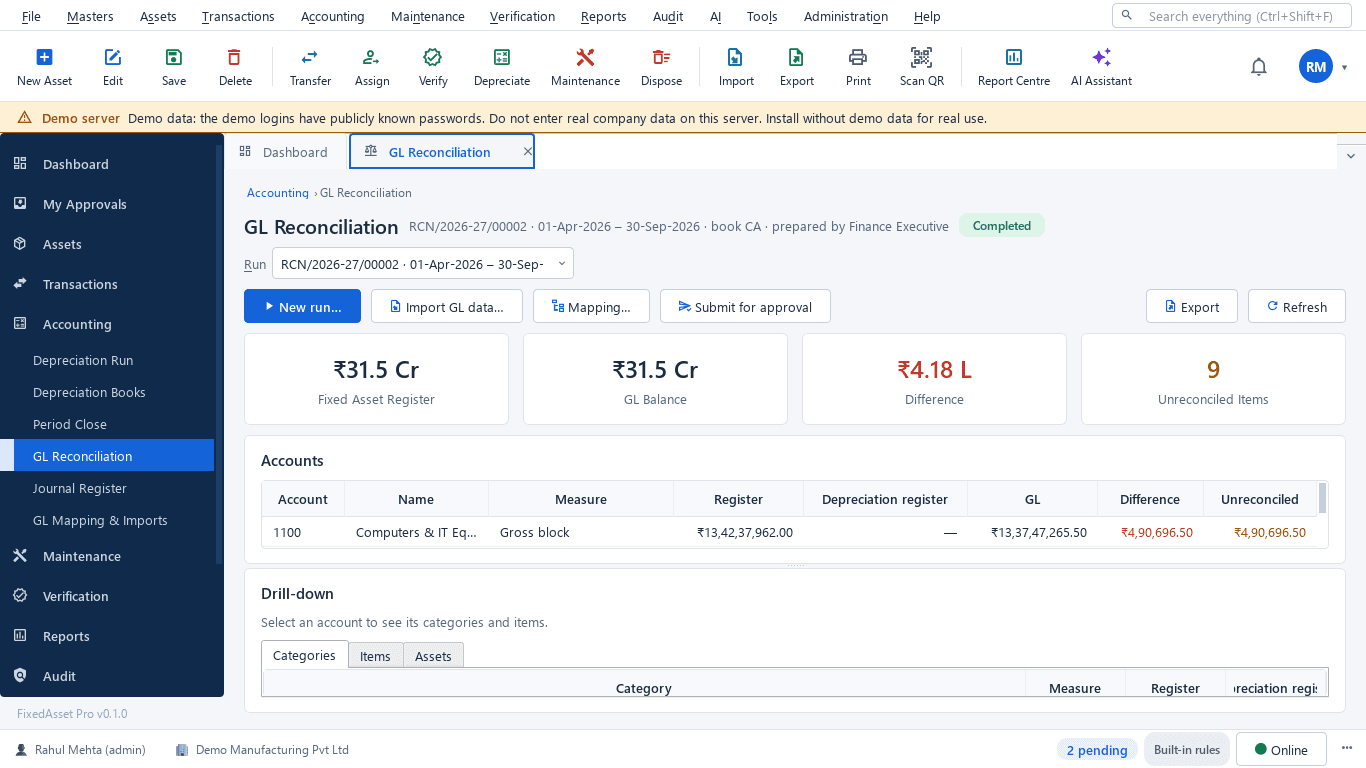
What this screen shows
- Fixed asset register total against the GL balance
- Difference and unreconciled items
- Per-account comparison of register, depreciation register and GL
- Drill-down to categories, items and assets
- Import GL data, mapping and submit for approval
Typical buyers and users
Group CFO or controller
Gross block, net book value and depreciation across entities as of one date, with drill-down to the asset when a number is questioned.
Solution for the Group CFO or controllerShared-service centre lead
One way of processing additions, transfers and disposals for every entity, with approval chains that match each entity's policy.
Solution for the Shared-service centre leadGroup internal audit
Access scoped to entity boundaries, a sealed audit trail for every transaction, and verification campaigns run the same way in every country.
Solution for the Group internal auditGroup IT
SSO through OpenID Connect or Active Directory, role scoping per company, scoped API keys and an integration per entity's accounting system.
Solution for the Group IT
Deployment considerations
The desktop edition is available today for a single PC or an office LAN; the cloud-hosted web edition and the mobile app are available too. All start with your real company, never demo data.
- Desktop editionAvailable now
Runs today on a server PC per office or data centre on the corporate network; multi-company and multi-branch are supported within one installation, with Local AI and OCR on your own server.
- Web editionAvailable now
Suits groups with entities in several countries: one organisation with many companies, a Year, Company and Branch context bar, approvals and dashboards from any office, and each organisation's data isolated.
- Using bothSame rules, same engine
A group that starts on desktop keeps its register; both editions share the same depreciation engine, approval chains and audit trail.
Frequently asked questions
Can each legal entity have its own currency and financial year?
Yes. Each company is created with its own country, currency, time zone and financial year, under one organisation. Reports run per company or across the group as of one date.
Which books are supported?
Companies Act and Income-tax books for Indian entities, plus Ind AS or IFRS, Management or custom books, each with its own policy. One corporate book posts to the general ledger. See Financial Management.
How are assets bought in foreign currency handled?
INR, USD, EUR, GBP, AED and SGD are supported with dated exchange rates, and s.43A exchange differences are recorded for Indian entities.
Can a user be limited to one entity?
Yes. Roles are scoped by company, branch and location; users see only the companies and branches they are given, and amounts are hidden from users without finance rights. See Audit & Compliance.
How does an inter-company transfer work?
As an approved transfer between companies: the asset leaves one register and joins the other with the agreed value, and the audit trail records the approvals on each side.
Does it connect to a different accounting system in each country?
Ledger mapping is per company; connectors exist for Tally, Zoho Books and QuickBooks Online, file mode for SAP, Oracle and Microsoft Dynamics, and a generic REST API with webhooks. See Integrations.
Guides and articles
Published articles tagged for this industry.
One asset, several books: how FixedAsset Pro keeps Companies Act, Income-tax and other depreciation side by side
Indian companies depreciate the same asset at least twice: once under Schedule II and once under the Income-tax Act. Groups reporting abroad add a third. Here is how depreciation books work in FixedAsset Pro, and what each one is for.
Moving assets between locations, branches and companies without losing the trail
A transfer looks like a change of location in the register. Depending on where the asset goes, it can also be a GST supply, a disposal by one company and an acquisition by another, and a gap in your verification. A practical guide.
Other industries
All industries Manufacturing
 Pharmaceutical & Life Sciences
 Healthcare & Hospitals
 Information Technology
 Banking & Financial Services
 Retail
 Wholesale & Distribution
 Logistics & Warehousing
 Education
 Government & Public Sector
 Real Estate & Facilities
 Construction & Infrastructure
 Energy & Utilities
 Telecommunications
 Hospitality
 Automotive
 Media & Entertainment
 Agriculture & Food Processing
 Professional Services
See FixedAsset Pro across your group
Start a free trial, or book a demo and bring the entity list, the books each one reports under and last quarter's consolidation sheet.