

Machinery that works in seasons needs a register that works all year
Harvesters run hard for six weeks and sit for forty-six. Processing lines and cold stores run every day. Both need servicing at the right time, insurance that matches what is actually on the farm or in the plant, and a location that is known when the equipment is spread across fields, depots and sites. FixedAsset Pro keeps all of that on the asset.
Who this page is for
- Agricultural enterprises
- Food manufacturers
- Cold storage operators
- Processing companies
Common challenges
The operational and financial problems this industry brings to an asset register, and what FixedAsset Pro does about each.
- Operational
Pre-season servicing is missed
Machinery that is used for a few weeks a year must be serviced before the season, not after the breakdown in the middle of it. Calendar reminders in one person's head do not scale across depots.
- Operational
Equipment is spread across fields and sites
Tractors, pumps and implements are at the depot, in the field or lent to another farm. Without locations in the register, the annual count starts with a search.
- Operational
Refrigeration downtime is product loss
A compressor failure in a cold store is measured in spoiled stock. Service contracts, warranty and breakdown history need to be on the unit, not in a drawer.
- Financial
Utilisation decides what to own
Owning a second harvester or hiring one for the season depends on how many days the first actually worked. That number is rarely recorded.
- Financial
Insurance schedules drift
Machinery is added and scrapped between policy renewals; the insurance schedule over-insures the scrapped and misses the new until a claim.
- Financial
Processing-line CapEx and CWIP
A new packaging line is installed and commissioned over months; its costs sit in CWIP and depreciation starts when someone remembers to capitalise it.
Asset categories you can track
Categories, lives and depreciation rates are configurable; these are the ones this industry usually needs.
- Agricultural machinery
- Processing lines
- Refrigeration
- Packaging equipment
- Storage systems
- Utilities and vehicles
Applicable workflows
Each workflow is a product area; the link opens the feature page.
Seasonal and meter-based servicing
Preventive schedules by time or meter raise work orders before the season; breakdowns are reported from the register or a scanned tag with parts, cost and downtime recorded against the machine.
Maintenance & AMCFarms, plants and depots as locations
Each farm, plant or cold store is a branch with its fields, sheds and lines as locations; a machine lent to another site goes through an approved transfer, so the register knows where it is.
Fixed Asset ManagementCounting at the depot and in the plant
Campaigns scoped by branch or category, scanned with a USB scanner or webcam or captured on paper and Excel count sheets for sites without a PC, with queues for missing and found-elsewhere items.
Physical VerificationInsurance and warranty cover on the asset
Policies, endorsements and claims recorded against the covered machinery, coverage gaps shown, and warranty expiry alerts before cover lapses.
Financial ManagementLines in CWIP until ready for use
Book vendor, material, labour and trial-run costs to CWIP, allocate common costs, and capitalise when the line is ready, with ageing reported in Schedule III buckets.
Procurement & CapEx
Key features
Idle Assets and Asset Age Analysis
Idle Assets (In Store) shows what is parked at the depot; Asset Age Analysis groups machinery into age buckets by category for replacement planning.
Count sheets for sites without a PC
Paper or Excel count sheets with import and validation, for a remote farm or a cold store where a scanner is not practical.
Warranty, AMC and insurance expiries
Alerts at 90, 60, 30 and 7 days before warranty ends, AMC and warranty cover shown on every work order, and the Insurance Expiry report for renewals.
Replacement Intelligence
A review list of machinery past its useful life, costly to maintain or often down, with the reason and evidence, drafting a CapEx request when you decide to replace. A review list, never an automatic decision.
Companies Act and Income-tax books
Schedule II lives, SLM or WDV per category, s.32 blocks with the 180-day rule for machinery bought before the season, and an Explain view for any figure.
Invoice to asset
Document Intelligence reads the dealer invoice for a tractor or a line component, drafts the asset with a confidence chip per field, and a person confirms every value.
The maintenance dashboard before the season
A real screen of the desktop edition, captured on a demo server. The figures are sample data, not customer data.
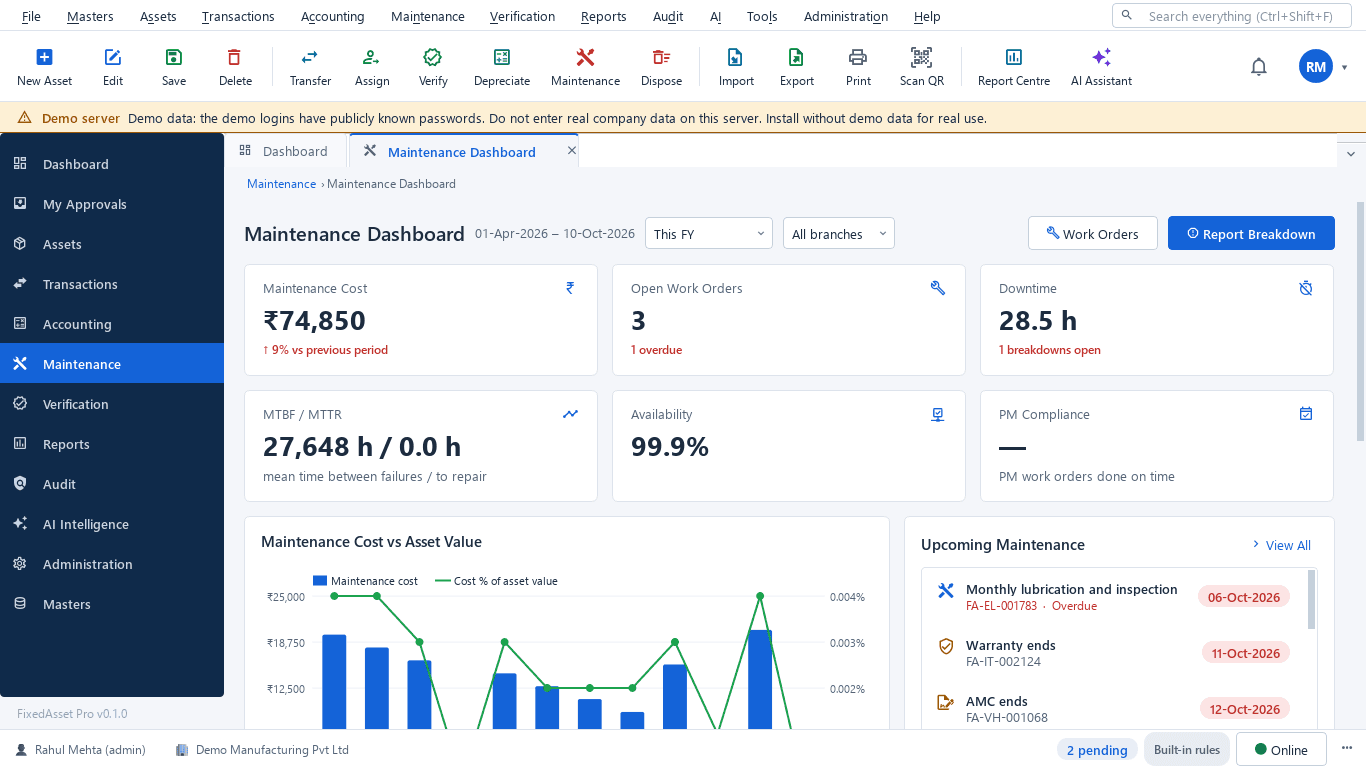
What this screen shows
- Maintenance cost against the previous period
- Open and overdue work orders
- Downtime hours and open breakdowns
- MTBF / MTTR and availability
- PM compliance
- Upcoming maintenance, warranty and AMC end dates
Typical buyers and users
Farm or plant operations manager
Which machines are serviced before the season, which cold-store units keep failing, and the downtime that cost product.
Solution for the Farm or plant operations managerAsset or stores manager
Where every tractor and implement is today, what is idle in the depot, and a count that works at sites without a PC.
Solution for the Asset or stores managerFinance manager
Insurance that matches the register, lines capitalised from CWIP on time, and depreciation on both books that reconciles to the ledger.
Solution for the Finance managerProcurement manager
Requests and purchase orders for machinery and line components, receipts at the right site and invoices matched before capitalisation.
Solution for the Procurement manager
Deployment considerations
The desktop edition is available today for a single PC or an office LAN; the cloud-hosted web edition and the mobile app are available too. All start with your real company, never demo data.
- Desktop editionAvailable now
Runs today on a server PC at the plant or head office, with client PCs on the same network; counts use USB scanners, webcams or count sheets, and daily work needs no internet.
- Web editionAvailable now
Suits groups with several farms, plants or cold stores: a Branch context bar per site, approvals from anywhere, dashboards across sites in a browser, and the companion mobile app for counting offline in the field.
- Using bothSame rules, same engine
A business that starts on desktop keeps its register; both editions share the same depreciation engine, approvals and audit trail.
Frequently asked questions
Can servicing be timed to the season rather than a fixed date?
Preventive schedules can be set by time or by a meter reading, so a pre-season service by date or a service by engine hours both raise their own work orders. See Maintenance & AMC.
How do we count machinery at a farm with no computer?
Print paper count sheets or use Excel count sheets, then import them with validation; the reconciliation queues work the same way as a scanned count. See Physical Verification.
Can a machine lent to another farm be tracked?
Yes. The other farm is a branch or location; lending the machine is an approved transfer, and the Asset Movement report lists it. Return is another transfer.
Does the product track utilisation?
It records meter readings for maintenance schedules, downtime on work orders and idle assets in store; from these the maintenance dashboard and the Idle Assets and Replacement Due reports support the own-or-hire decision. It does not replace a fleet telematics system.
How is a new processing line capitalised?
Costs accumulate in CWIP (vendor, material, labour, borrowing cost, trial runs), common costs can be split and allocated, and the line is capitalised when ready for use. See Procurement & CapEx.
Can we keep insurance in step with the register?
Policies, endorsements and claims are recorded against the covered assets, coverage gaps are shown, and the Insurance Expiry report lists policies ending within a chosen window.
Guides and articles
Published articles tagged for this industry.
Tagging the awkward ones: a field guide for assets that resist a label
Laptops and chairs are easy. Hot machines, sterilised equipment, vehicles, moulds at a vendor's site and land are not. A practical, asset-by-asset guide to tagging and verifying what does not take a sticker well.
Other industries
All industries Manufacturing
 Pharmaceutical & Life Sciences
 Healthcare & Hospitals
 Information Technology
 Banking & Financial Services
 Retail
 Wholesale & Distribution
 Logistics & Warehousing
 Education
 Government & Public Sector
 Real Estate & Facilities
 Construction & Infrastructure
 Energy & Utilities
 Telecommunications
 Hospitality
 Automotive
 Media & Entertainment
 Professional Services
 Multinational Enterprises
See FixedAsset Pro on your own machinery register
Start a free trial, or book a demo and bring your machinery list, the service schedule and this year's insurance policy.