
AI that shows its working, and never moves an asset on its own.
Figures are calculated by the application, not invented by a model. Every answer links to the register, a report, the evidence and the calculation, and only reads the data you are allowed to see.
Every AI feature on Desktop, Web and Mobile, with real answers
What you get
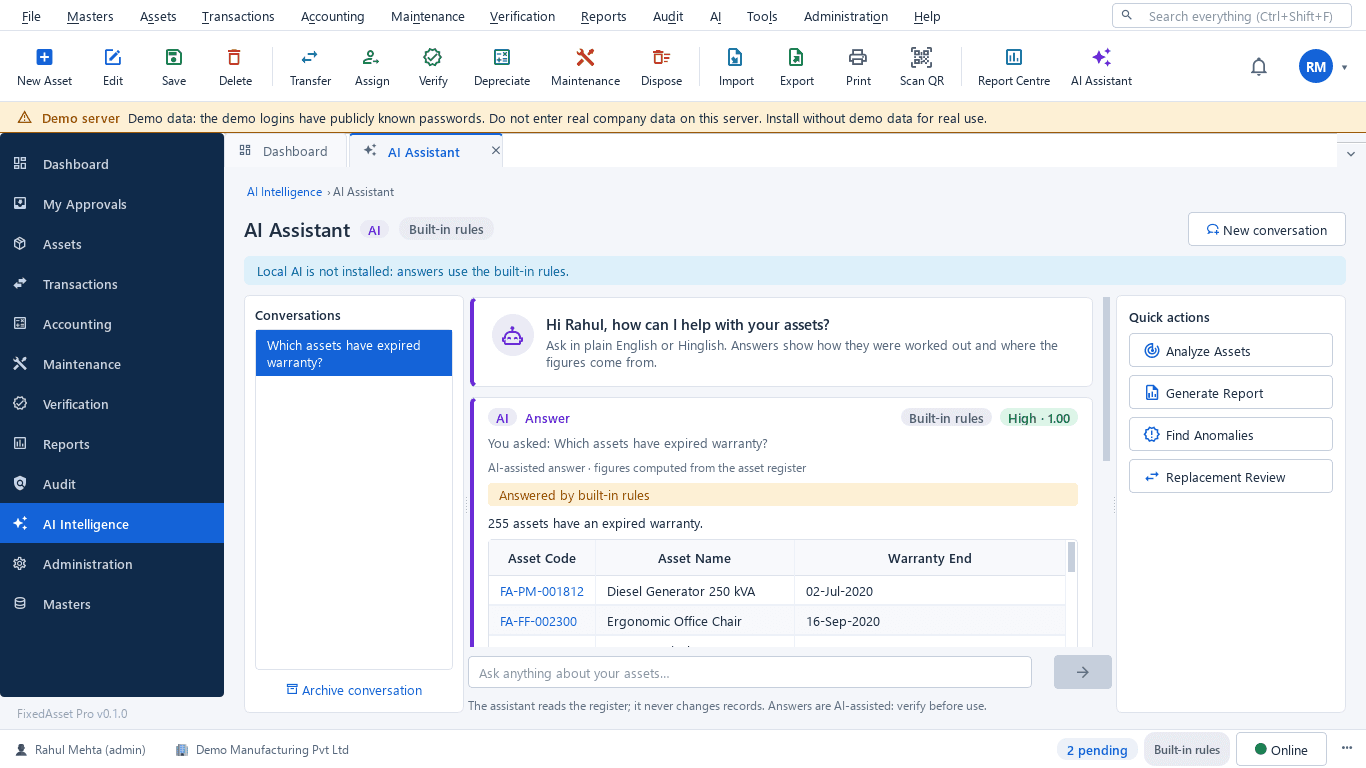
Search assets in natural language
Ask for laptops bought in 2024, assets with zero book value or missing assets in Delhi, in English or Hinglish, from any screen (F8 on the desktop). The answer is a computed list with links to the register and the report behind it.
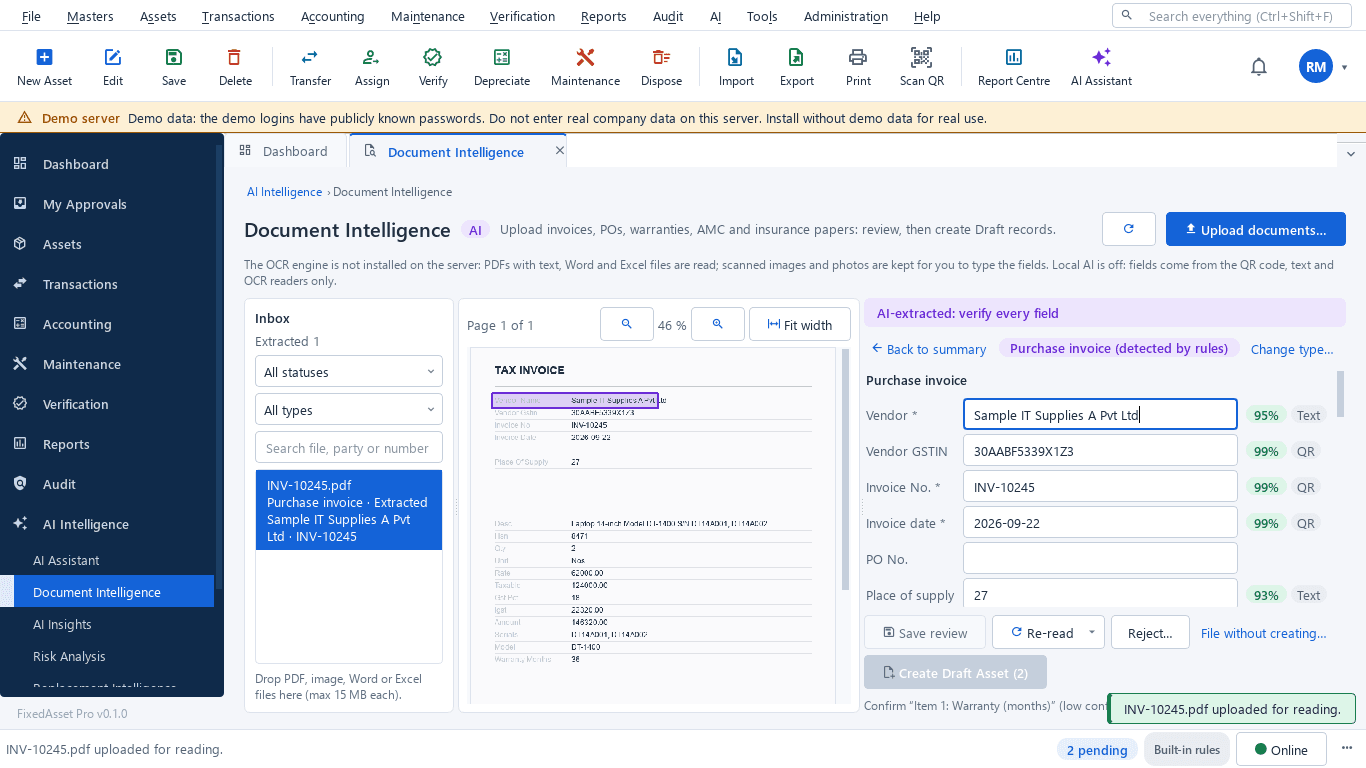
Extract asset information from invoices
Drop in a purchase invoice, purchase order, goods receipt, warranty certificate, AMC contract, insurance policy or lease. Fields are read from the GST e-invoice QR code, the PDF text or OCR, each with a confidence chip. A duplicate invoice or a low-confidence field blocks creation; a person confirms every value; the result is a Draft asset that goes through normal approval.
Detect potential duplicate records
Duplicate serial numbers and look-alike assets grouped side by side; ghost assets that are in the books but have never been sighted.
Identify missing documentation
Assets without an invoice, vendor, location or custodian, from nightly scans or a scan you run now; each finding can become an audit exception.
Explain financial differences
Explain this depreciation, or a register-to-ledger difference, with the inputs, the method and the figures the application computed; the model only words the explanation, it never calculates.
Summarise maintenance history
Maintenance cost, downtime and work-order history per asset, summarised with the figures they come from, feeding the risk indicator.
Prepare draft audit observations
Audit summary and CFO summary packs in PDF, Excel or Word. AI-written summaries are labelled as such and discarded automatically if any number in them does not match the report.
Identify assets for replacement review
Assets past their useful life, costly to maintain or often down, with the reason and the evidence. Keep, plan a replacement (which drafts a CapEx request) or open a disposal review. A review list, not an automatic decision.
Recommendations require review
AI recommendations are supported by source records and require appropriate review before consequential transactions. The assistant refuses to create, transfer, dispose of or depreciate assets. The only write path is a Draft asset that a person creates after confirming every value, and it goes through normal approval.
Private by design
Desktop: the model runs on your server PC and nothing leaves your network. Web: AI runs inside the FixedAsset Pro service; an external cloud provider is off by default, needs an administrator's opt-in per data class, and never receives database rows. Every AI question and action is written to a hash-chained activity log.
How it works
AI governance: a suggestion becomes a transaction only through people.
AI suggestion
A finding, a draft or an answer, always with its source records.
Evidence
The report, the calculation and the documents it is based on are one click away.
Human review
A person checks the values; red-confidence fields and duplicates block progress.
Approval
The normal approval chain for that transaction type.
Transaction
Only then is a record created or changed, by the application, and audited.
In the product
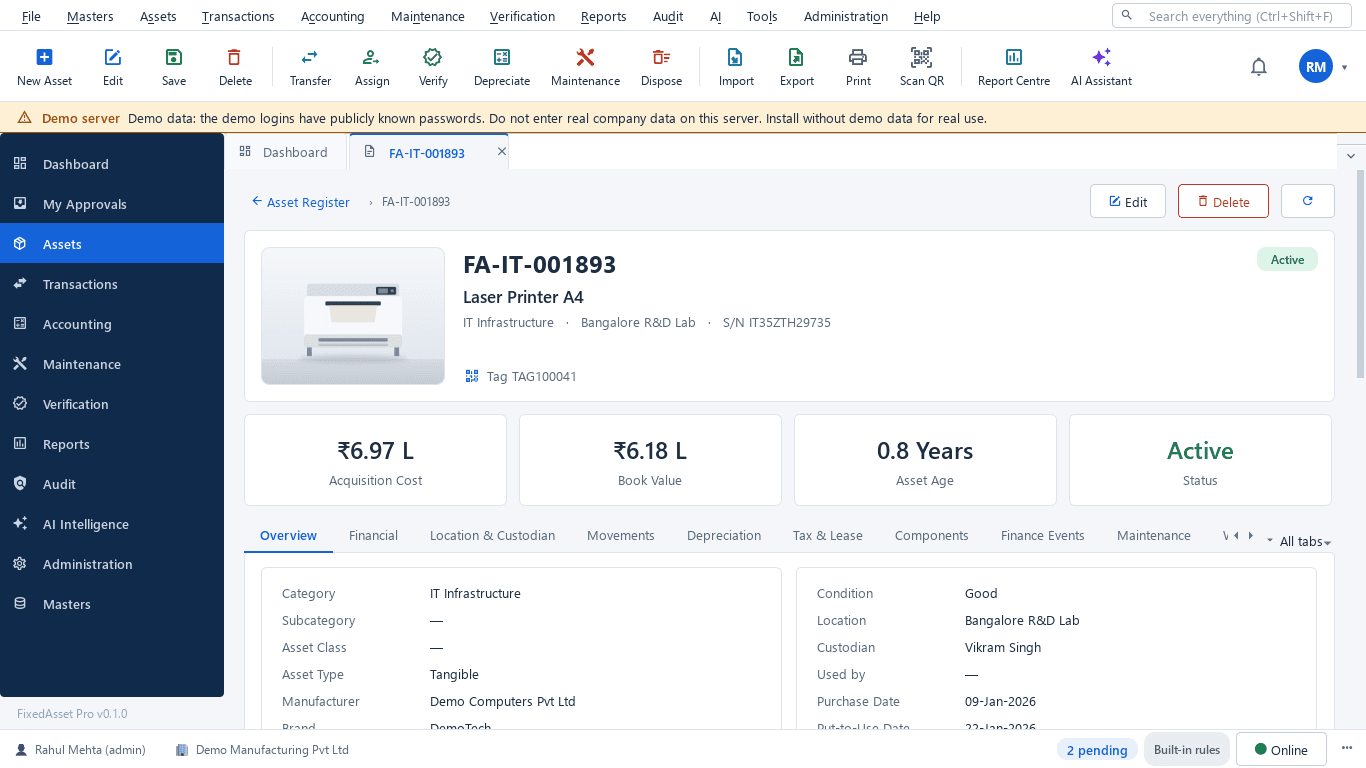
Real screens of the desktop edition, captured on a demo server. The web edition runs the same backend rules in the browser.
Web and desktop
Which edition has it today. One backend, the same depreciation engine, approval chains and audit trail on every surface.
Web app
AvailableAssistant, document intelligence, anomaly, risk and replacement insights and AI report packs, within the AI quota of your plan.
Desktop app
AvailableA local AI model (qwen2.5 1.5B through Ollama) and OCR are bundled with the installer and run on your server PC; built-in rules answer when the model is off.
Works with
Where this feature connects to the rest of the platform, and who uses it most.
Frequently asked questions
Does the AI change our records?
No. It reads, computes through the same permission-checked services as the screens, and explains. The one write path is a Draft asset, created by a person from a reviewed extraction, which then goes through normal approval.
Does our data leave our servers?
On the desktop edition, no: the model runs locally on your server PC. On the web edition, AI runs inside the FixedAsset Pro service; an external cloud provider stays off unless an administrator opts in, and even then it receives the question or the document text, never database rows.
What if the model is not available?
Every AI feature has a rules-based path, so nothing waits for the model. The source label on each answer says whether it came from the local AI, a cloud provider or the built-in rules.
Is the risk score a prediction?
No. It is an indicator built from age, maintenance cost, downtime, warranty, verification and book value, with its reason and evidence shown. It is never presented as a fact or a forecast.
More about AI Asset Intelligence
Impairment indicators for fixed assets: a practical year-end review under Ind AS 36 and AS 28
You do not have to test every asset for impairment every year, but you do have to look for indicators at every reporting date. How to run that review, document it, and recognise when a full test is needed.
What your auditor will ask for on fixed assets, and how to have it ready
A prepared-by-client list for property, plant and equipment, organised by the questions the auditor is trying to answer: does it exist, is it complete, do you own it, and is it valued and presented correctly.
See it on your own register
Start a free trial of the web edition, or book a demo and we will walk through it with your data. No card is needed to begin.