

Hundreds of branches, one register the auditor can trust
A bank or NBFC holds its fixed assets in many small pieces: ATMs, cash-handling machines, strong-room fittings, branch furniture and IT, spread over hundreds of branches. Concurrent, statutory and internal auditors all ask for the same thing: the register, the ledger and the evidence must agree. FixedAsset Pro keeps them together, branch by branch.
Who this page is for
- Banks
- Financial institutions
- Insurance organisations
- NBFCs
- Distributed branch networks
Common challenges
The operational and financial problems this industry brings to an asset register, and what FixedAsset Pro does about each.
- Operational
Branches keep their own lists
Each branch maintains a fixed-asset register in its own format. Head office consolidates them at year-end, and transfers between branches show up in one list and not the other.
- Operational
Branch openings, closures and mergers
Opening, relocating or closing a branch moves furniture, safes and IT in bulk. Without approved transfers the register keeps assets at addresses that no longer exist.
- Operational
Verification across many sites
Annual verification across hundreds of branches is a circular, a spreadsheet and weeks of follow-up. Exceptions are noted but rarely closed with an owner.
- Financial
Register and ledger drift apart
Additions, disposals and depreciation posted at branch level do not always match the general ledger. Reconciling them by hand delays the close.
- Financial
Approvals need segregation
The person who records an asset should not be the one who approves its disposal. Auditors look for the maker-checker trail on every significant transaction.
- Financial
Reports must be controlled
Fixed asset schedules and depreciation figures go into regulatory and statutory reporting. Who ran the report, on what data and when, matters.
Asset categories you can track
Categories, lives and depreciation rates are configurable; these are the ones this industry usually needs.
- Branch banking equipment
- Security equipment
- IT equipment
- Furniture and fit-outs
- Premises and leases
- Vehicles
Applicable workflows
Each workflow is a product area; the link opens the feature page.
Register to GL reconciliation
Map each category to cost, accumulated depreciation, expense, CWIP, gain and loss accounts; import the trial balance or ledger entries and compare register, GL and depreciation with drill-down to the asset.
Financial ManagementBranches, regions and scopes
Each branch is a branch in the register, with users scoped by company, branch and location. Regional and head office roles see their own scope; amounts are hidden from users without finance rights.
Fixed Asset ManagementAudit cockpit and exceptions
Verified, missing, mismatches, duplicates, missing documents and register-to-GL variance in one view; exceptions carry severity, owners, due dates and the four-eyes rule.
Audit & ComplianceBranch transfers and disposals with approval
Transfers between branches and disposals go through configurable approval chains by type, amount and branch, with technical, finance and management review for disposals.
Asset LifecycleCampaigns across the network
Scope a campaign by region or branch, count with a USB scanner or webcam, resolve missing and found-elsewhere items, and sign off from asset manager to finance to management.
Physical Verification
Key features
Approval segregation
Configurable approval chains by transaction type, amount and branch, and audit exceptions that follow the four-eyes rule.
Tamper-evident audit trail
Who, when, old value, new value and reason for every change; sealed every 15 minutes, with an integrity check and out-of-band database changes listed separately.
Branch-wise Summary
One row per branch with count, cost, accumulated depreciation and net book value, plus Assets by Location for the detail.
Lease register
Leased branch premises recorded with right-of-use lives, kept apart from owned assets in each book.
Read-only auditor access
An Auditor role with exports, evidence packs and the sealed audit trail, without the right to change records.
Evidence packs
Verification results, documents, movements and approvals bundled per asset or campaign with a SHA-256 checksum; packs cannot be deleted.
Register to ledger, per company
A real screen of the desktop edition, captured on a demo server. The figures are sample data, not customer data.
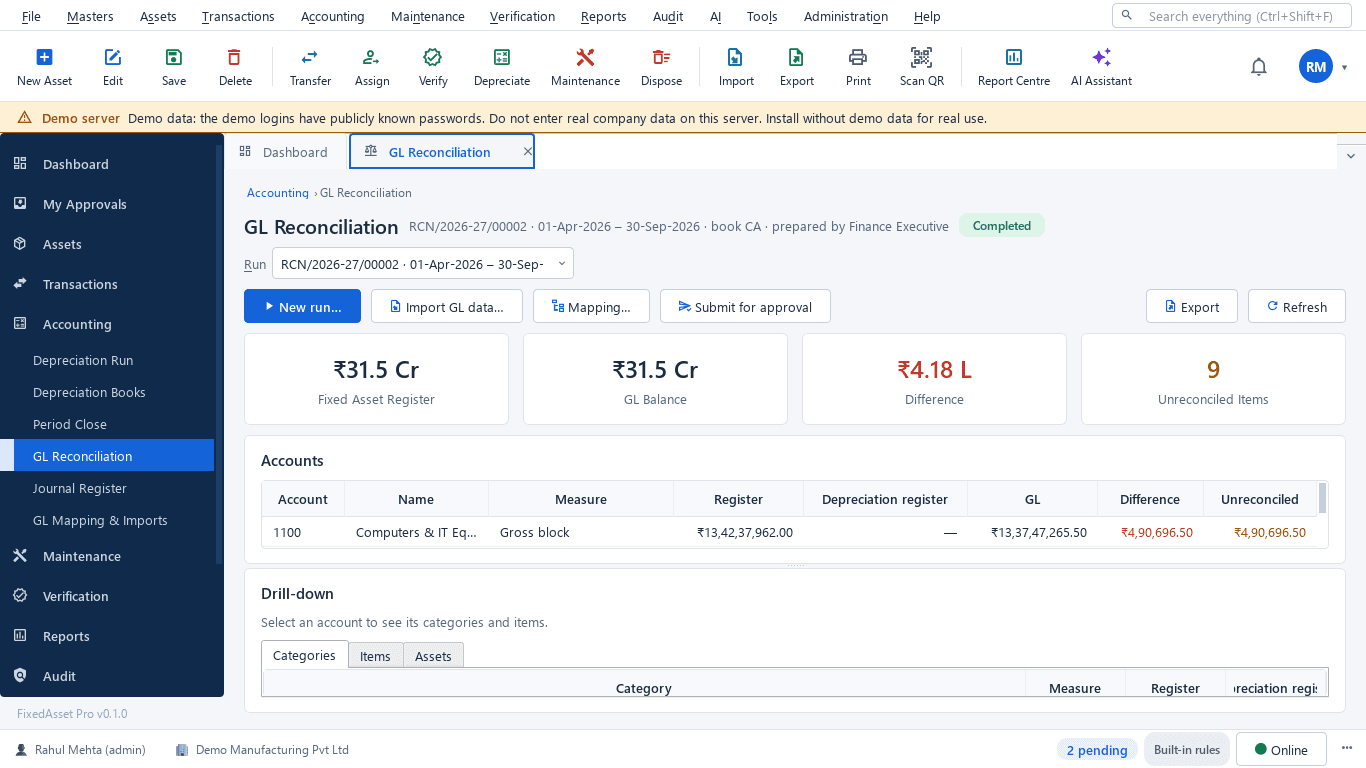
What this screen shows
- Fixed asset register total against the GL balance
- Difference and unreconciled items
- Per-account comparison of register, depreciation register and GL
- Drill-down to categories, items and assets
- Import GL data, mapping and submit for approval
Typical buyers and users
CFO or financial controller
A register that reconciles to the ledger every period, depreciation that can be explained, and a close that is not held up by fixed assets.
Solution for the CFO or financial controllerFinance or premises manager
Branch openings and closures recorded as transfers, leased premises in the lease register, and branch-wise figures on demand.
Solution for the Finance or premises managerInternal or concurrent auditor
Maker-checker evidence on every disposal, verification results per branch, and exceptions closed with an owner.
Solution for the Internal or concurrent auditorIT manager
Branch IT on the register, MFA and single sign-on, and role scopes that match the branch hierarchy.
Solution for the IT manager
Deployment considerations
The desktop edition is available today for a single PC or an office LAN; the cloud-hosted web edition and the mobile app are available too. All start with your real company, never demo data.
- Desktop editionAvailable now
Runs today on a server PC inside your own network, with client PCs at head office or a regional office; data, documents and local AI stay on your infrastructure.
- Web editionAvailable now
Suits networks where regions and branches work from different places: browser access with a Branch context bar and approvals from anywhere. Hosted in our cloud, so review it against your own outsourcing and data policies first.
- Using bothSame rules, same engine
An institution can keep the register on its own server today and evaluate the web edition later; both editions share the same rules, approvals and audit trail.
Frequently asked questions
Can we reconcile the asset register with our general ledger?
Yes. Map categories to GL accounts, import the trial balance or ledger entries, and compare register, GL and depreciation with drill-down to the asset; differences can be explained or raised as exceptions. See Financial Management.
How is maker-checker enforced?
Approval chains are configured by transaction type, amount and branch, so the person who records a transaction is not the one who approves it. Audit exceptions follow the four-eyes rule.
Can branch users see only their branch?
Yes. Users are scoped by company, branch and location; regional and head office roles can be given wider scopes, and amounts are hidden from users without finance rights.
Do you hold banking or security certifications?
We do not claim any certification on this page. Our Security page lists the controls that are implemented today; review them against your own requirements.
Can auditors work in the system without changing data?
Yes. The Auditor role is read-only, with exports, evidence packs and the sealed audit trail.
Guides and articles
Published articles tagged for this industry.
The audit trail rule and your fixed asset register
Since 1 April 2023, companies keeping books in accounting software must use software with an audit trail that cannot be disabled, and auditors report on it under Rule 11(g). What that means for the system that holds your fixed assets.
Moving assets between locations, branches and companies without losing the trail
A transfer looks like a change of location in the register. Depending on where the asset goes, it can also be a GST supply, a disposal by one company and an acquisition by another, and a gap in your verification. A practical guide.
What your auditor will ask for on fixed assets, and how to have it ready
A prepared-by-client list for property, plant and equipment, organised by the questions the auditor is trying to answer: does it exist, is it complete, do you own it, and is it valued and presented correctly.
Other industries
All industries Manufacturing
 Pharmaceutical & Life Sciences
 Healthcare & Hospitals
 Information Technology
 Retail
 Wholesale & Distribution
 Logistics & Warehousing
 Education
 Government & Public Sector
 Real Estate & Facilities
 Construction & Infrastructure
 Energy & Utilities
 Telecommunications
 Hospitality
 Automotive
 Media & Entertainment
 Agriculture & Food Processing
 Professional Services
 Multinational Enterprises
See FixedAsset Pro on your own branch register
Start a free trial, or book a demo and bring a few branches' asset lists and the matching GL balances.