

Tooling, test rigs and lines, tracked from plant to supplier and back
Automotive plants own equipment that does not stay in the plant: dies and moulds at suppliers, fixtures loaned between lines, test equipment calibrated on a cycle. Add a capital plan tied to model launches, and the register has to carry both the floor and the finance view. FixedAsset Pro does, on the same asset record.
Who this page is for
- Vehicle manufacturers
- Automotive suppliers
- Service networks
- Dealership groups
Common challenges
The operational and financial problems this industry brings to an asset register, and what FixedAsset Pro does about each.
- Operational
Tooling at suppliers is owned but out of sight
Dies, moulds and jigs are made for a part and placed at the supplier. Which supplier holds which tool, and in what condition, is in a purchasing file rather than the register.
- Operational
Test and measurement equipment needs calibration evidence
CMMs, dynos and gauges must be calibrated on a cycle with a record someone else signed off. Customer audits ask for the certificate for a specific instrument on a specific date.
- Operational
Line changes move equipment without a record
A new model launch rearranges stations, robots and fixtures between lines and plants. The register learns about it at the next count.
- Financial
Model-launch CapEx spans projects and years
Tooling and line investments are budgeted per model programme and spent over several years; the CWIP balance and the capitalisation date are reconstructed at year-end.
- Financial
Dies wear, and their accounting should show it
A die's life is in shots, not years; replaced inserts and refurbishments need component accounting rather than a single cost that never changes.
- Financial
Two depreciation books on heavy equipment
Companies Act lives with extra-shift depreciation and Income-tax blocks with the 180-day rule are kept in separate workbooks, with the auditor asking how each figure was reached.
Asset categories you can track
Categories, lives and depreciation rates are configurable; these are the ones this industry usually needs.
- Production equipment
- Tooling
- Testing equipment
- Utilities and support
- Dealer and service equipment
- Industrial IT
Applicable workflows
Each workflow is a product area; the link opens the feature page.
Tooling placed at suppliers as an approved transfer
A die sent to a supplier is a transfer to that location with an approval chain; the supplier site is a location in the register, and the Asset Movement report shows what went where and when.
Asset LifecycleCalibration with a second-person approval
Calibration records with tolerance checks and a second-person approval, kept on the instrument next to its warranty and AMC cover, with work orders for repairs.
Maintenance & AMCModel programmes as CapEx projects
Budget per programme, requests and approvals, costs in CWIP until the line is ready for use, and budget against spent with the variance on the CapEx Projects screen.
Procurement & CapExComponent accounting for dies and inserts
Significant parts such as inserts, spindles and controllers carry their own cost and life; a refurbishment is a cost adjustment or change of estimate recorded as a finance event, not a silent edit.
Financial ManagementPlant counts and supplier spot checks
A full count per plant and sample campaigns for tooling at suppliers, scanned with a USB scanner or webcam or captured on count sheets, with queues for missing and found-elsewhere items.
Physical Verification
Key features
Extra-shift and component depreciation
Companies Act book with Schedule II lives, SLM or WDV per category or asset, extra-shift and component depreciation by policy, and an Explain view for any asset's figure.
Income-tax blocks
Block of assets under s.32 with the 180-day rule, additional depreciation u/s 32(1)(iia), s.50 when a block ends, and Form 3CD clause 18.
Supplier sites as locations
Locations outside your own plants hold the tooling placed there; Assets by Location and Assets by Vendor show what sits with each supplier.
Downtime and availability per line
The maintenance dashboard shows downtime, MTBF / MTTR, availability and PM compliance for the branch and period, with upcoming maintenance listed by date.
Replacement Intelligence
A review list of equipment past its useful life, costly to maintain or often down, with reasons and evidence, drafting a CapEx request when you decide to replace. A review list, never an automatic decision.
Evidence for customer audits
Calibration certificates, service reports and photos versioned on the asset; evidence packs with a SHA-256 checksum that cannot be deleted.
A depreciation run on the Companies Act book
A real screen of the desktop edition, captured on a demo server. The figures are sample data, not customer data.
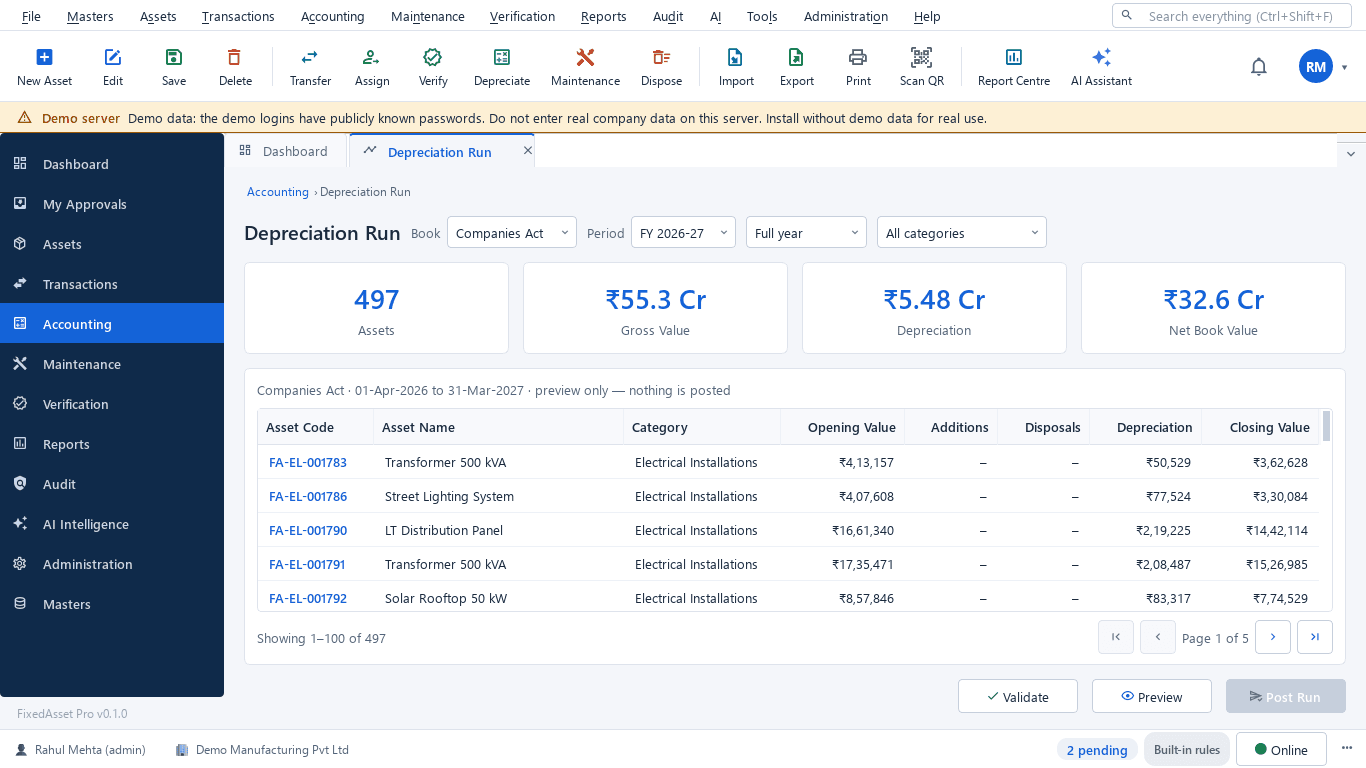
What this screen shows
- Book and period
- Assets in the run, gross value, depreciation and net book value
- Per-asset opening value, additions, disposals, depreciation and closing value
- Validate and preview before posting
Typical buyers and users
Plant head or manufacturing engineering
Which lines lose the most hours, which rigs are due for calibration, and where each fixture is after the last layout change.
Solution for the Plant head or manufacturing engineeringTooling or asset manager
Every die and mould traced to a supplier site, its condition and inserts, and spot checks that confirm it is there.
Solution for the Tooling or asset managerCFO or plant controller
CapEx by programme against spend, CWIP ageing, depreciation on both books and a register that reconciles to the ledger.
Solution for the CFO or plant controllerProcurement manager
Requests, purchase orders and receipts for tooling and equipment against the programme budget, with invoices matched before capitalisation.
Solution for the Procurement manager
Deployment considerations
The desktop edition is available today for a single PC or an office LAN; the cloud-hosted web edition and the mobile app are available too. All start with your real company, never demo data.
- Desktop editionAvailable now
Runs today on a server PC in the plant's LAN, with client PCs on the floor and in the office; tags are scanned with USB scanners or webcams, and daily work needs no internet.
- Web editionAvailable now
Suits groups with several plants and supplier networks: a Company and Branch context bar, approvals for transfers and requests from any office, and dashboards across plants in a browser.
- Using bothSame rules, same engine
A plant that starts on desktop keeps its register; both editions share the same depreciation engine, approval chains and audit trail.
Frequently asked questions
Can we track dies and moulds placed at suppliers?
Yes. The supplier site is a location in the register; sending a tool there is an approved transfer, and Assets by Location and Assets by Vendor show what each supplier holds. Sample campaigns verify them.
How are refurbished dies and replaced inserts accounted for?
Inserts and other significant parts are components with their own cost and life; a refurbishment is recorded as a cost adjustment or a change of estimate, a finance event on the asset. See Financial Management.
Does the product keep calibration records for test equipment?
Yes. Calibration with tolerance checks and a second-person approval is recorded on the instrument, with certificates kept in the evidence vault. See Maintenance & AMC.
Can depreciation reflect two or three shifts on a press line?
Yes. The Companies Act book supports extra-shift depreciation by policy, alongside Schedule II lives and SLM or WDV per category or asset. Agree the policy with your auditor before the first run.
How does a model programme's CapEx reach the register?
As a CapEx project: budget, approved, spent and variance on one screen, costs in CWIP with ageing, and capitalisation when the line is ready for use. See Procurement & CapEx.
Does it fit a dealership group as well as a plant?
Yes. Dealerships are branches with lifts, diagnostic tools and paint booths as assets; the same maintenance, warranty, AMC and verification workflows apply, and amounts are hidden from users without finance rights.
Guides and articles
Published articles tagged for this industry.
Tagging the awkward ones: a field guide for assets that resist a label
Laptops and chairs are easy. Hot machines, sterilised equipment, vehicles, moulds at a vendor's site and land are not. A practical, asset-by-asset guide to tagging and verifying what does not take a sticker well.
Other industries
All industries Manufacturing
 Pharmaceutical & Life Sciences
 Healthcare & Hospitals
 Information Technology
 Banking & Financial Services
 Retail
 Wholesale & Distribution
 Logistics & Warehousing
 Education
 Government & Public Sector
 Real Estate & Facilities
 Construction & Infrastructure
 Energy & Utilities
 Telecommunications
 Hospitality
 Media & Entertainment
 Agriculture & Food Processing
 Professional Services
 Multinational Enterprises
See FixedAsset Pro on your own plant and tooling register
Start a free trial, or book a demo and bring your tooling list, the calibration schedule and last year's depreciation schedule.