

A public asset register with a history anyone can follow
Public bodies hold assets on behalf of others, and every addition, transfer and write-off may be questioned years later. The answer has to be in the record: who approved it, when and why. FixedAsset Pro keeps the register, the approvals and the evidence together, with an audit trail that cannot be switched off.
No official approval is claimed
Who this page is for
- Government departments
- Public-sector enterprises
- Municipal organisations
- Public institutions
- Accounts and audit officers
Common challenges
The operational and financial problems this industry brings to an asset register, and what FixedAsset Pro does about each.
- Operational
Dead-stock registers on paper
Many offices still keep handwritten stock registers. Searching them, consolidating them across offices or answering a query about one item takes days.
- Operational
Transfers between offices
Officers are posted, offices are reorganised and equipment follows them. Without recorded transfers, items disappear from one register and never appear in another.
- Operational
Verification is periodic and manual
Physical verification is done by committees with printed lists. Shortages are recorded, but following them up to a decision is slow.
- Financial
Every approval must be visible
Purchases, transfers and write-offs need an approver at the right level. When approvals sit in note sheets, the link between the decision and the asset record is lost.
- Financial
Reports in prescribed formats
Different departments and auditors ask for asset reports in their own formats. Re-typing the register into each format invites errors.
- Financial
Write-offs and condemnation take years
Unserviceable items stay on the register because the condemnation process is slow to document. The register overstates what the office actually holds.
Asset categories you can track
Categories, lives and depreciation rates are configurable; these are the ones this industry usually needs.
- Office equipment
- Furniture
- Vehicles
- Plant and machinery
- Public infrastructure equipment
- Buildings and improvements
Applicable workflows
Each workflow is a product area; the link opens the feature page.
One register across offices
Departments or entities as companies, offices as branches and rooms as locations, with users scoped to their own office and wider scopes for the head office.
Fixed Asset ManagementAssignment and transfers with approval
Assign items to an officer with a printable handover and acknowledgement; transfers between officers, sections and offices go through configurable approval chains.
Asset LifecycleVerification with follow-up
Scope a campaign by office or location, count with a USB scanner, webcam or count sheets, and resolve shortages into recoveries, transfers or proposed write-offs.
Physical VerificationRecord history and evidence
Every change carries who, when, the old and new value and the reason; documents, photos and approvals are kept in the evidence vault per asset.
Audit & ComplianceConfigurable reporting
Register, movement, age, verification and disposal reports filtered by office and period, exported to PDF, Excel, CSV or Word for the format you need.
Reporting & Analytics
Key features
Transparent approval chains
Approval chains by transaction type, amount and branch, so each purchase, transfer and write-off shows who approved it at which level.
Tamper-evident audit trail
Sealed every 15 minutes, with an integrity check that shows any break and out-of-band database changes listed separately. It cannot be switched off.
Condemnation with review
Disposal through technical, finance and management review with the method, gain or loss and a disposal approval certificate; a disposal made in error can be reversed.
Officer acknowledgement
An Employee Asset Acknowledgement listing what each officer holds, for postings, transfers and annual confirmation.
Read-only auditor access
An Auditor role with exports, evidence packs and the audit trail, without the right to change records.
Data on your own server
The desktop edition keeps the database, documents and local AI on a server PC in your network; cloud AI is off by default.
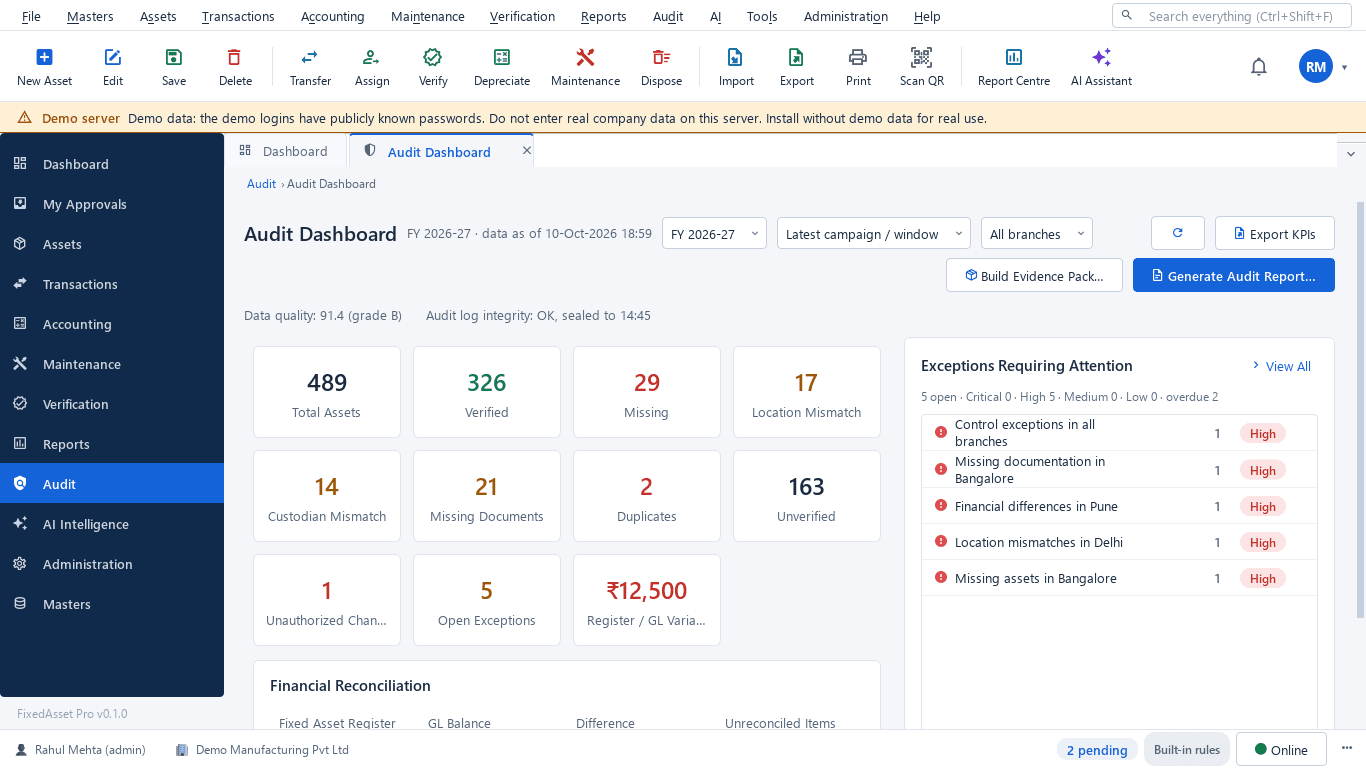
The audit dashboard for an office
A real screen of the desktop edition, captured on a demo server. The figures are sample data, not customer data.
What this screen shows
- Verified, missing, mismatched and duplicate assets
- Assets with missing documents
- Register-to-GL variance
- Click a tile for the assets, double-click for the evidence
- Open audit exceptions with owners and due dates
Typical buyers and users
Accounts or finance officer
A register that matches the accounts, approvals recorded at the right level, and reports in the formats the department needs.
Solution for the Accounts or finance officerStore or asset officer
Items assigned to officers with acknowledgements, transfers recorded at postings, and condemnation that does not drag on.
Solution for the Store or asset officerInternal or audit officer
Verification evidence per office, shortages followed up with owners, and a record history that cannot be altered.
Solution for the Internal or audit officerIT officer
Data held on the organisation's own server, role-based access per office, and MFA for every user.
Solution for the IT officer
Deployment considerations
The desktop edition is available today for a single PC or an office LAN; the cloud-hosted web edition and the mobile app are available too. All start with your real company, never demo data.
- Desktop editionAvailable now
Runs today on a server PC inside your own network, with client PCs on the LAN. Data, documents, AI and OCR stay on your infrastructure, and daily work needs no internet.
- Web editionAvailable now
The cloud-hosted web edition is available now. Public bodies with data-residency or hosting rules can ask our Sales Team about a dedicated managed instance or a separate database, or choose the desktop edition on their own servers.
- Using bothSame rules, same engine
An organisation can keep the register on its own server and decide on the web edition later; both editions use the same rules, approvals and audit trail.
Frequently asked questions
Is FixedAsset Pro approved or empanelled for government use?
We do not claim any government approval, accreditation, empanelment or procurement-portal listing on this page. Check your own procurement rules, and ask us for the documentation you need.
Can we produce reports in our department's format?
Reports can be filtered by office and period and exported to Excel, CSV, PDF or Word, so they can be arranged in the format you need. See Reporting & Analytics.
Can every change be traced to a person?
Yes. The audit trail records who, when, the old value, the new value and the reason for every change, is sealed every 15 minutes and cannot be switched off.
Can the data stay on our own premises?
Yes, with the desktop edition. The database and documents live on a server PC in your network, and local AI and OCR run there too.
Can we import our existing stock registers?
Yes. Import from Excel, CSV or JSON with a column-mapping wizard and a dry run that checks every row; nothing is partly imported.
Guides and articles
Published articles tagged for this industry.
Schedule III disclosures for property, plant and equipment: what the notes must show
The fixed asset note is more than a roll-forward. Since the 2021 amendments, Schedule III also asks about title deeds, registered valuers, CWIP ageing and benami proceedings. A walk through what goes in, and where the data comes from.
Tagging the awkward ones: a field guide for assets that resist a label
Laptops and chairs are easy. Hot machines, sterilised equipment, vehicles, moulds at a vendor's site and land are not. A practical, asset-by-asset guide to tagging and verifying what does not take a sticker well.
Other industries
All industries Manufacturing
 Pharmaceutical & Life Sciences
 Healthcare & Hospitals
 Information Technology
 Banking & Financial Services
 Retail
 Wholesale & Distribution
 Logistics & Warehousing
 Education
 Real Estate & Facilities
 Construction & Infrastructure
 Energy & Utilities
 Telecommunications
 Hospitality
 Automotive
 Media & Entertainment
 Agriculture & Food Processing
 Professional Services
 Multinational Enterprises
See FixedAsset Pro on your own office register
Start a free trial, or book a demo and bring one office's stock register and the report formats you have to produce.