

Every store opened, refitted and counted on one register
A retail chain buys the same fit-out again and again: shelving, display units, POS terminals, chillers, signage. Stores open, relocate and close, and equipment moves with them. FixedAsset Pro treats each store as a branch, so head office sees the whole chain and each store manager sees their own.
Who this page is for
- Retail chains
- Franchise groups
- Supermarkets and convenience chains
- Fashion and lifestyle retailers
- Store operations and finance teams
Common challenges
The operational and financial problems this industry brings to an asset register, and what FixedAsset Pro does about each.
- Operational
Store openings are capitalised late
A new store's fit-out, signage and equipment arrive from many vendors over a few weeks. If the costs are not collected per store, capitalisation waits for year-end and depreciation starts late.
- Operational
Equipment moves between stores
Display units, chillers and POS terminals are moved when a store refits or closes. The register still shows them at the old store, and the next count finds them missing.
- Operational
Counts across many small sites
Verifying a chain of stores with printed lists takes months. Store teams are busy with customers, and nobody reconciles the results.
- Financial
Refits mix disposals and additions
A refit scraps some fixtures and adds new ones. Without recording both, the books carry assets that were thrown away.
- Financial
Leased stores and leasehold improvements
Most stores are leased, and the fit-out is depreciated over the lease. Lease lives and improvement lives need to be kept per store.
- Financial
Store profitability ignores asset cost
Comparing stores needs depreciation and maintenance cost per store, which a consolidated spreadsheet cannot give.
Asset categories you can track
Categories, lives and depreciation rates are configurable; these are the ones this industry usually needs.
- Store fit-out
- POS and store IT
- Refrigeration
- Building equipment
- Leasehold improvements
- Vehicles
Applicable workflows
Each workflow is a product area; the link opens the feature page.
Store opening as a CapEx project
Budget the new store, book vendor, material and labour costs to CWIP, and capitalise the fit-out and equipment when the store opens, so depreciation starts on the right date.
Procurement & CapExTransfers between stores
Moving equipment from a closing store or a refit is an approved transfer between branches; the Asset Movement report lists every move in the period.
Asset LifecycleStore-by-store verification
Scope a campaign by region or store, count with a USB scanner or webcam, use rapid mode when nothing differs, and resolve missing and found-elsewhere items into transfers or write-offs.
Physical VerificationFit-out over the lease
Leased stores in the lease register with right-of-use lives; leasehold improvements depreciated per policy on the Companies Act book, with Income-tax blocks alongside.
DepreciationBranch-wise reporting
Branch-wise Summary, Assets by Location, Asset Additions and Disposals per store, exported to PDF, Excel, CSV or Word.
Reporting & Analytics
Key features
Stores as branches
Each store is a branch with its own locations; users are scoped to their store or region, and head office sees the whole chain.
Partial disposal
Scrap or sell part of a fixture set by quantity or value during a refit, with the gain or loss and a disposal approval certificate.
Tags on every fixture
QR, barcode and Data Matrix labels generated from the register, with reprint and replace when a tag is damaged on the shop floor.
Warranty and AMC on refrigeration
AMCs for chillers and air-conditioning with visits, missed visits and renewals, and alerts at 90, 60, 30 and 7 days before cover ends.
Invoice to asset
Document Intelligence reads the fit-out vendor's invoice and drafts the assets with a confidence chip per field; a person confirms every value.
Import with a dry run
Bring each store's existing list in through the column-mapping wizard, with a dry run that checks every row before an all-or-nothing commit.
The asset manager dashboard for a store chain
A real screen of the desktop edition, captured on a demo server. The figures are sample data, not customer data.
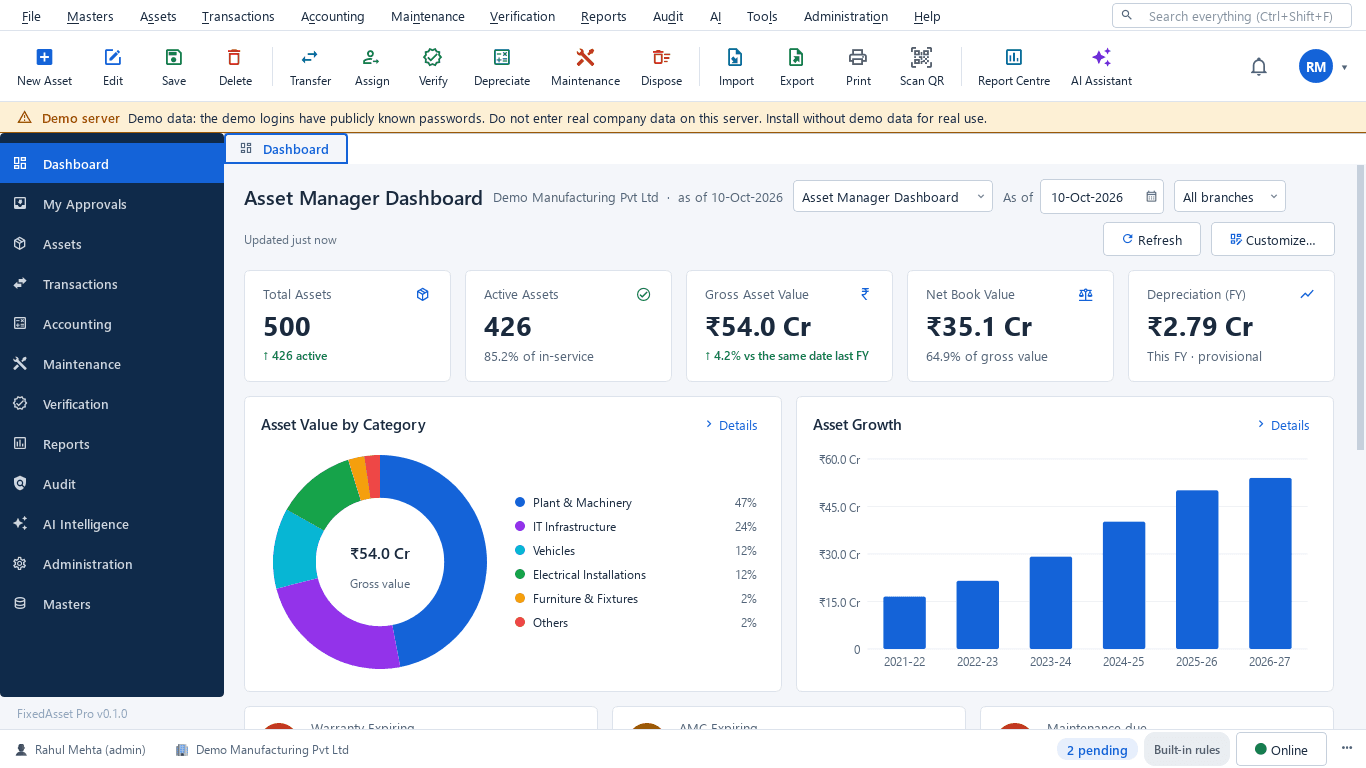
What this screen shows
- Total and active assets
- Gross asset value and net book value
- Depreciation for the financial year
- Asset value by category
- Asset growth by financial year
- Warranty expiring, AMC expiring and maintenance due
Typical buyers and users
Finance manager
Store openings capitalised on time, refits that record disposals, and depreciation per store that reconciles to the ledger.
Solution for the Finance managerStore operations manager
Equipment moved between stores on record, refrigeration AMCs kept up, and counts that do not shut a store.
Solution for the Store operations managerProcurement manager
Store-opening budgets against spend, vendor invoices turned into assets, and the same fit-out bought consistently.
Solution for the Procurement managerInternal auditor
Verification evidence per store, missing items resolved with a reason, and a register that matches the books.
Solution for the Internal auditor
Deployment considerations
The desktop edition is available today for a single PC or an office LAN; the cloud-hosted web edition and the mobile app are available too. All start with your real company, never demo data.
- Desktop editionAvailable now
Runs today on a server PC at head office, with client PCs for finance and operations; store counts use USB scanners or webcams, or count sheets imported back with validation.
- Web editionAvailable now
Suits chains with many stores: head office and store managers in a browser with a Branch context bar, approvals from anywhere, and store counts through the companion mobile app.
- Using bothSame rules, same engine
A chain that starts on desktop at head office keeps its register; both editions use the same rules, approvals and audit trail.
Frequently asked questions
Can each store manager see only their own store?
Yes. Stores are branches, and users are scoped by company, branch and location. Head office and regional roles can see wider scopes.
How do we capitalise a new store?
Run it as a CapEx project: budget, approve, book costs to CWIP and capitalise when the store is ready to open. See Procurement & CapEx.
Can stores count without a scanner?
Yes. Counts can use a USB scanner, a webcam or manual entry, and paper or Excel count sheets can be imported with validation. Web users can add the phone camera through the companion app.
How are leasehold improvements depreciated?
Per the policy you set for the category, on each book. Leased premises go into the lease register with a right-of-use life. Agree the policy with your auditor before the first run.
Does FixedAsset Pro track merchandise stock?
No. It manages fixed assets such as fit-out, equipment and IT. Merchandise inventory belongs in your retail or ERP system.
Guides and articles
Published articles tagged for this industry.
Moving assets between locations, branches and companies without losing the trail
A transfer looks like a change of location in the register. Depending on where the asset goes, it can also be a GST supply, a disposal by one company and an acquisition by another, and a gap in your verification. A practical guide.
Low-value assets: setting a capitalisation threshold after Schedule XIV
The old ₹5,000 write-off rule disappeared with Schedule XIV. Here is what replaced it in the books, why the Income-tax and GST answers differ, and how to keep control of items you expense.
Other industries
All industries Manufacturing
 Pharmaceutical & Life Sciences
 Healthcare & Hospitals
 Information Technology
 Banking & Financial Services
 Wholesale & Distribution
 Logistics & Warehousing
 Education
 Government & Public Sector
 Real Estate & Facilities
 Construction & Infrastructure
 Energy & Utilities
 Telecommunications
 Hospitality
 Automotive
 Media & Entertainment
 Agriculture & Food Processing
 Professional Services
 Multinational Enterprises
See FixedAsset Pro on your own store register
Start a free trial, or book a demo and bring two or three stores' equipment lists and your last store-opening budget.