
Fleets, forklifts and conveyors, accounted for and kept running
A logistics operator's assets are always moving: trucks on the road, forklifts between warehouses, handheld scanners between shifts. Each one needs servicing by hours or kilometres, insurance that is current and a location someone can vouch for. FixedAsset Pro keeps the operational and the financial record of each asset together.
Who this page is for
- Logistics providers
- Warehouses
- Third-party logistics operators
- Fleet and distribution companies
- Cold-chain operators
Common challenges
The operational and financial problems this industry brings to an asset register, and what FixedAsset Pro does about each.
- Operational
Servicing by hours and kilometres
Forklifts are serviced by running hours and vehicles by kilometres. Calendar reminders miss the busy months, and breakdowns follow.
- Operational
Equipment moves with the contract
When a client contract starts or ends, forklifts, racking and scanners move between warehouses. The register is updated weeks later, if at all.
- Operational
Small devices go missing
Handheld scanners, mobile printers and RF terminals are shared across shifts. Without custodians and counts, losses are noticed only when a replacement is ordered.
- Operational
Utilisation is invisible
Some warehouses are short of reach trucks while others have equipment standing idle. Without downtime and idle data per asset, redeployment is guesswork.
- Financial
Insurance and permits per vehicle
Each vehicle and major machine has its own policy and renewal date. Lapsed cover is expensive, and over-insuring sold vehicles is a quiet leak.
- Financial
Heavy assets, residual values and disposals
Trucks and handling equipment are sold or traded in at the end of their life. Gains, losses and the residual-value policy need to be recorded per asset.
Asset categories you can track
Categories, lives and depreciation rates are configurable; these are the ones this industry usually needs.
- Forklifts and handling equipment
- Vehicles
- Conveyors and sortation
- Scanners and mobile devices
- Racking and storage
- Warehouse utilities
Applicable workflows
Each workflow is a product area; the link opens the feature page.
Meter-based preventive maintenance
Schedules by running hours, kilometres or time raise work orders automatically; breakdowns record parts, cost and downtime against the forklift or vehicle.
Maintenance & AMCMovement between warehouses
Equipment moved for a new contract is an approved transfer between branches or locations, and the lifecycle timeline shows where each asset has been.
Asset LifecycleCounting yards and warehouses
Scope campaigns by warehouse or yard, scan location labels and asset tags, and resolve missing, found-elsewhere and custodian-mismatch queues.
Physical VerificationShared devices with custodians
Assign scanners and terminals to a person or a shift supervisor with a printable handover, so missing devices have a last custodian.
Fixed Asset ManagementInsurance, idle and movement reports
Insurance Expiry, Uninsured Assets, Idle Assets and Asset Movement per warehouse, exported to PDF, Excel, CSV or Word.
Reporting & Analytics
Key features
Downtime and availability
The maintenance dashboard shows downtime hours, availability, MTBF / MTTR and PM compliance for each warehouse and period.
Insurance and claims per asset
Policies, endorsements and claims recorded against each vehicle or machine, with coverage gaps shown before renewal.
Tags built for the floor
QR, barcode, Data Matrix and RFID labels with reprint, replace and tag history; RFID EPC codes exported for your printer-encoder.
Replacement Intelligence
A review list of vehicles and equipment past their useful life, costly to maintain or often down, with the evidence for each. Never an automatic decision.
Residual value with justification
Residual values per policy, with recorded justification for overrides, and disposal by sale or trade-in showing the gain or loss.
Multi-company groups
Separate companies for owned fleet and leasing entities in one installation, each with its own books and branches.
Reports for the operations and finance teams
A real screen of the desktop edition, captured on a demo server. The figures are sample data, not customer data.
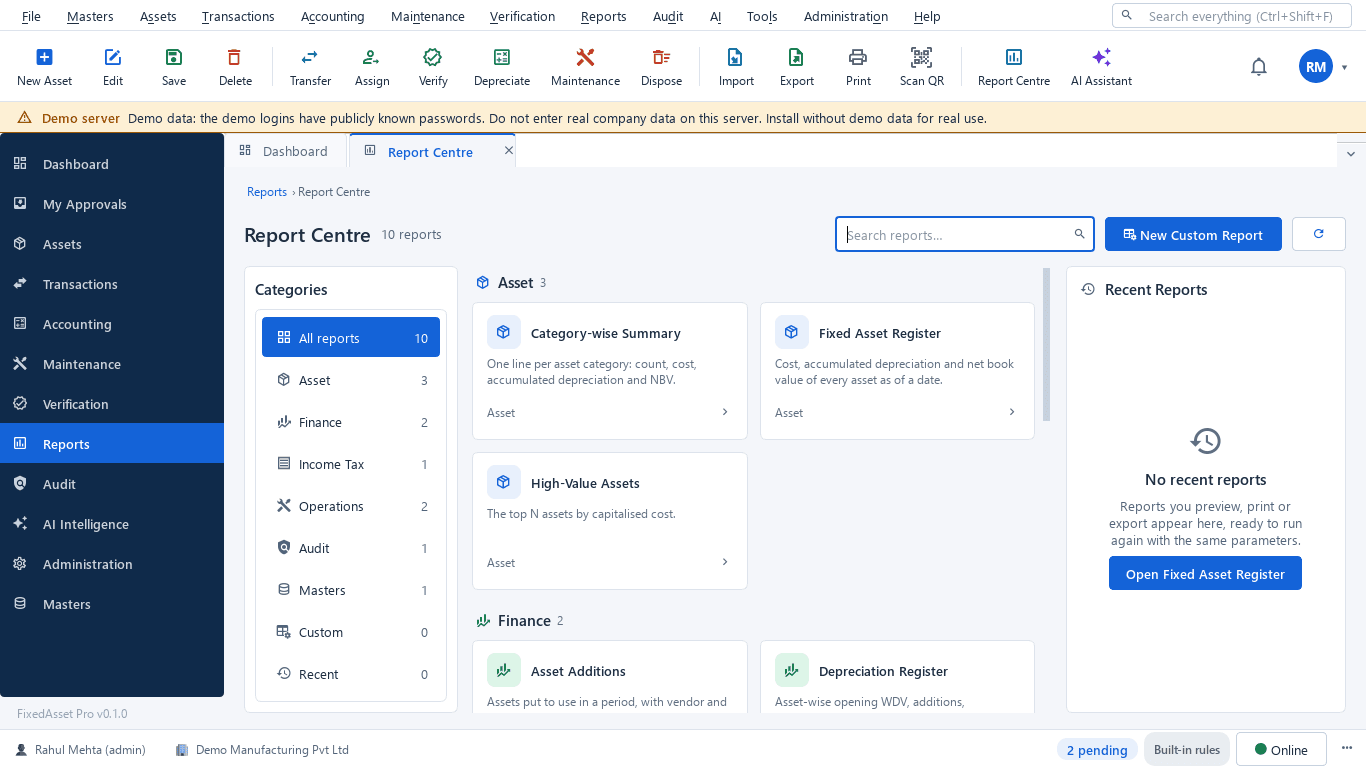
What this screen shows
- Report groups for asset, finance, income tax, operations, audit and system reports
- Operations reports such as warranty, age analysis, movement, idle and uninsured assets
- Filters by period, company and branch
- Export to PDF, Excel, CSV or Word
Typical buyers and users
Operations or warehouse manager
Forklifts serviced by hours, breakdowns with downtime, and idle equipment moved to the warehouse that needs it.
Solution for the Operations or warehouse managerFleet or asset manager
Where every vehicle and machine is, insurance renewals on time, and handheld devices with a custodian.
Solution for the Fleet or asset managerCFO
Heavy-asset depreciation that is consistent, disposals that show their gain or loss, and replacement decisions backed by cost and downtime.
Solution for the CFOProcurement manager
Replacement requests drafted from evidence, and new equipment budgeted and capitalised per contract.
Solution for the Procurement manager
Deployment considerations
The desktop edition is available today for a single PC or an office LAN; the cloud-hosted web edition and the mobile app are available too. All start with your real company, never demo data.
- Desktop editionAvailable now
Runs today on a server PC at head office or the main warehouse, with client PCs on the LAN; scanning uses USB scanners or webcams and daily work needs no internet.
- Web editionAvailable now
Suits operators with many warehouses and yards: browser access with a Branch context bar, approvals from anywhere, and counts and breakdown reports through the companion mobile app.
- Using bothSame rules, same engine
An operator that starts on desktop keeps its register; both editions use the same depreciation engine, approval chains and audit trail.
Frequently asked questions
Can maintenance follow running hours or kilometres?
Yes. Preventive schedules can be based on a meter reading or on time, and work orders are raised automatically when a schedule falls due. See Maintenance & AMC.
Is this a vehicle-tracking or fleet-telematics system?
No. FixedAsset Pro keeps the register, maintenance, insurance and accounting of each vehicle. It does not track vehicles live; tracking units can be recorded as assets themselves.
Can we tag racking and conveyors?
Yes. Any asset can carry a QR, barcode, Data Matrix or RFID label, and large installations can be recorded with components.
How do we handle a vehicle sold or traded in?
Record a disposal by sale; the gain or loss is calculated per book and the disposal goes through the approval chain you configure.
Can a 3PL keep client-dedicated equipment separate?
Use branches, locations or cost centres for each client site, so equipment, depreciation and reports can be filtered per client.
Guides and articles
Published articles tagged for this industry.
Moving assets between locations, branches and companies without losing the trail
A transfer looks like a change of location in the register. Depending on where the asset goes, it can also be a GST supply, a disposal by one company and an acquisition by another, and a gap in your verification. A practical guide.
Other industries
All industries Manufacturing
 Pharmaceutical & Life Sciences
 Healthcare & Hospitals
 Information Technology
 Banking & Financial Services
 Retail
 Wholesale & Distribution
 Education
 Government & Public Sector
 Real Estate & Facilities
 Construction & Infrastructure
 Energy & Utilities
 Telecommunications
 Hospitality
 Automotive
 Media & Entertainment
 Agriculture & Food Processing
 Professional Services
 Multinational Enterprises
See FixedAsset Pro on your own fleet and warehouse register
Start a free trial, or book a demo and bring your forklift and vehicle list with their service schedules.