

Run depreciation, post it, close the period, and be able to explain all of it
The finance manager does the work the CFO signs: capitalising assets on time, running depreciation in every book, booking disposals correctly and closing the period. FixedAsset Pro turns each of those into a checked, approved and audited transaction instead of a formula in a workbook.
The questions this role asks
- Is every asset that was put to use this month capitalised, with the right date?
- Which inputs are missing before I can run depreciation?
- How was this asset's depreciation worked out, in each book?
- What journal does this disposal need, and what is the tax effect?
- What still blocks the period from closing?
A typical workflow
In order, with the product area behind each step.
Capitalise
Capitalise from a goods receipt, a CWIP project or a draft, prefilled from the source document and approved before depreciation starts from the put-to-use date.
Financial ManagementValidate and preview the run
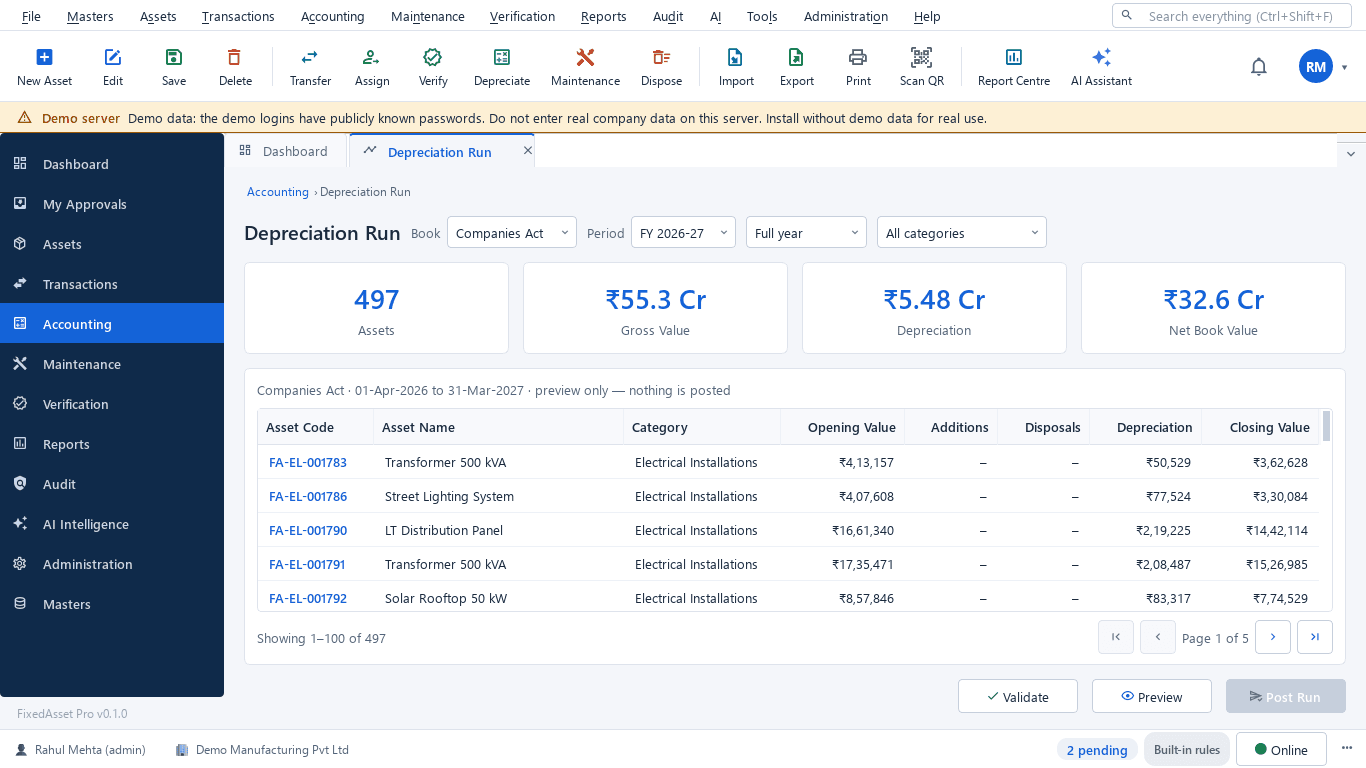
Pick the book, period and categories; validation lists missing inputs, then the preview shows opening, additions, disposals, depreciation and closing per asset.
DepreciationExplain, submit and post
Explain any line, submit the run for approval and post it. A posted run is reversed as its own transaction, never edited.
DepreciationBook revaluations and disposals
Revaluation and impairment documents with a preview; full or partial disposals with gain or loss, the disposal journal and the Income-tax effect when a block ends.
Financial ManagementExport journals and reconcile
Journals per GL mapping go to your accounting system; reconciliation compares register, ledger and depreciation per account.
Financial ManagementClose the period
Work through the close checklist, close the period with a note, and lock the financial year once the audit is done.
Financial Management
Outcomes the platform is designed to support
Outcomes depend on how your organisation uses the product; we do not promise savings or percentages.
Depreciation you can defend
Every figure has an explanation and every posted run can be reproduced, so recomputation by the auditor matches.
Capitalisation on time
Assets are capitalised from the receipt or the CWIP project when ready for use, not in a year-end clean-up.
Both books without double entry
Companies Act and Income-tax books sit on the same asset; the tax schedules come from the same transactions.
A clean close
Blocking items are listed before close, and a closed period refuses back-dated changes, so the numbers stay as reported.
Reports this role opens most
- Depreciation Register
- Depreciation Summary by Category
- Monthly Depreciation
- Fixed Asset Schedule (Schedule III)
- Income-tax Depreciation (Block-wise, s.32)
- Additions: 180-day Split
- Form 3CD Clause 18
- Section 50: Capital Gains on Depreciable Assets
- Register Reconciliation
Frequently asked questions
Can we run depreciation monthly?
Yes. Runs can be for a month, a quarter or a full year, per book and category, on your fiscal calendar (April to March by default).
Are Schedule II lives and tax rates built in?
They ship as reference data. Agree them with your auditor before the first run; overrides are allowed with a recorded justification.
Is posting available on both editions?
Posted runs, period close, revaluation and impairment are available on the web edition. The desktop edition has both books with preview and explain; posting and close are planned there. Each feature page shows the current state.
How are GST and input credit handled on capital goods?
GST fields are on every acquisition line, with ITC eligibility, blocked credit under s.17(5), common credit under Rule 43 and GST on disposal under s.18(6).
Relevant guides and articles
One asset, several books: how FixedAsset Pro keeps Companies Act, Income-tax and other depreciation side by side
Indian companies depreciate the same asset at least twice: once under Schedule II and once under the Income-tax Act. Groups reporting abroad add a third. Here is how depreciation books work in FixedAsset Pro, and what each one is for.
Capital work-in-progress: ageing, overdue projects and getting the capitalisation date right
CWIP is where cost waits until an asset is ready for use. Too long there and the Schedule III ageing exposes it; too short and depreciation starts on an asset that is not ready. How to manage CWIP through the year.
Impairment indicators for fixed assets: a practical year-end review under Ind AS 36 and AS 28
You do not have to test every asset for impairment every year, but you do have to look for indicators at every reporting date. How to run that review, document it, and recognise when a full test is needed.






Run a depreciation preview on your own register
Start a free trial and import your assets with opening balances, or book a demo with your current depreciation workbook.