
Books, capitalisation, revaluation, impairment and period close, tied to the ledger.
Several depreciation books per company, CWIP and capitalisation, revaluation and impairment documents, disposal accounting, journals mapped to your chart of accounts, multi-currency and GST on capital goods.
What you get
Books
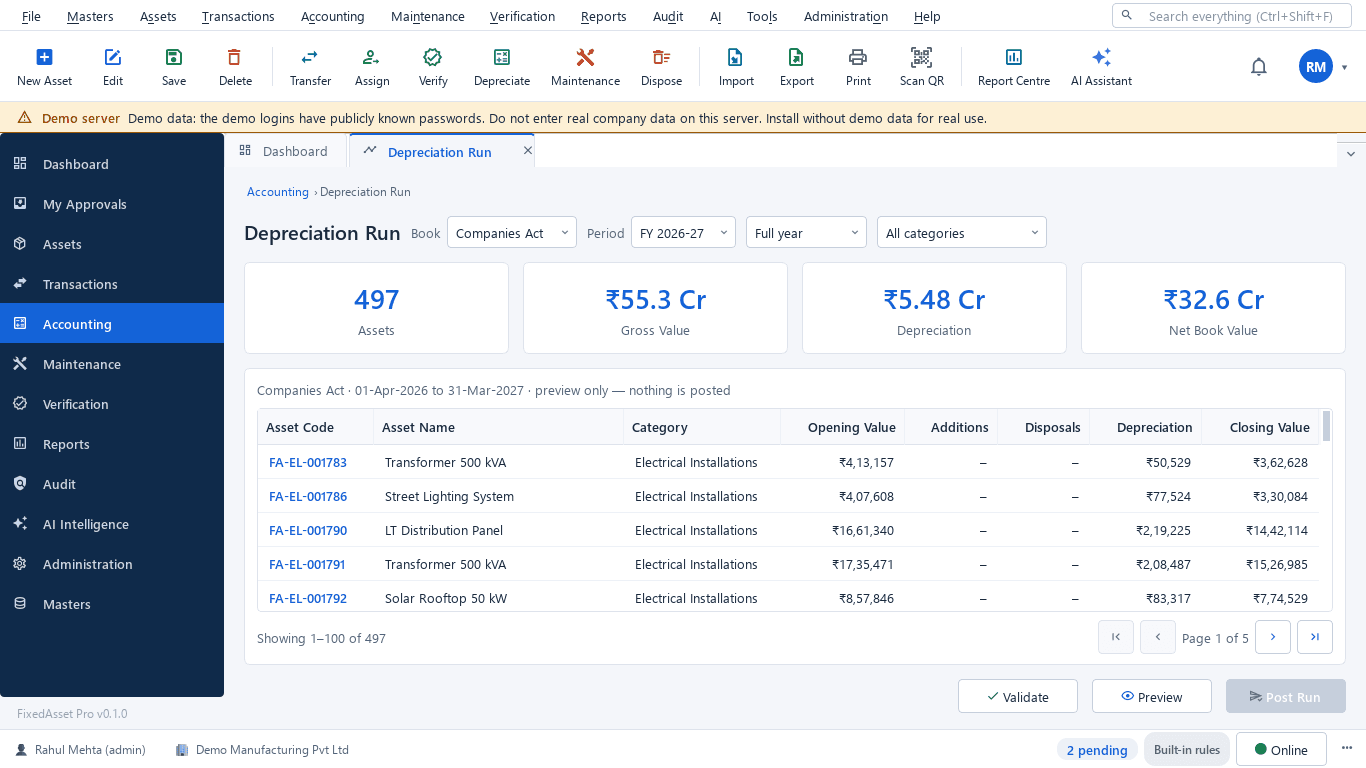
Companies Act and Income-tax books out of the box. Add Ind AS / IFRS, management or custom books. Each book has its own policy: month rule, low-value write-off, true-up, disposal day. One corporate book posts to the general ledger.
CWIP and capitalisation
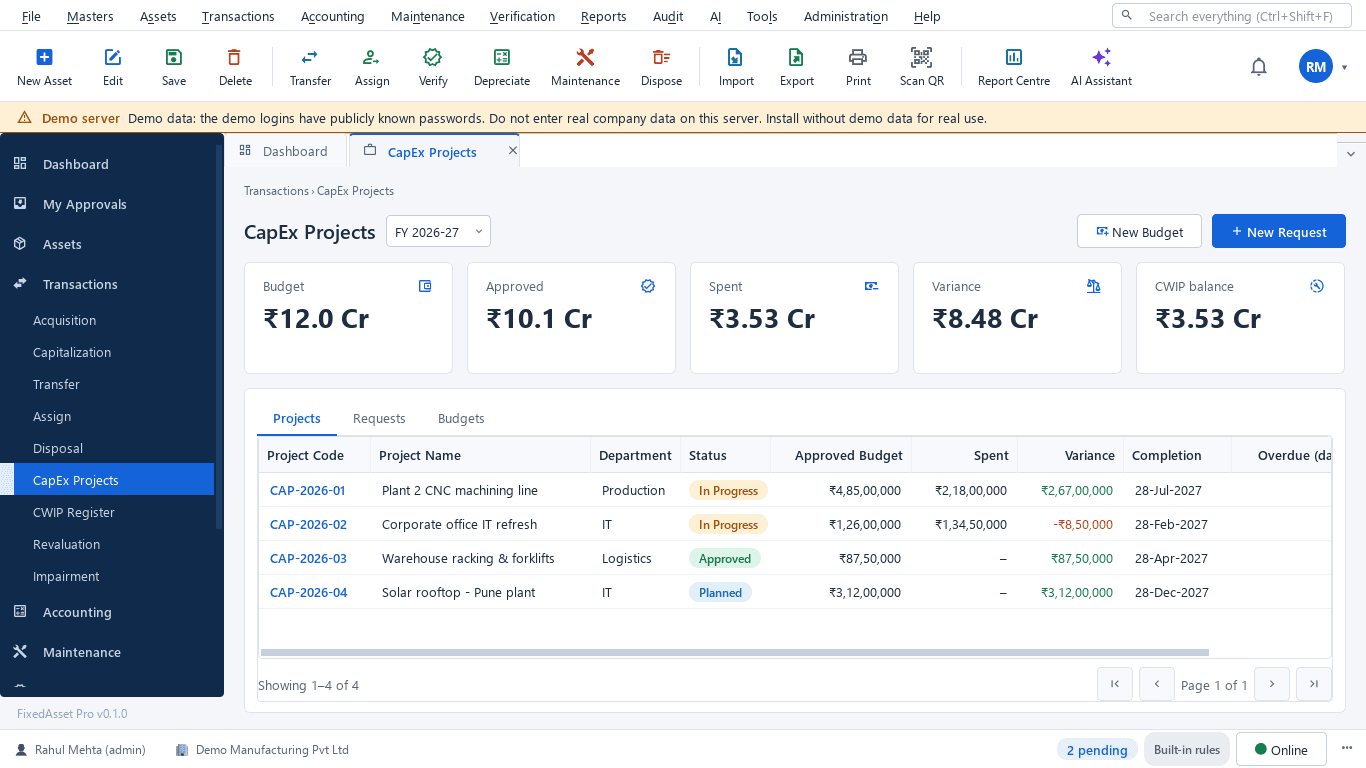
CWIP projects with vendor, material, labour, borrowing-cost and trial-run entries; split, write-off and allocation of common costs; ageing in Schedule III buckets. Capitalise when the asset is ready for use, prefilled from the receipt or the project.
Revaluation and impairment
Revaluation and impairment documents with a preview, submit, cancel and reverse; cash-generating units for impairment; held-for-sale classification; a value history on every asset.
Disposal accounting
Full or partial disposal with gain or loss, the disposal journal and the Income-tax effect when a block ends.
Journals and GL mapping
Map each category to its cost, accumulated depreciation, expense, CWIP, gain and loss accounts. A journal register for every posting; export journals or send them to an ERP target. The application never creates ledgers in your accounting system.
GL reconciliation
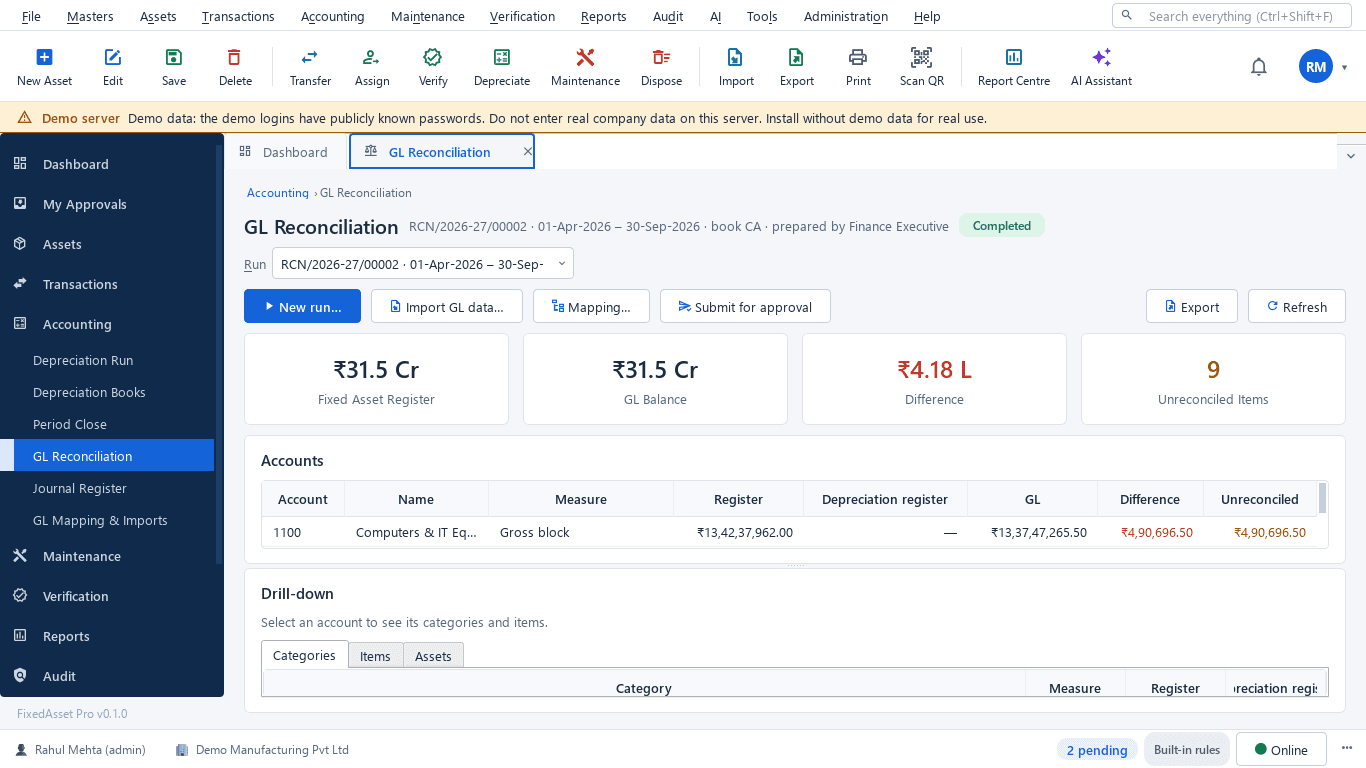
Import a trial balance and ledger entries from the template, or pull from Tally. Compare register, ledger and depreciation per account as at a date, drill down to the asset, explain a difference or raise an audit exception.
Period close
A close checklist with blocking items, close and reopen periods with a note, lock a financial year. A closed period blocks back-dated transactions, and every close is audited.
Multi-currency, GST and leases
INR, USD, EUR, GBP, AED and SGD with dated rates and s.43A exchange differences. ITC eligibility, blocked credit s.17(5), common credit Rule 43 and GST on disposal s.18(6). A lease register with right-of-use life.
Statutory defaults are reference data
Useful lives, rates and thresholds are supplied as reference data. Agree them with your auditor before the first run; the application records the justification for every override.
How it works
From the first capitalisation to a closed period that ties to the ledger.
Set up books and mapping
Choose the books, their policies and the GL accounts per category.
Capitalise
From a goods receipt, a CWIP project or a draft, through approval.
Run depreciation
Per book and period, validated and previewed before posting.
Record value events
Revaluation, impairment, held for sale, disposal: each a document with a preview.
Reconcile
Register, ledger and depreciation compared per account, with drill-down.
Close the period
Checklist, close, lock the year; reopen only with permission and a note.
In the product
Real screens of the desktop edition, captured on a demo server. The web edition runs the same backend rules in the browser.
Web and desktop
Which edition has it today. One backend, the same depreciation engine, approval chains and audit trail on every surface.
Web app
AvailableBooks, CWIP, capitalisation, revaluation, impairment, held for sale, journals, GL import and reconciliation, period close and year lock.
Desktop app
Partly availableBooks, CWIP, capitalisation, GL mapping and reconciliation, journals and the Tally pull are available. Posted runs, period close, revaluation and impairment are planned for the desktop edition.
Works with
Where this feature connects to the rest of the platform, and who uses it most.
Frequently asked questions
Which books can we keep?
Companies Act (Schedule II) and Income-tax (s.32 blocks) are built in. You can add Ind AS / IFRS, management or custom books, each with its own policy, and choose the one corporate book that posts to the ledger.
Can journals go to our accounting system?
Journals can be exported, or sent to an ERP target through the integrations (Tally, Zoho Books, QuickBooks Online, and file mode for SAP, Oracle and Dynamics). FixedAsset Pro never creates ledgers in your accounting system; you map accounts first.
What does a closed period block?
Back-dated transactions in that period. The close checklist must pass first, the close is audited, and reopening needs the permission and a note.
Does it handle foreign-currency purchases?
Yes. Purchases in USD, EUR, GBP, AED or SGD are recorded with a dated rate, and exchange differences on settlement are handled under s.43A for the Income-tax book.
More about Financial Management
Learn more in our guides
One asset, several books: how FixedAsset Pro keeps Companies Act, Income-tax and other depreciation side by side
Indian companies depreciate the same asset at least twice: once under Schedule II and once under the Income-tax Act. Groups reporting abroad add a third. Here is how depreciation books work in FixedAsset Pro, and what each one is for.
Capital work-in-progress: ageing, overdue projects and getting the capitalisation date right
CWIP is where cost waits until an asset is ready for use. Too long there and the Schedule III ageing exposes it; too short and depreciation starts on an asset that is not ready. How to manage CWIP through the year.
Impairment indicators for fixed assets: a practical year-end review under Ind AS 36 and AS 28
You do not have to test every asset for impairment every year, but you do have to look for indicators at every reporting date. How to run that review, document it, and recognise when a full test is needed.
See it on your own register
Start a free trial of the web edition, or book a demo and we will walk through it with your data. No card is needed to begin.