

Long-lived assets deserve a history that lasts as long
A transformer stays in service for decades, is serviced by several vendors, moves between substations and is revalued in people's heads many times. FixedAsset Pro records each event in its life as its own transaction, keeps the evidence with the asset and reports lifecycle cost from the figures, not from memory.
Who this page is for
- Renewable-energy organisations
- Utilities
- Power operators
- Industrial energy providers
Common challenges
The operational and financial problems this industry brings to an asset register, and what FixedAsset Pro does about each.
- Operational
History is overwritten, not kept
When a record is edited to show the new location or the new rating, the old value disappears. Twenty years of a transformer's life ends up as a single row with today's details.
- Operational
Distributed sites are hard to verify
Substations, solar parks and pumping stations are spread across a region. Verifying that each panel string or breaker exists, and is where the register says, is a campaign across many small sites, not a walk around one plant.
- Operational
Maintenance evidence is requested years later
A failure review or an insurer asks for the service history of one unit. Reports from three vendors, in three formats, are easier to produce if they were attached to the asset when the work was done.
- Financial
Lifecycle cost is not visible per unit
Deciding whether to refurbish a unit or replace it needs its age, maintenance spend, downtime and book value side by side. These sit in the maintenance system, the ledger and a spreadsheet.
- Financial
Capital projects run for years
A new feeder or a solar extension accumulates vendor, material, labour and borrowing costs over a long build. Without a CWIP register with ageing, capitalisation and the start of depreciation are guesses.
- Financial
Two books with long lives
Companies Act lives for plant and Income-tax blocks diverge over long horizons; the reconciliation between them, and to the general ledger, is rebuilt every year-end.
Asset categories you can track
Categories, lives and depreciation rates are configurable; these are the ones this industry usually needs.
- Electrical equipment
- Transformers
- Generators
- Monitoring equipment
- Renewable-energy assets
- Lines and infrastructure
- Vehicles and field tools
Applicable workflows
Each workflow is a product area; the link opens the feature page.
A lifecycle timeline per unit
Every acquisition, transfer, maintenance event, verification and finance event is a transaction on the asset card; history is never overwritten, so the record can always explain how it got here.
Fixed Asset ManagementPreventive maintenance and breakdowns
Schedules by time or meter raise work orders; breakdowns record parts, cost and downtime; the dashboard shows MTBF / MTTR and availability for the period and branch.
Maintenance & AMCCampaigns across many small sites
Scope a campaign by branch, location or category, count with a USB scanner, webcam or paper and Excel count sheets, and resolve the missing and found-elsewhere queues into transfers or write-offs.
Physical VerificationLong-running capital projects in CWIP
Book vendor, material, labour, borrowing-cost and trial-run entries to CWIP, split and allocate common costs, and capitalise when the asset is ready for use, with CWIP ageing in Schedule III buckets.
Procurement & CapExEvidence that stays with the asset
Service reports, test certificates and photos are versioned in the evidence vault; evidence packs carry a SHA-256 checksum and cannot be deleted, and the audit trail is sealed every fifteen minutes.
Audit & Compliance
Key features
Asset History and Asset Age Analysis
Asset History lists every event for one unit or for a period; Asset Age Analysis groups the fleet into age buckets by category for replacement planning.
Component accounting
Bushings, tap changers, inverters and other significant parts can be recorded as components with their own cost and life, so a replaced part is accounted for without rewriting the parent unit.
Finance events on the record
Change of estimate, cost adjustment, pause and resume of depreciation are recorded as finance events, so a refurbishment that extends useful life is explained, not silently edited.
Asset Risk Engine
A heat grid by risk level from age, maintenance cost, downtime, warranty, verification and book value, each level with its reason and evidence. An indicator, never presented as fact.
Insurance and warranty cover
Policies, endorsements and claims against covered units, warranty expiry alerts at 90, 60, 30 and 7 days, and the Insurance Expiry and Warranty Register reports.
Register to GL reconciliation
Register, depreciation register and general ledger compared per account with drill-down to the asset; differences are explained, exceptions raised and the run approved.
One asset, its whole life
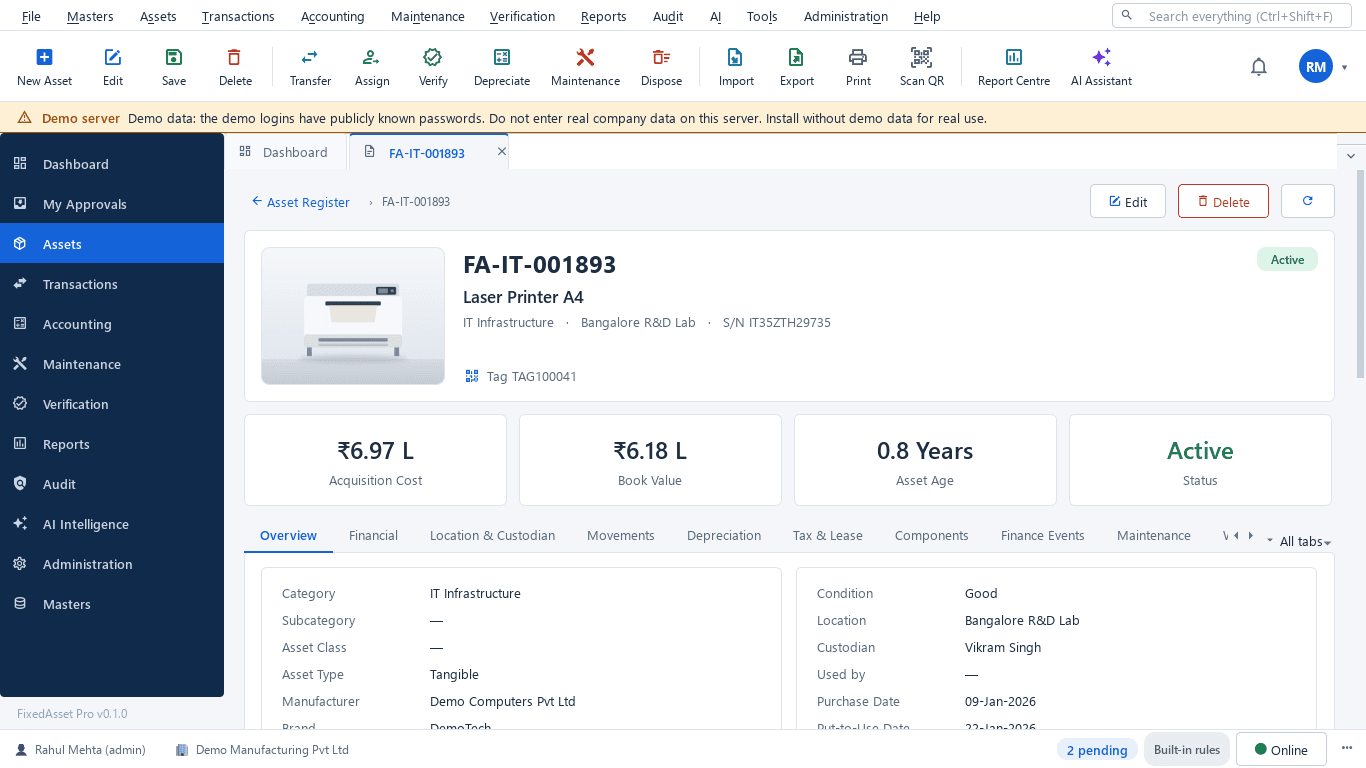
A real screen of the desktop edition, captured on a demo server. The figures are sample data, not customer data.
What this screen shows
- Acquisition cost, book value, age and status
- Overview with category, location and custodian
- Financial, Depreciation and Tax & Lease tabs
- Movements and Finance Events
- Components with their own cost and life
- Maintenance, warranty, AMC and insurance on the same record
Typical buyers and users
Head of operations and maintenance
Which units fail most, what each failure costs in parts and downtime, and whether preventive work is done on schedule.
Solution for the Head of operations and maintenanceAsset manager
A complete record per unit across substations and parks, verified on a campaign cycle, with transfers that actually reach the register.
Solution for the Asset managerCFO or finance head
Gross block, net book value, CWIP ageing on long projects, and two depreciation books that reconcile to the ledger.
Solution for the CFO or finance headInternal auditor
Evidence packs per unit, a tamper-evident audit trail and a register-to-GL reconciliation with the differences explained.
Solution for the Internal auditor
Deployment considerations
The desktop edition is available today for a single PC or an office LAN; the cloud-hosted web edition and the mobile app are available too. All start with your real company, never demo data.
- Desktop editionAvailable now
Runs today on a server PC at head office or a regional centre, with client PCs on the company network; daily work needs no internet, and Local AI and OCR stay on your server.
- Web editionAvailable now
Suits utilities with regional offices and a central finance function: a Branch context bar per region, approvals from any office, dashboards across the estate in a browser, and field counting through the companion mobile app.
- Using bothSame rules, same engine
An organisation that starts on desktop keeps its register; both editions share the same depreciation engine, transaction approvals and sealed audit trail.
Frequently asked questions
Can a unit's record keep its history after a refurbishment?
Yes. A refurbishment is recorded as a cost adjustment or change of estimate, a finance event on the asset; earlier values are never overwritten, and the lifecycle timeline shows every event with its document number.
How do we verify assets spread across many substations?
Scope a campaign by branch, location or category, full count or sample. Count with a USB scanner, a webcam or paper and Excel count sheets with import and validation, then resolve the queues. See Physical Verification.
Can a solar park be recorded as strings and inverters rather than one asset?
Yes. Record each inverter, tracker or string as its own asset, or as components of a parent asset with their own cost and life, whichever matches your accounting policy.
Does the product calculate lifecycle cost?
It reports the figures that make it up: maintenance cost per asset and period, downtime, age, book value and the Replacement Due list. The maintenance dashboard shows maintenance cost against asset value for the period.
Do capital projects that run for years fit the CWIP register?
Yes. Vendor, material, labour, borrowing-cost and trial-run entries accumulate in CWIP, common costs can be split and allocated, and ageing is reported in Schedule III buckets until capitalisation. See Procurement & CapEx.
Guides and articles
Published articles tagged for this industry.
Capital work-in-progress: ageing, overdue projects and getting the capitalisation date right
CWIP is where cost waits until an asset is ready for use. Too long there and the Schedule III ageing exposes it; too short and depreciation starts on an asset that is not ready. How to manage CWIP through the year.
Impairment indicators for fixed assets: a practical year-end review under Ind AS 36 and AS 28
You do not have to test every asset for impairment every year, but you do have to look for indicators at every reporting date. How to run that review, document it, and recognise when a full test is needed.
Component accounting in practice: deciding what to split and how to price it
Schedule II and Ind AS 16 both require significant parts with different lives to be depreciated separately. The hard part is the judgement: which parts, at what cost, and what happens when one is replaced.
Other industries
All industries Manufacturing
 Pharmaceutical & Life Sciences
 Healthcare & Hospitals
 Information Technology
 Banking & Financial Services
 Retail
 Wholesale & Distribution
 Logistics & Warehousing
 Education
 Government & Public Sector
 Real Estate & Facilities
 Construction & Infrastructure
 Telecommunications
 Hospitality
 Automotive
 Media & Entertainment
 Agriculture & Food Processing
 Professional Services
 Multinational Enterprises
See FixedAsset Pro on your own plant register
Start a free trial, or book a demo and bring the service history of one transformer and last year's Schedule III.