

Laptops, desks and offices: a register the partners can sign off
A consulting, law, accounting or engineering firm owns mostly computers and furniture, spread across offices and assigned to people who join, move and leave. The register is simple in principle and messy in practice: who has which laptop, what moved to the new office, and whether the depreciation schedule the auditor sees matches it. FixedAsset Pro answers those three questions.
Who this page is for
- Consulting firms
- Law firms
- Accounting practices
- Engineering consultancies
- Multi-office companies
Common challenges
The operational and financial problems this industry brings to an asset register, and what FixedAsset Pro does about each.
- Operational
Joiners, movers and leavers
A laptop is issued at onboarding, swapped when it fails and sometimes not returned when the person leaves. The HR list, the IT list and the register disagree.
- Operational
Office moves and new offices
Opening a new office or consolidating two moves furniture, printers and conference equipment in a weekend. The register is updated from memory, weeks later.
- Operational
Annual verification is nobody's job
The count is a request from finance to IT to office administration. Without a campaign with scope, teams and sign-off, it drifts and the auditor gets a spreadsheet.
- Financial
Depreciation lives in a workbook
Companies Act lives and Income-tax blocks for computers, furniture and office equipment are kept in a spreadsheet that nobody wants to touch at year-end.
- Financial
Low-value items clutter the books
Monitors, docking stations and chairs are either capitalised one by one or expensed inconsistently; a per-book low-value policy keeps it tidy.
- Financial
Leased offices and leased equipment
Office leases and leased printers need a lease register with right-of-use lives, separate from owned assets.
Asset categories you can track
Categories, lives and depreciation rates are configurable; these are the ones this industry usually needs.
- Computers
- Office furniture
- Conference equipment
- Printers and office machines
- Office infrastructure
- Vehicles
Applicable workflows
Each workflow is a product area; the link opens the feature page.
Assignment to employees
Assign a laptop to a person with a printable handover and acknowledgement; the custodian is locked on the record until a transaction moves it, and Assets by Employee lists what each person holds.
Fixed Asset ManagementOffice transfers
Moving equipment between offices is a transfer between branches or locations with an approval chain; the Asset Movement report lists every move in the period.
Asset LifecycleBoth books from one register
Schedule II lives for computers, furniture and office equipment, SLM or WDV per category, Income-tax blocks with the 180-day rule, and an Explain view for any asset's figure.
DepreciationAn annual campaign per office
Scope the campaign by branch, assign teams, scan with a USB scanner or webcam, and let custodians confirm With me, Not with me or Damaged for what is assigned to them.
Physical VerificationYear-end reports for the auditor
Fixed Asset Schedule (Schedule III), Depreciation Register, Asset Additions and Disposals, Income-tax block-wise depreciation and Form 3CD clause 18, exported to PDF, Excel, CSV or Word.
Reporting & Analytics
Key features
Employee Asset Acknowledgement
A form per custodian with the assets held and signature lines, for onboarding, annual confirmation and exit.
Low-value write-off policy per book
Items below the threshold follow the policy rather than being depreciated individually; the category rate master keeps life, method and rate consistent per category.
Lease register
Office leases and leased equipment recorded with right-of-use life, kept apart from owned assets in both books.
Warranty Register and Warranty Expiry
All laptops and printers with warranty dates, expiries within a chosen window, and alerts at 90, 60, 30 and 7 days.
Import with a dry run
Bring the existing spreadsheet in through the column-mapping wizard with a dry run that checks every row and opening balances for both books tied to audited totals.
Read-only auditor access
An Auditor role with exports, evidence and a sealed audit trail that shows it has not been altered; amounts hidden from users without finance rights.
The asset register, filtered and exported
A real screen of the desktop edition, captured on a demo server. The figures are sample data, not customer data.
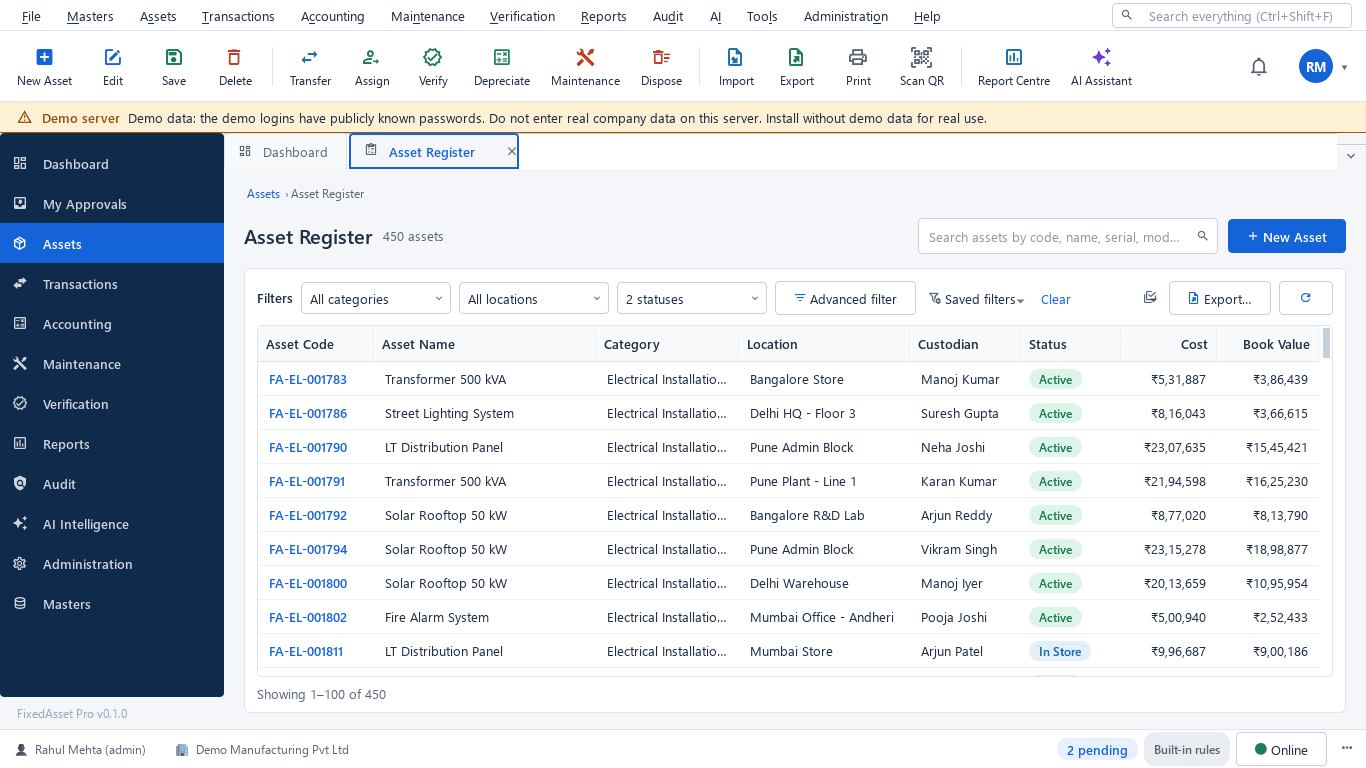
What this screen shows
- Asset code, name and category
- Location and custodian
- Status and condition
- Cost and book value
- Filters by category, location and status, with saved filters
- Export to Excel, CSV or PDF
Typical buyers and users
Finance manager or practice accountant
A depreciation schedule on both books from the register, additions and disposals that reconcile, and year-end reports the auditor accepts.
Solution for the Finance manager or practice accountantIT manager
Every laptop assigned to a named person, warranty dates, returns at exit, and SSO sign-in with roles per office.
Solution for the IT managerOffice or administration manager
Furniture and conference equipment per office, transfers recorded when offices move, and an annual count that actually finishes.
Solution for the Office or administration managerManaging partner or CFO
Gross block and net book value per office, CapEx on fit-outs, and a register the partners can sign off.
Solution for the Managing partner or CFO
Deployment considerations
The desktop edition is available today for a single PC or an office LAN; the cloud-hosted web edition and the mobile app are available too. All start with your real company, never demo data.
- Desktop editionAvailable now
Runs today on a server PC in the main office, with client PCs on the office network; a single-computer setup also works for a small practice. Daily work needs no internet.
- Web editionAvailable now
Suits firms with several offices: one browser login with a Branch context bar per office, approvals from anywhere, employee self-service to confirm assets and request transfers, and a central finance view.
- Using bothSame rules, same engine
A firm that starts on desktop keeps its register; both editions share the same depreciation engine, approvals and audit trail.
Frequently asked questions
How do we know who has which laptop?
Assign each laptop to an employee; the custodian is on the record and locked until a transfer or return moves it. Assets by Employee lists what each person holds, and the acknowledgement form carries their signature. See Fixed Asset Management.
What happens when someone leaves?
Their assets are returned to store or reassigned through a transaction; the Employee Asset Acknowledgement report shows what they held, and the Assets by Employee report confirms nothing is left against their name.
Can the firm's existing depreciation workbook be imported?
Yes. Import from Excel, CSV or JSON with a column-mapping wizard and a dry run; opening balances for both books are cut over and tied to your audited Schedule III totals.
Do small items like monitors and chairs have to be depreciated individually?
Each book has a low-value write-off policy; items below the threshold follow that rule. Items above it depreciate by the category rate master. Agree the threshold with your auditor.
Can our auditor see the register without changing anything?
Yes. The Auditor role is read-only with exports, evidence and the audit trail, which is sealed every fifteen minutes and cannot be switched off. See Audit & Compliance.
Is a single-office practice too small for this?
No. The desktop edition installs as a single computer or a small LAN, with the full register, both books and the reports; the web edition offers plans sized for small teams.
Guides and articles
Published articles tagged for this industry.
The audit trail rule and your fixed asset register
Since 1 April 2023, companies keeping books in accounting software must use software with an audit trail that cannot be disabled, and auditors report on it under Rule 11(g). What that means for the system that holds your fixed assets.
Low-value assets: setting a capitalisation threshold after Schedule XIV
The old ₹5,000 write-off rule disappeared with Schedule XIV. Here is what replaced it in the books, why the Income-tax and GST answers differ, and how to keep control of items you expense.
Other industries
All industries Manufacturing
 Pharmaceutical & Life Sciences
 Healthcare & Hospitals
 Information Technology
 Banking & Financial Services
 Retail
 Wholesale & Distribution
 Logistics & Warehousing
 Education
 Government & Public Sector
 Real Estate & Facilities
 Construction & Infrastructure
 Energy & Utilities
 Telecommunications
 Hospitality
 Automotive
 Media & Entertainment
 Agriculture & Food Processing
 Multinational Enterprises
See FixedAsset Pro on your own office register
Start a free trial, or book a demo and bring your laptop list and last year's depreciation workbook.