
Every machine on the floor, every rupee on the books
Plant machinery is where most of a manufacturer's capital sits and where most of the surprises happen: a breakdown nobody logged, a CNC machine moved between lines without a record, a CapEx project that quietly became a CWIP balance. FixedAsset Pro keeps the register, the maintenance history and the finance figures on the same asset record.
Who this page is for
- Manufacturing companies
- Industrial groups
- Factory owners
- Plant managers
- Finance leaders
- Maintenance managers
Common challenges
The operational and financial problems this industry brings to an asset register, and what FixedAsset Pro does about each.
- Operational
Downtime is felt, not measured
Breakdowns are fixed and forgotten. Without work orders tied to the asset there is no MTBF, no MTTR and no case for replacing the machine that keeps stopping the line.
- Operational
Machines move between lines and plants
A press shifted from Line 1 to Line 3, or a forklift lent to the second plant, rarely reaches the register. Verification then finds assets in the wrong place and nobody remembers why.
- Operational
Calibration and safety checks live in binders
Gauges, test equipment and safety gear need dated checks with a second signature. Paper records are hard to find when a customer audit or an incident review asks for them.
- Financial
CapEx projects drift into CWIP
A new machining line is budgeted, ordered, installed and commissioned over months. If capitalisation waits for a year-end clean-up, depreciation starts late and the CWIP ageing is unexplained.
- Financial
Two depreciation books, one spreadsheet
Companies Act lives and Income-tax blocks are kept in separate workbooks, with extra-shift depreciation worked out by hand. Every year-end the auditor asks how a figure was reached.
- Financial
Overhaul or replace is a guess
Deciding whether to overhaul or replace a machine needs its age, maintenance cost, downtime and book value side by side. Those numbers usually sit in four different systems.
Asset categories you can track
Categories, lives and depreciation rates are configurable; these are the ones this industry usually needs.
- Production machinery
- CNC machines
- Tools and equipment
- Forklifts and material handling
- Utilities equipment
- Industrial IT
- Safety equipment
Applicable workflows
Each workflow is a product area; the link opens the feature page.
Breakdown, work order, history
Report a breakdown from the register, the dashboard or a scanned tag. The work order records parts, cost and downtime against the machine, and preventive schedules by time or meter raise their own orders.
Maintenance & AMCCapEx project to capitalised line
Budget, approve and track a project such as a new machining line; book vendor, material, labour and trial-run costs to CWIP and capitalise when the line is ready for use.
Procurement & CapExTransfers between lines and plants
Moves between location, department, branch or company go through an approved transfer, so the register and the plant layout agree and the audit trail shows who moved what.
Asset LifecycleCompanies Act and Income-tax books together
Schedule II lives, extra-shift and component depreciation by policy, s.32 blocks with the 180-day rule, and an Explain view for any asset's figure.
DepreciationPlant-wide verification with scanning
Count a shop floor by scanning the room label and then each tag with a USB scanner or webcam; missing, found-elsewhere and custodian-mismatch queues are resolved into transfers or write-offs.
Physical Verification
Key features
Downtime, MTBF / MTTR and PM compliance
The maintenance dashboard shows maintenance cost, open and overdue work orders, downtime hours, availability and preventive-maintenance compliance for the period and branch you pick.
Calibration with a second-person approval
Calibration records with tolerance checks and a second-person approval, kept on the asset next to its warranty, AMC and insurance cover.
Component accounting
Significant parts such as spindles or motors can be recorded as components with their own cost and life, so a replaced part is accounted for without rewriting the parent asset.
Replacement Intelligence
A review list of assets past their useful life, costly to maintain or often down, with the reason and evidence for each; it drafts a CapEx request when you decide to replace. A review list, never an automatic decision.
Tags that survive the shop floor
QR, barcode, Data Matrix and RFID labels generated from the register, with reprint, replace and full tag history; the QR carries a secure identifier, never sensitive data.
Reports for the plant and the auditor
Asset Age Analysis, Replacement Due, Idle Assets, Warranty and AMC Expiry, Fixed Asset Schedule (Schedule III) and the CARO 3(i)(b) verification statement, from one Report Centre.
The maintenance dashboard for a plant
A real screen of the desktop edition, captured on a demo server. The figures are sample data, not customer data.
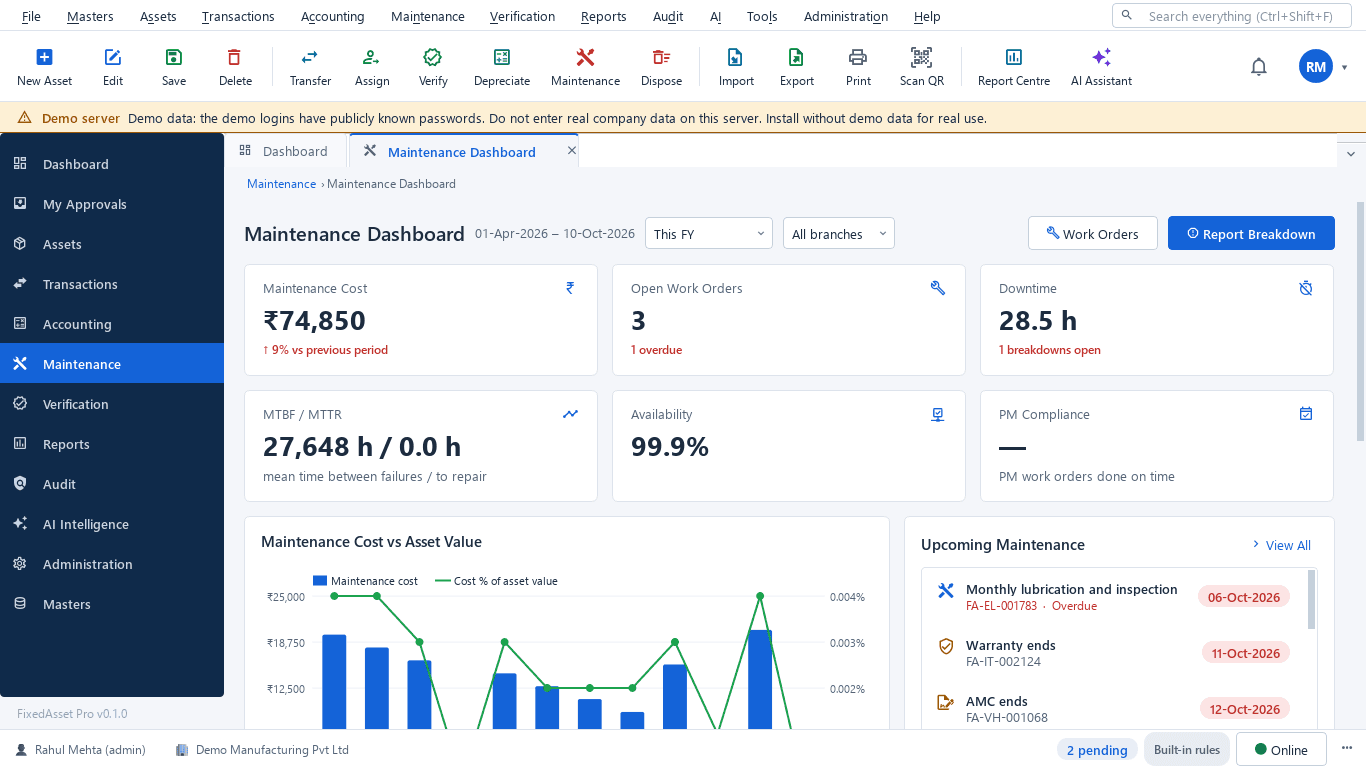
What this screen shows
- Maintenance cost against the previous period
- Open and overdue work orders
- Downtime hours and open breakdowns
- MTBF / MTTR
- Availability
- PM compliance
- Upcoming maintenance, warranty and AMC end dates
Typical buyers and users
Plant or operations manager
Which machines stop the line, what each stoppage costs, and whether preventive maintenance is actually done on time.
Solution for the Plant or operations managerMaintenance manager
Work orders with parts and cost, PM schedules by hours or cycles, calibration due dates and AMC visits that were missed.
Solution for the Maintenance managerCFO or finance head
Gross block, net book value, CapEx budget against spend, CWIP ageing and depreciation that ties to the general ledger.
Solution for the CFO or finance headInternal auditor
A verification campaign across plants with scanned evidence, exceptions with owners, and a register-to-GL reconciliation.
Solution for the Internal auditor
Deployment considerations
The desktop edition is available today for a single PC or an office LAN; the cloud-hosted web edition and the mobile app are available too. All start with your real company, never demo data.
- Desktop editionAvailable now
Runs today on a server PC inside the plant's LAN. Shop-floor PCs run the client, scan with USB scanners or webcams, and daily work needs no internet. Local AI and OCR stay on your server.
- Web editionAvailable now
Suits groups with several plants and a central finance team: one browser login with a Year, Company and Branch context bar, approvals from anywhere and executive dashboards across sites.
- Using bothSame rules, same engine
Plants that start on desktop keep their register; both editions use the same depreciation engine, approval chains and audit trail. Mobile counting is a companion of the web edition only.
Frequently asked questions
Can we record extra-shift depreciation for machines running two or three shifts?
Yes. The Companies Act book supports extra-shift depreciation by policy, alongside Schedule II useful lives and SLM or WDV per category or asset. Agree the policy with your auditor before the first run.
How do we handle a machine that is rebuilt with a new spindle or motor?
Record the part as a component of the parent asset with its own cost and life. Component accounting keeps the replaced part's history without rewriting the machine's record.
Do we need the internet on the shop floor?
Not for the desktop edition. It runs on your LAN: one server PC holds the database, client PCs connect to it over the office network, and scanning works with USB scanners or webcams.
Can preventive maintenance be scheduled by running hours instead of dates?
Yes. Preventive schedules can be based on time or on a meter reading, and the work orders are raised automatically when a schedule falls due.
How does a CapEx project become an asset?
Budget and approve the project, book costs to CWIP (vendor, material, labour, borrowing cost and trial runs), then capitalise from CWIP when the line is ready for use. CWIP ageing is reported in Schedule III buckets.
Can the register be imported from our existing spreadsheet?
Yes. Import from Excel, CSV or JSON with a column-mapping wizard, a dry run that checks every row, and opening balances for both books tied to your audited Schedule III totals. See Fixed Asset Management.
Guides and articles
Published articles tagged for this industry.
One asset, several books: how FixedAsset Pro keeps Companies Act, Income-tax and other depreciation side by side
Indian companies depreciate the same asset at least twice: once under Schedule II and once under the Income-tax Act. Groups reporting abroad add a third. Here is how depreciation books work in FixedAsset Pro, and what each one is for.
Capital work-in-progress: ageing, overdue projects and getting the capitalisation date right
CWIP is where cost waits until an asset is ready for use. Too long there and the Schedule III ageing exposes it; too short and depreciation starts on an asset that is not ready. How to manage CWIP through the year.
Impairment indicators for fixed assets: a practical year-end review under Ind AS 36 and AS 28
You do not have to test every asset for impairment every year, but you do have to look for indicators at every reporting date. How to run that review, document it, and recognise when a full test is needed.
Other industries
All industries Pharmaceutical & Life Sciences
 Healthcare & Hospitals
 Information Technology
 Banking & Financial Services
 Retail
 Wholesale & Distribution
 Logistics & Warehousing
 Education
 Government & Public Sector
 Real Estate & Facilities
 Construction & Infrastructure
 Energy & Utilities
 Telecommunications
 Hospitality
 Automotive
 Media & Entertainment
 Agriculture & Food Processing
 Professional Services
 Multinational Enterprises
See FixedAsset Pro on your own plant register
Start a free trial, or book a demo and bring your machine list, your maintenance log and last year's depreciation schedule.