Ask about your assets in plain language, read invoices for review, and see ranked anomalies, risk indicators and replacement reviews, from your own recorded, permission-filtered data.
AI never changes asset or financial records by itself. Any change goes through the normal screens, permissions and approvals.
Web app, demo data: a real answer from the built-in rules
How it works
How an AI answer is made
The same pipeline runs for every question, on every surface. Rules come first; a model, if your administrator configured one, only helps to understand the question.
01Your questionTyped, picked from the suggestions, or asked from an asset.
02Permission filterYour roles, branch scope and Finance.View decide what can be read; missing permissions are named.
03Your recorded dataScoped read services over the register, maintenance, verification, audit and finance records.
04Built-in rules · AI engineRules understand the question first; a configured local or cloud model only picks the question type when the rules are unsure, and never sees your records.
05Answer with evidenceResult, source records, calculation steps, data time and confidence High / Medium / Low; every request is logged.
06You decideAI never changes records. Changes go through the normal screens, permissions and approvals.
Live chat replay
Real answers, replayed
Pick a question to replay the answer the AI Assistant gave on our demo server. Nothing here is written by us: the text, sources, calculation and confidence are what the application showed.
Replay of real answers recorded on our demo server (demo data)
Recorded on 23 Oct 2026 in the web app with the demo company; the demo server has no AI model installed, so every answer says Built-in rules. Tables show the first 5 rows. “Explain this depreciation calculation” first asks which asset, as the real assistant did; the follow-up names one.
Suggested questions
AI AssistantRecorded answer
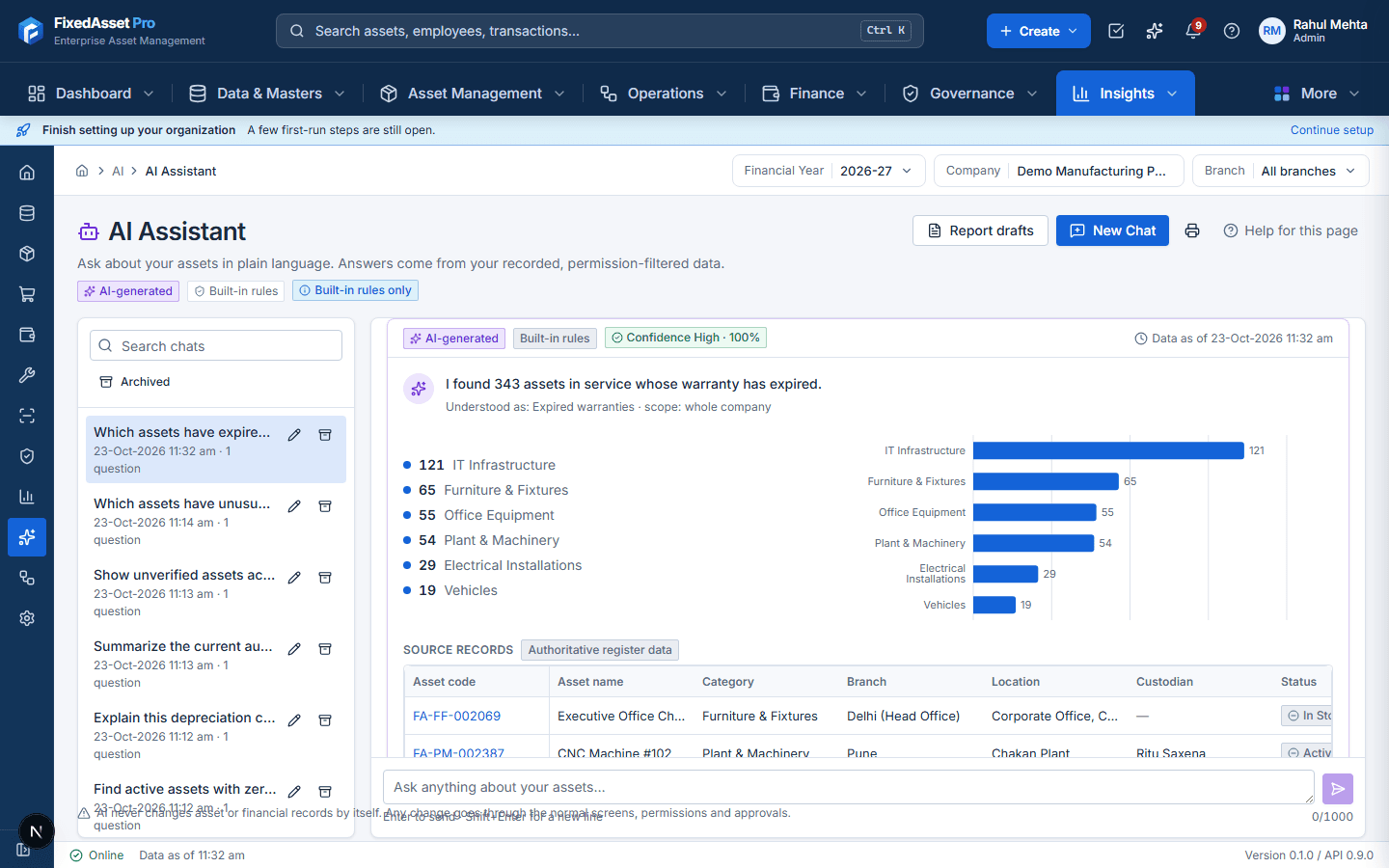
You: Which assets have expired warranties?
AI-generatedBuilt-in rulesConfidence High · 100%Data as of 23-Oct-2026 11:32 am
I found 343 assets in service whose warranty has expired.
Understood as: Expired warranties · scope: whole company
IT Infrastructure121
Furniture & Fixtures65
Office Equipment55
Plant & Machinery54
Electrical Installations29
Vehicles19
Source records
Asset code
Asset name
Category
Branch
Location
Custodian
Status
Warranty end
FA-FF-002069
Executive Office Chair
Furniture & Fixtures
Delhi (Head Office)
Corporate Office, Connaught Place
—
In Store
19-Oct-2026
FA-PM-002387
CNC Machine #102
Plant & Machinery
Pune
Chakan Plant
Ritu Saxena
Active
17-Oct-2026
FA-IT-002311
48-Port PoE Network Switch
IT Infrastructure
Delhi (Head Office)
Server Room, Delhi HO
Pooja Saxena
Active
12-Oct-2026
FA-IT-002431
Next-Gen Firewall Appliance
IT Infrastructure
Pune
Pune Warehouse, Talegaon
Neha Reddy
Active
10-Oct-2026
FA-IT-002412
Next-Gen Firewall Appliance
IT Infrastructure
Bangalore
Data Centre, Whitefield
—
In Store
05-Oct-2026
Showing 5 of 343 records
How this was calculated
Filter: warranty end date before today.
Only your company and branches you may see.
In-service assets (Draft, Disposed and Transferred excluded).
warranty_end between — and 2026-10-22.
Data sources
Asset register — as of 23-Oct-2026 11:33 am
Evidence
assets.warranty_end
Logged in the AI activity log (reference 140992b1).
AI-assisted answer. The linked records are the authoritative data; this card is not an accounting record.
AI never changes records by itself. Any change goes through the normal screens, permissions and approvals.
Document Intelligence
From an invoice to a Draft record, with you in the loop
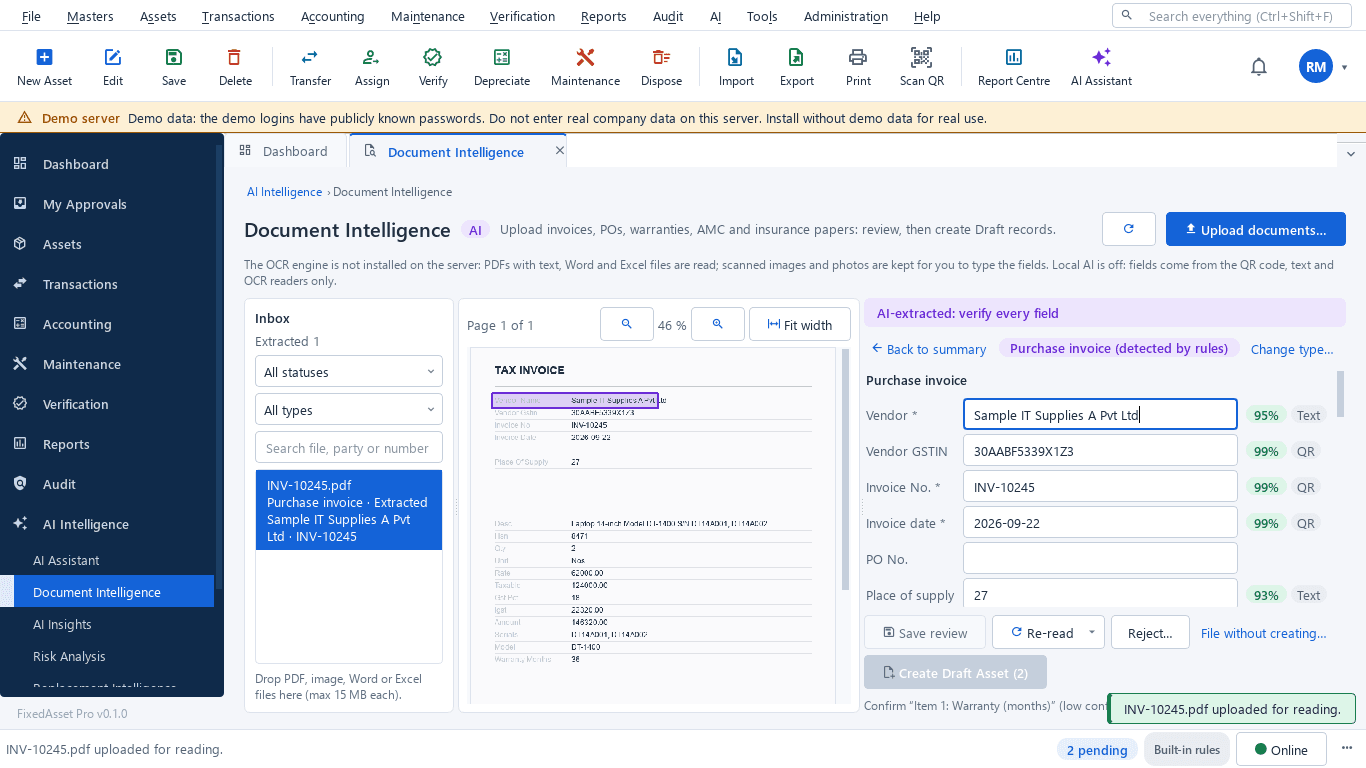
Documents are read on your server; every field shows its confidence and where it was found, and nothing is created until you confirm.
01UploadInvoice, PO, GRN, warranty, AMC, insurance or lease; PDF, image, Word or Excel.
02ExtractionPDF text or OCR; fields with confidence and page position; vendor matched to your master.
03Field reviewValidations: GSTIN checksum, totals, duplicate invoice, serial in use. Low-confidence fields flagged.
04You confirmNothing is created while a blocking issue remains; you click the create button yourself.
05Draft recordA Draft asset, or a cover date on an existing asset, through the normal create / edit rules and approval.
Desktop edition, demo data: “AI-extracted: verify every field”
Every AI feature
What the AI does, and where
Each card is a feature in the application today, with the surfaces that have it and the rule it follows.
AI Assistant
Ask about your assets in plain language
Answers questions such as expired warranties, zero book value, high maintenance cost, unverified assets, audit exceptions or a depreciation working, from your recorded data. Each answer is a card with the result, a breakdown, the source records, how it was calculated, the data time and a confidence level. Conversations are kept per user and can be searched, renamed and archived.
In:
A question (up to 1,000 characters) or a suggested question; optionally the asset you came from.
Out:
Answer card: summary, breakdown chart, authoritative source records, calculation steps, sources, "understood as", confidence (High / Medium / Low) and engine badge (Built-in rules, Local AI or Cloud AI).
Reads only the data your roles and branches allow; a request to change data is refused with a link to the normal workflow.
Desktop
Web
Mobile
Ask AI from any screen
F8 or Ctrl+K opens Ask AI wherever you are
An Ask AI panel opens from any screen with F8, from the command palette (Ctrl+K) or from the Ask AI tab, with quick actions (summarize assets, find insights, create report) and the latest insights. On the asset card the question is asked about that asset.
In:
A question, a quick action or the asset you are looking at.
Out:
The same answer card as the full assistant, with "Open full assistant".
Hidden when AI is not in your plan or your role has no AI permission.
Desktop
Web
Mobile
Document Intelligence
Read invoices and contracts, review, then create a Draft
Reads invoices, purchase orders, goods receipts, delivery challans, warranty certificates, AMC agreements, insurance policies, leases, quotations and maintenance invoices. Each field comes with its confidence and where it was read on the page; the vendor is matched to your vendor master and the result is validated (GSTIN checksum, totals that do not add up, duplicate invoice, serial number already in use, dates).
In:
PDF, PNG, JPG, TIFF, DOCX or XLSX. PDF text and office files are read directly; scanned pages need the OCR engine on the server.
Out:
Extracted fields with confidence and validations; after your review, a Draft asset, or the warranty / AMC / insurance end date on an asset you pick (the desktop also offers targets such as a Draft AMC contract).
Nothing is created until a person reviews the fields and clicks the create button; records start as Draft and go through normal approval.
Desktop
Web
Mobile
Fill forms from a document or photo
Read a bill, nameplate or asset tag into the form you are on
A read button on the new-asset, vendor invoice, goods receipt, purchase order, warranty, AMC, insurance, lease, work order, vendor, disposal and bulk-import screens reads a document or photo into that form. On the asset card, "Read nameplate" takes manufacturer, model and serial number from a photo of the rating plate; during verification a photo of the asset tag finds the asset.
In:
An uploaded file or a phone camera photo.
Out:
Each value with its confidence and where it was read; only the values you tick are copied into the form.
Nothing is saved until you save the form through that module's own rules; low-confidence values start unticked; the copy is logged.
Desktop
Web
Mobile
AI Insights
Ranked observations, each with its rule and next step
Ranks what needs attention in your recorded data: warranties, AMC and insurance about to end, assets out of warranty, missing assets, assets not verified in the control period, duplicates and the anomaly families. Tiles show high-risk assets, replacement reviews, open anomalies and documents to review; Run AI scan recalculates risk and replacement.
In:
Your recorded data, read with your permissions.
Out:
Observations with severity, the rule that fired, evidence and a suggested next step.
Rule-based and labelled "AI insight · rule-based"; acting on an observation opens the normal screen.
Desktop
Web
Mobile
Anomaly Detection
Duplicate, ghost, location, maintenance and financial findings
A rules engine checks eight areas: duplicate assets, ghost assets (not verified in the control period), location, custodian, maintenance, depreciation, documents and financial differences. Each finding shows why it was flagged, how it was calculated, the evidence, confidence and a suggested action.
In:
Asset register, verification, maintenance, documents and finance records.
Out:
Findings you can acknowledge, explain as a valid exception, dismiss as a false positive, resolve or raise as an audit exception.
Reviewing findings needs the Data Quality manage permission; every review is recorded with who and why.
Desktop
Web
Mobile
Asset Risk Analysis
Transparent risk indicators, not predictions
Scores each asset from age against useful life, 12-month repair cost, downtime, warranty / AMC cover, physical verification, incidents and utilisation. Factors without data are left out and shown as data coverage; weights, bands and thresholds come from your settings.
In:
Asset dates and life, maintenance and downtime history, warranty / AMC dates, verification results, incidents, usage.
Out:
Score, level (Critical / High / Medium / Low / Insufficient data), the factor table with weight and sub-score, and the suggested next step.
Labelled as an indicator built from recorded data with the thresholds shown, not a prediction.
Desktop
Web
Mobile
Replacement Intelligence
Review packs for assets meeting your replacement criteria
Finds assets that meet your replacement criteria (past useful life, high maintenance cost, high downtime, frequent breakdowns, written down and in poor condition) and builds a review pack: criteria met or not, cost, net book value, condition, documents, a replacement cost estimate with its basis and the maintenance cost trend.
In:
Your replacement criteria and the asset, maintenance and finance records.
Out:
A review pack per asset; you accept, snooze, dismiss or mark it done.
A review, not a decision: nothing is purchased or disposed of automatically; you raise the CapEx request or disposal yourself.
Desktop
Web
Mobile
AI Audit Assistant
Summaries, missing items and draft audit observations
Summarises the open audit exceptions and evidence you may see, lists missing items (exceptions without evidence or owner, overdue items, assets not verified) and drafts observations as condition, criteria, cause, effect and recommendation.
In:
Audit exceptions, findings and evidence packs, filtered by branch, campaign, severity and type.
Out:
An audit summary draft with figures, missing items and draft observations.
A qualified reviewer approves or rejects the draft before anything becomes a formal finding.
Desktop
Web
Mobile
AI report drafts
Management report drafts from your own data
Builds a management report draft from the sections you choose: asset position, additions, disposals, depreciation, audit exceptions, data-quality anomalies, asset risk and replacement review. Each section is computed by the assistant from the data you may see, so its figures match the reports.
In:
Title, financial year and sections.
Out:
An editable draft you can export to PDF or Word and mark as reviewed (desktop: report presets exported to PDF, Excel or Word).
Saved only for you; never published, shared or sent automatically. A section you may not see is marked, never silently dropped.
Desktop
Web
Mobile
AI on the asset card
Observations, risk and "Ask AI about this asset"
The asset card shows rule-based observations (warranty, AMC and insurance dates, breakdowns, risk), a 12-month maintenance summary, the risk indicator and the replacement review status, with "Ask AI about this asset" and "Explain depreciation". Records created from a reviewed extraction carry an AI-origin banner. On the web new-asset form, AI can suggest a category.
In:
The asset's own records.
Out:
Observations and summaries on the card; a suggested category you can use or ignore.
Read-only; a suggestion is applied only when you click "Use".
Desktop
Web
Mobile
Search inside scanned documents
The document library and global search match scanned text
A background job reads the text of every document in the library (PDF text, office text, and OCR of scans when the OCR engine is installed) so the library search and the global search find words inside them. You can view the text read from any document.
In:
Documents already in the library.
Out:
Searchable document text and an indexing status card.
Reading never changes the document.
Desktop
Web
Mobile
AI controls and activity log
Where AI runs, who used it and a tamper-evident log
Administrators choose rules only, a local AI model on your own server or an opted-in cloud provider; switch AI per feature; set retention and the daily question limit; and review the AI Activity Log, where every AI request is recorded with engine, model, sources and time in a hash chain that can be verified.
In:
Administrator settings.
Out:
Engine status, provider disclosure, quotas and usage, and the AI Activity Log with chain verification.
Offline by default: nothing leaves your server unless an administrator opts in to a cloud provider, with a second confirmation for document text.
Desktop
Web
Mobile
Desktop · Web · Mobile
The same assistant on every surface
Real captures of the AI Assistant in the Desktop application, the Web application and the Mobile App, all on demo data.
AI › AI Assistant with chat history
Web app AI Assistant answering "Which assets have expired warranties?" with a breakdown by category, source records and the Built-in rules and confidence badges
Comparison
AI features by surface
AI features available in the Desktop application, the Web application and the Mobile App
Yes: Administration › AI Settings and Audit › AI Activity Log
Yes: Administration › AI, with AI quota warnings
Yes: Same on a phone
FAQ
Privacy, limits and accuracy
Whose data does the AI read?+
Only your organisation's recorded data, through the same permission checks as the screens: your roles, your branch scope and, for amounts, Finance.View. If a question needs a permission you do not have, the answer names the missing permission instead of guessing; money columns are hidden without Finance.View.
Does my data leave my server? Local AI or cloud AI?+
By default the answers come from built-in rules on your own server and no prompt or document leaves your organisation. An administrator can add a local AI model on your own server, or opt in to a cloud provider (https only, for the assistant and / or document extraction). Sending document text to a cloud provider needs a second confirmation that names the DPDP Act 2023; cloud is never used for insights, risk, replacement or validation. Even with a model, the assistant's model only receives the question and the list of supported question types, never your records; every figure is computed by the application.
Can the AI change my records?+
No. AI never changes asset or financial records by itself. Any change goes through the normal screens, permissions and approvals. A request such as "dispose this asset" is refused with a link to the normal workflow. Document extraction creates only a Draft after a person reviews it and clicks create; replacement and audit drafts need a person's decision or a qualified reviewer's approval.
How accurate are the answers?+
Figures come from your recorded data through the same services as the reports, and each answer shows its source records, the calculation steps, the data time and "understood as". Confidence has a defined meaning: High: the question matched a supported query and every figure is computed from recorded data; Medium: the question was interpreted (closest match, a default or a model), so check "understood as"; Low: a best guess, verify before relying on it. The linked records are the authoritative data.
Are there usage limits?+
Each user has a daily question limit that the administrator sets (500 a day by default). On the cloud web edition, plan, organisation and personal AI quotas can also apply per day or month; you are warned at the quota's threshold, and a blocking quota at 100 % pauses AI requests until it resets. See AI usage in pricing.
What happens if no AI model is installed?+
Everything on this page still works with the built-in rules: the assistant, insights, anomalies, risk and replacement reviews. Scanned images need the OCR engine on the server; PDFs with text, Word and Excel files are read without it. If a configured model stops responding, a circuit breaker switches to the built-in rules and the screen says so.
Is AI use audited?+
Every AI request is written to the AI Activity Log with the engine, model, intent, permission checks, sources and time. The log is append-only and hash-chained, and an auditor can verify the chain from the screen. Retention is set by the administrator (365 days by default).
Does AI work on the Mobile App?+
Yes. The Mobile App is the web application on your phone, so every AI screen of the web app works there, and you can photograph a document, nameplate or asset tag with the phone camera.
AI included
Ask your own asset register
Start a trial and ask the assistant about your data, or book a demo and we will walk you through it.