
Every device has a name next to it
In a technology company the assets walk out of the door every evening. Laptops are issued, swapped and returned; servers are racked and retired; monitors drift between floors. FixedAsset Pro ties each device to a person, a location and a warranty, and keeps the finance figures on the same record.
Who this page is for
- Software companies
- IT service providers
- Data centres
- Managed service providers
- Corporate IT departments
Common challenges
The operational and financial problems this industry brings to an asset register, and what FixedAsset Pro does about each.
- Operational
Who has the laptop?
Devices are handed over at onboarding, exchanged at the help desk and collected at exit, often by different people. Without a recorded handover the register and reality part ways within months.
- Operational
Missing devices are found too late
A laptop that was never returned shows up as missing in the annual count, long after the employee left. The follow-up needs a last-seen date and the person it was assigned to.
- Operational
Warranties expire unnoticed
Hundreds of devices bought in batches expire in batches. Repairs out of warranty and lost extended-warranty claims cost more than anyone tracks.
- Operational
Servers and network gear move between racks
Data-centre equipment is relocated, re-purposed and retired, and the register still shows the original rack and the original project.
- Financial
Short lives, many small items
Computers depreciate fast and in large numbers; monitors, docks and peripherals sit near the low-value threshold. Inconsistent rules make the depreciation hard to defend.
- Financial
Disposals and buy-backs
Refresh cycles retire whole batches through vendor buy-back or e-waste disposal. Gains, losses and the disposal approvals need to be recorded per device.
Asset categories you can track
Categories, lives and depreciation rates are configurable; these are the ones this industry usually needs.
- Laptops and desktops
- Servers and storage
- Networking equipment
- Monitors and peripherals
- Printers and office devices
- Mobile and test devices
- Software-related tracked assets
Applicable workflows
Each workflow is a product area; the link opens the feature page.
Assign a device to an employee
Assign with a printable handover and employee acknowledgement; the custodian is locked on the record until a transaction moves it, and Assets by Employee lists what each person holds.
Fixed Asset ManagementSwap, return to store and exit
Exchanges, returns to store and transfers between people, departments, locations or cost centres are transactions with history, so an exit checklist can show exactly what a leaver still holds.
Asset LifecycleCustodian confirmation and counts
Run a campaign by office or floor; custodians confirm With me, Not with me or Damaged for what is assigned to them, and the missing list shows last-seen date and campaigns missed.
Physical VerificationWarranty and repair history
Warranty and extended-warranty dates on every device with alerts at 90, 60, 30 and 7 days; repair work orders record cost and show whether the device was still covered.
Maintenance & AMCSingle sign-on and API access
Sign in through your identity provider, and use API keys to connect the register to the tools your IT team already runs.
Integrations
Key features
QR, barcode and RFID tags
Labels generated from the register with reprint, replace and full tag history; the QR carries a secure identifier, never sensitive data. Scan with a USB scanner or webcam.
Employee Asset Acknowledgement
A form per custodian listing the devices held, with signature lines, for onboarding, annual confirmation and exit.
Global search
Find a device by serial, tag, invoice, PO, employee or vendor from one search box, and open its lifecycle timeline.
Duplicate and data-quality checks
Nightly rules flag duplicate serials, missing custodians and missing invoices, with a data-quality score and grade.
Low-value write-off policy per book
Peripherals below the threshold follow the policy instead of being depreciated one by one; computers keep consistent lives and rates per category.
Disposal by batch
Full or partial disposal by sale, scrap or write-off with gain or loss per device and a disposal approval certificate for refresh cycles.
One device, its whole life
A real screen of the desktop edition, captured on a demo server. The figures are sample data, not customer data.
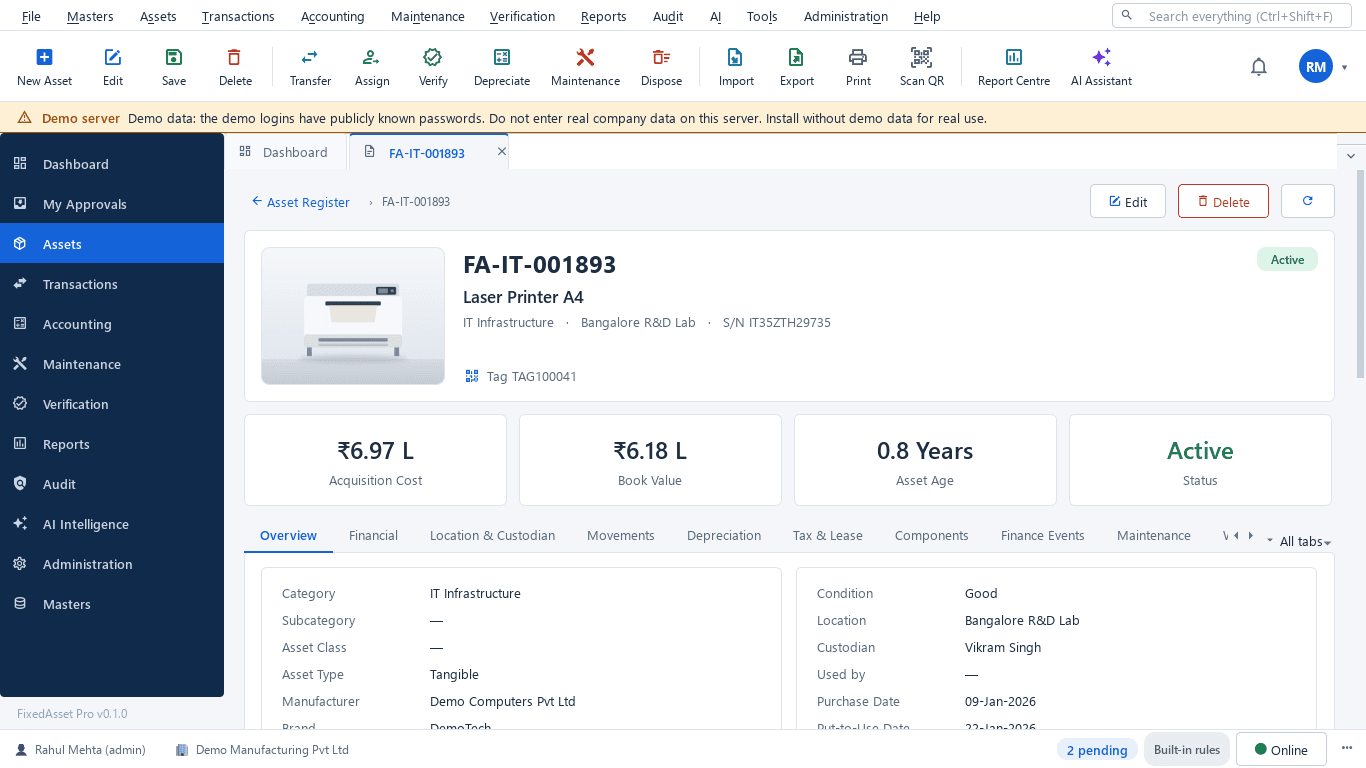
What this screen shows
- Acquisition cost, book value, age and status
- Overview with category, location and custodian
- Movements between people and locations
- Warranty, AMC and maintenance on the same record
- Documents such as the invoice and warranty certificate
- Verification results and audit history
Typical buyers and users
IT manager
Every device assigned to a named person, warranty dates, returns at exit, and single sign-on with roles per office.
Solution for the IT managerIT asset or help-desk lead
Fast handover and return, tags that scan, and a missing-devices list with the last person who held each one.
Solution for the IT asset or help-desk leadFinance manager
Consistent lives for computers, a low-value policy for peripherals, and disposals that show their gain or loss.
Solution for the Finance managerInternal auditor
Custodian confirmations as evidence, missing devices followed up with owners, and an audit trail of every reassignment.
Solution for the Internal auditor
Deployment considerations
The desktop edition is available today for a single PC or an office LAN; the cloud-hosted web edition and the mobile app are available too. All start with your real company, never demo data.
- Desktop editionAvailable now
Runs today on a server PC in your office LAN, with client PCs for IT and finance; scanning works with USB scanners or webcams and daily work needs no internet.
- Web editionAvailable now
Suits distributed and remote-first teams: browser access from any office, employee self-service to confirm assets or report a loss, and counting through the companion mobile app.
- Using bothSame rules, same engine
Companies that start on desktop keep their register; both editions use the same rules, approvals and audit trail.
Frequently asked questions
Can employees confirm the devices they hold?
Yes. In a verification campaign custodians confirm With me, Not with me or Damaged. The web edition adds self-service to confirm assets, request a transfer or report a loss; the desktop edition supports confirmation.
Is this an IT service-management tool?
No. FixedAsset Pro is a fixed asset register with assignment, verification, maintenance and accounting. It does not replace a ticketing or device-management tool; it keeps the ownership and financial record of the hardware.
How do we follow up a laptop that was never returned?
The missing-assets list shows the last-seen date, the campaigns missed and the last custodian. You can raise an audit exception with an owner and a due date, or propose a write-off. See Physical Verification.
Can we import our current device list?
Yes. Import from Excel, CSV or JSON with a column-mapping wizard and a dry run that checks every row; nothing is partly imported.
Do QR labels expose employee or device data?
No. The QR carries a secure identifier only; scanning it opens the record for users with the right permissions.
Guides and articles
Published articles tagged for this industry.
The audit trail rule and your fixed asset register
Since 1 April 2023, companies keeping books in accounting software must use software with an audit trail that cannot be disabled, and auditors report on it under Rule 11(g). What that means for the system that holds your fixed assets.
Low-value assets: setting a capitalisation threshold after Schedule XIV
The old ₹5,000 write-off rule disappeared with Schedule XIV. Here is what replaced it in the books, why the Income-tax and GST answers differ, and how to keep control of items you expense.
Other industries
All industries Manufacturing
 Pharmaceutical & Life Sciences
 Healthcare & Hospitals
 Banking & Financial Services
 Retail
 Wholesale & Distribution
 Logistics & Warehousing
 Education
 Government & Public Sector
 Real Estate & Facilities
 Construction & Infrastructure
 Energy & Utilities
 Telecommunications
 Hospitality
 Automotive
 Media & Entertainment
 Agriculture & Food Processing
 Professional Services
 Multinational Enterprises
See FixedAsset Pro on your own device list
Start a free trial, or book a demo and bring your laptop list with the people they are assigned to.