

Every lab, classroom and department accountable for what it holds
A campus is a collection of departments, each with its own labs, computers and furniture, often bought from different budgets and grants. The annual stock verification is a ritual of registers and signatures. FixedAsset Pro gives each department and campus its own view of one register and turns verification into a campaign with evidence.
Who this page is for
- Schools
- Universities
- Colleges
- Research institutions
- Multi-campus groups
- Bursars and finance offices
Common challenges
The operational and financial problems this industry brings to an asset register, and what FixedAsset Pro does about each.
- Operational
Department registers on paper
Each department keeps a stock register in its own format. The central office cannot see what the physics lab holds or which computers the library has.
- Operational
Annual verification takes a term
Committees walk every room with printed lists. Discrepancies are written in the margin and carried to next year.
- Operational
Equipment moves between labs and campuses
Projectors, lab instruments and furniture are shifted between rooms, buildings and campuses without a record, so nobody is accountable.
- Financial
Grants and projects need their own trail
Equipment bought under a research grant or a funded project must be traceable to that grant, and reported separately when the funder asks.
- Financial
Write-offs need committee approval
Condemning old computers or broken furniture needs a recorded proposal, an approval and a disposal method. Paper files make that hard to show later.
- Financial
Depreciation and fund accounting differ
Institutions may follow different accounting rules from companies. The register must support the books your auditor expects, not a fixed method.
Asset categories you can track
Categories, lives and depreciation rates are configurable; these are the ones this industry usually needs.
- Computers
- Laboratory equipment
- Furniture
- Library equipment
- Vehicles
- Campus infrastructure
Applicable workflows
Each workflow is a product area; the link opens the feature page.
Departments, campuses and custodians
Each campus is a branch; buildings, labs and rooms are locations, and each asset has a department and a custodian such as the lab in-charge. Users are scoped to their campus or department.
Fixed Asset ManagementAnnual verification as a campaign
Scope the campaign by campus, department or location, assign teams, scan room labels and tags, and resolve missing and found-elsewhere items before sign-off.
Physical VerificationTransfers and condemnation
Moves between labs, departments or campuses are approved transfers; condemnation goes through technical, finance and management review with a disposal approval certificate.
Asset LifecycleBudgets for new labs and buildings
Budget and approve a new lab or building, book costs to CWIP while it is built, and capitalise when it is ready for use.
Procurement & CapExDepartment and campus reports
Assets by Location, Assets by Employee, Branch-wise Summary and Asset Age Analysis per campus or department, exported to PDF, Excel, CSV or Word.
Reporting & Analytics
Key features
Grant or project references
Record the funding grant or project as a cost centre on the asset where you configure it, and keep the sanction letter in the evidence vault, so funded equipment can be listed on request.
Custodian acknowledgement
An Employee Asset Acknowledgement per lab in-charge or faculty member, listing what they hold, with signature lines.
Configurable books
Companies Act and Income-tax books are built in; Management or custom books with their own methods can be added to match the accounting your institution follows.
Verification sign-off
Campaigns end with sign-off from asset manager to finance to management, and an evidence pack with a SHA-256 checksum.
Warranty and AMC alerts
Computer-lab warranties and AMCs for lifts, DG sets and lab equipment, with alerts at 90, 60, 30 and 7 days.
Import from department registers
Bring each department's spreadsheet in through the column-mapping wizard with a dry run that checks every row.
Counting a lab with a scanner
A real screen of the desktop edition, captured on a demo server. The figures are sample data, not customer data.
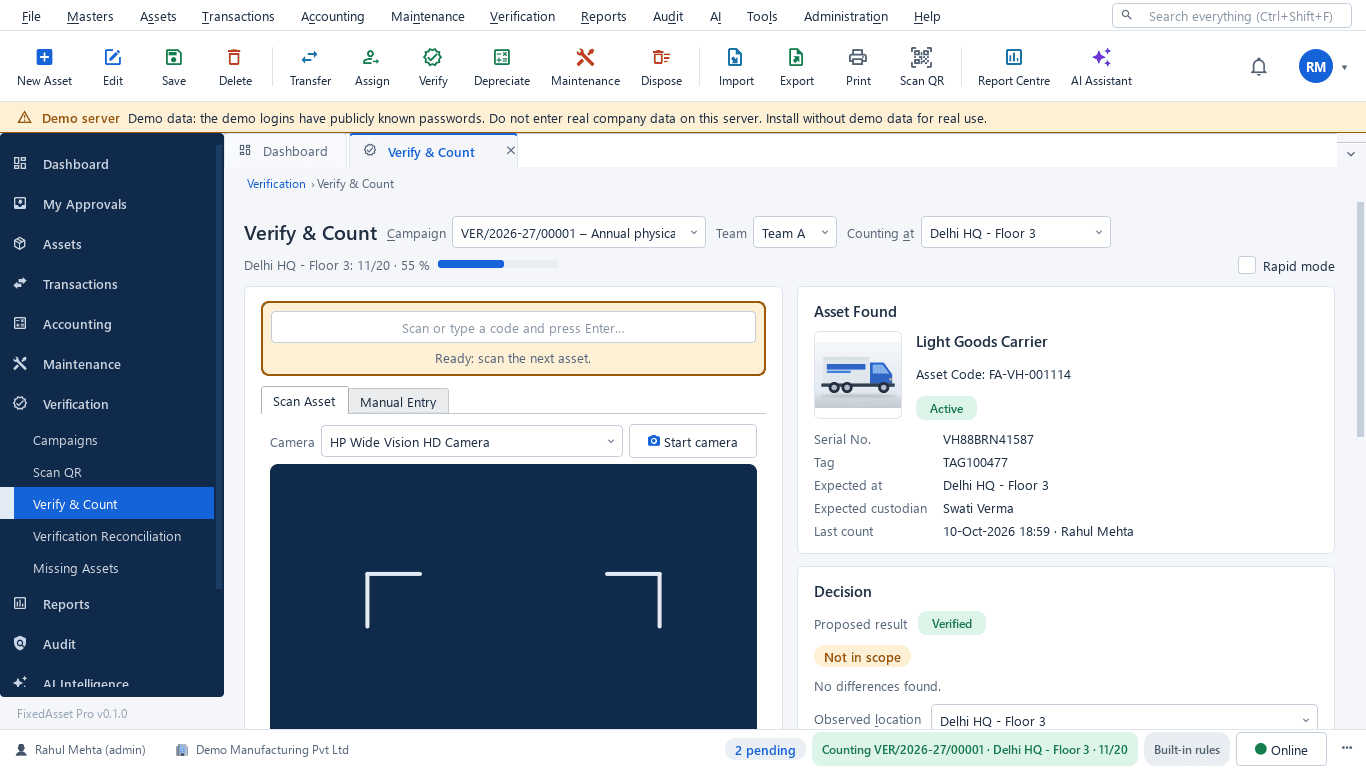
What this screen shows
- Campaign, team and the location being counted
- Progress for the location
- Scan or type a code, or use the camera
- Asset found: serial, tag, expected location and custodian, last count
- Proposed result and observed location
- Rapid mode for unchanged items
Typical buyers and users
Bursar or finance officer
One register across departments, funded equipment traceable to its grant, and depreciation on the books the auditor expects.
Solution for the Bursar or finance officerEstate or asset manager
What each building and lab holds, moves between campuses on record, and a verification that finishes in weeks, not a term.
Solution for the Estate or asset managerIT manager
Computer labs and faculty laptops assigned and under warranty, and access scoped by campus.
Solution for the IT managerInternal auditor
Verification evidence per department, condemnations approved with reasons, and a sealed audit trail.
Solution for the Internal auditor
Deployment considerations
The desktop edition is available today for a single PC or an office LAN; the cloud-hosted web edition and the mobile app are available too. All start with your real company, never demo data.
- Desktop editionAvailable now
Runs today on a server PC in the campus network, with client PCs in the accounts office and departments; daily work needs no internet and data stays on campus.
- Web editionAvailable now
Suits multi-campus groups and universities with distributed departments: browser access with a Branch context bar, approvals from anywhere, and counting through the companion mobile app.
- Using bothSame rules, same engine
An institution that starts on desktop keeps its register; both editions share the same rules, approvals and audit trail.
Frequently asked questions
Can each department see only its own assets?
Yes. Users are scoped by company, branch and location, and assets carry a department and custodian. The central office can see everything.
Can we link equipment to a research grant?
Where you configure it, the grant or project is recorded as a cost centre on the asset and the sanction documents are kept in the evidence vault, so you can list funded equipment for the funder.
Do we have to use Companies Act depreciation?
No. Companies Act and Income-tax books are built in, and Management or custom books with their own methods can be added. Agree the policy with your auditor before the first run.
How does the annual verification work?
As a campaign scoped by campus, department or location, counted with a USB scanner, webcam or count sheets, and signed off with an evidence pack. See Physical Verification.
Can we condemn old equipment through a committee?
Yes. Disposal goes through technical, finance and management review, records the method (sale, scrap, donation or write-off) and produces a disposal approval certificate.
Guides and articles
Published articles tagged for this industry.
Tagging the awkward ones: a field guide for assets that resist a label
Laptops and chairs are easy. Hot machines, sterilised equipment, vehicles, moulds at a vendor's site and land are not. A practical, asset-by-asset guide to tagging and verifying what does not take a sticker well.
Low-value assets: setting a capitalisation threshold after Schedule XIV
The old ₹5,000 write-off rule disappeared with Schedule XIV. Here is what replaced it in the books, why the Income-tax and GST answers differ, and how to keep control of items you expense.
Other industries
All industries Manufacturing
 Pharmaceutical & Life Sciences
 Healthcare & Hospitals
 Information Technology
 Banking & Financial Services
 Retail
 Wholesale & Distribution
 Logistics & Warehousing
 Government & Public Sector
 Real Estate & Facilities
 Construction & Infrastructure
 Energy & Utilities
 Telecommunications
 Hospitality
 Automotive
 Media & Entertainment
 Agriculture & Food Processing
 Professional Services
 Multinational Enterprises
See FixedAsset Pro on your own campus register
Start a free trial, or book a demo and bring one department's stock register and last year's verification report.